HouseholdRanker
Menu
TP-Link RE315 vs RE550 WiFi Extenders

Comparison

TP-Link RE315 vs RE550 WiFi Extenders

The TP-Link RE315 (AC1200) and TP-Link RE550 (AC1900) are dual-band Wi‑Fi extenders designed to reduce dead zones and improve coverage around the home. The RE315 focuses on low cost and simple setup, while the RE550 adds a higher Wi‑Fi class and a gigabit Ethernet port for more demanding layouts and wired-device use.

Expert tested Data driven Unbiased reviews Updated 18 May 2026
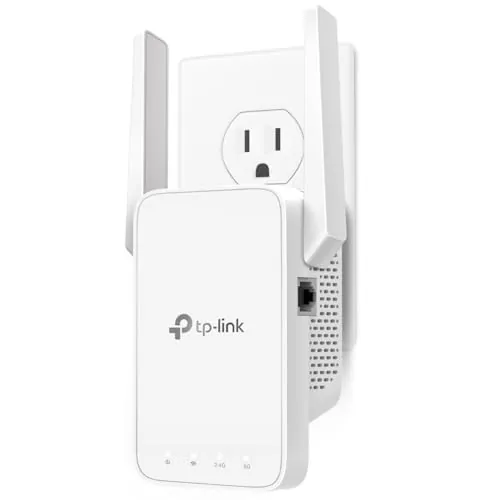
TP-Link AC1200 WiFi Extender (RE315)

#1 Overall Winner

TP-Link AC1200 WiFi Extender (RE315)

84/100
  • Excellent budget-friendly way to extend Wi‑Fi coverage in dead zones
View review
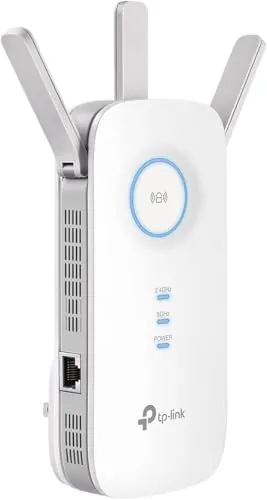
TP-Link AC1900 WiFi Range Extender (RE550)

Contender

TP-Link AC1900 WiFi Range Extender (RE550)

84/100
  • Stronger overall extender feature set, including a gigabit Ethernet port and AP mode
View review

Quick verdict

Choose the TP-Link RE315 if you want an inexpensive, compact extender that’s easy to set up and good at fixing basic dead zones. Choose the TP-Link RE550 if you need more coverage headroom, want a gigabit Ethernet port, or expect to run an access point-style setup for better wired performance.

Overall winner

Depends on your needs

At-a-glance comparison

Feature TP-Link AC1200 WiFi Extender (RE315) TP-Link AC1900 WiFi Range Extender (RE550) Winner
Type Dual-band Wi‑Fi extender (AC1200) Dual-band Wi‑Fi extender (AC1900) TP-Link AC1900 WiFi Range Extender (RE550)
Typical best fit Apartments/smaller homes, single dead zones Larger homes or broader weak-area coverage TP-Link AC1900 WiFi Range Extender (RE550)
Ethernet port 1x Ethernet (100 Mbps) 1x Gigabit Ethernet TP-Link AC1900 WiFi Range Extender (RE550)
Setup & onboarding Very simple; strong app-led setup feedback Simple; app + web UI options Tie
Coverage claims Up to about 1500–1600 sq ft (listing varies) Up to about 2200–2800 sq ft (listing varies) TP-Link AC1900 WiFi Range Extender (RE550)
Antenna configuration Two external antennas Three external antennas TP-Link AC1900 WiFi Range Extender (RE550)
App features mentioned Cloud management, LED control, access control Cloud management, LED control, access control, domain login (listing) TP-Link AC1900 WiFi Range Extender (RE550)
Access point mode Supported (spec) but some instability reports Supported (spec); commonly used with wired backhaul TP-Link AC1900 WiFi Range Extender (RE550)
Reliability (based on provided scoring + reviews) Generally solid; some drop/slow reports Generally solid; some mesh/compatibility complaints TP-Link AC1900 WiFi Range Extender (RE550)
Portability / repositioning Smaller plug-in body; easy to move/test locations Larger unit; still plug-in but bulkier TP-Link AC1200 WiFi Extender (RE315)
Space efficiency More outlet-friendly footprint Takes more space on a wall outlet TP-Link AC1200 WiFi Extender (RE315)
Value for money Very low cost for basic coverage extension Higher cost but stronger features and gigabit wired option Depends

Detailed comparison

Home Use

For everyday home use, both extenders are designed to remove “dead zones” and keep devices connected more reliably in rooms that your main router struggles to reach. The RE315 is typically the simpler fit for smaller homes, home offices, and quick fixes where you just want better coverage without much setup time. The RE550 makes more sense when you’re stretching coverage across more floors or into outdoor/patio areas, or when you want to plug in a console/PC/TV via Ethernet with less risk of the port being the bottleneck.

Performance

In terms of core job performance—extending usable Wi‑Fi into weak areas—the RE550 has the edge thanks to its higher-class AC1900 design and stronger overall feature set. Reviews also show strong results for streaming and multi-device use when it’s placed well, and it can be especially effective in access point mode with a wired connection. The RE315 performs well for its class and price, and many buyers report it fixes dead zones quickly, but there are more mixed reports around slowdowns or occasional dropouts depending on placement and environment.

Reliability

Both RE315 and RE550 have strong overall buyer sentiment, but neither is immune to common extender issues like occasional dropouts, speed reduction versus the main router, or device roaming quirks. The RE315 has more explicit mixed feedback around connection drops or slower performance for some users, including reports of intermittent issues in access point mode. The RE550 is generally described as stable once set up, with strong reports for streaming and multi-device use, but some users mention compatibility limitations in certain mesh/AiMesh-style environments.

Security Monitoring

If you’re extending Wi‑Fi primarily to support security cameras or other monitoring devices at the edge of your property, both models can help by improving coverage reliability. The RE550 is generally better suited when you need stronger reach or want to rely on a wired backhaul/access point setup for steadier connectivity. The RE315 can still be effective for a single weak spot, but user feedback includes occasional drops in some environments, which is worth considering for always-on monitoring devices.

Security Monitoring Analysis

For monitoring-focused setups (outdoor cameras, garage devices, door-area equipment), the key factors are stable connectivity and predictable roaming so devices don’t cling to a weak signal. Reviews indicate both extenders can help significantly when placed correctly, and users mention improved performance for camera/garage-type devices. The RE550 is the safer bet when you need more reach or want to use access point mode with Ethernet for steadier backhaul, while RE315 is better as a low-cost fix for a single weak zone.

TP-Link AC1200 WiFi Extender (RE315)

Pros

  • Excellent budget-friendly way to extend Wi‑Fi coverage in dead zones
  • Very easy setup for most homes, with strong guidance via the TP-Link Tether app
  • Compact plug-in design with adjustable external antennas for placement tuning
  • EasyMesh/EasyMesh-style support can help keep one network name when paired with compatible gear
  • Ethernet port is useful for a single wired device (streamer, PC) where Wi‑Fi is weak
  • High overall buyer satisfaction with lots of feedback on stable everyday use

Cons

  • Ethernet port is limited to 100 Mbps, which can cap wired performance
  • Some buyers report connection drops or slower-than-expected throughput
  • Access point mode can be inconsistent for some setups (per buyer feedback)
  • Extenders improve coverage more than speed; throughput can still drop versus the main router
  • Physical width/antenna placement may block nearby sockets on some outlets/power splitters
TP-Link AC1200 WiFi Extender (RE315)

TP-Link AC1900 WiFi Range Extender (RE550)

Pros

  • Stronger overall extender feature set, including a gigabit Ethernet port and AP mode
  • Better suited to larger homes or tougher coverage gaps thanks to higher-class Wi‑Fi and three antennas
  • Easy setup via WPS and/or the TP-Link Tether app, with extra settings available in web UI
  • Good real-world reports for streaming and multi-device households when placed well
  • EasyMesh compatibility for more seamless roaming with compatible routers/extenders
  • Strong connectivity and reliability scores relative to typical budget extenders

Cons

  • Still subject to typical extender trade-offs (repeater mode can reduce throughput versus the source)
  • Larger body than small plug-in extenders, so it can be more awkward on crowded outlets
  • Some reviews mention mesh/AiMesh compatibility limitations or roaming behavior issues
  • App experience sentiment is solid overall, but not as strong as the simpler RE315 experience
  • Higher upfront cost than basic extenders, even if features are better
TP-Link AC1900 WiFi Range Extender (RE550)

Final verdict

The TP-Link RE315 and RE550 are both solid Wi‑Fi extenders with strong buyer ratings, but they serve different priorities. The RE315’s biggest strength is value and simplicity: it’s compact, quick to set up, and often effective for fixing common dead zones, with the main limitation being mixed reports of drops/slowdowns in some setups and a 100 Mbps Ethernet port. The RE550’s main strength is capability: higher-class Wi‑Fi, a gigabit Ethernet port, and a richer feature set that suits larger homes and wired/AP mode use, with the main limitation being that extender/mesh behavior can still vary by environment and compatibility. If you want the simplest low-cost fix, pick RE315; if you need more reach and better wired options, pick RE550.


Overall winner

Depends on your needs

Frequently asked questions

Which is better, TP-Link RE315 or TP-Link RE550?

It depends on what you need. The RE315 is a simpler, very low-cost extender that reviewers frequently describe as easy to set up and effective for removing dead zones. The RE550 costs more but adds a higher Wi‑Fi class and a gigabit Ethernet port, which can matter for faster wired connections and larger coverage goals.

Which extender is better for larger homes?

The RE550 is positioned for larger coverage and uses a higher Wi‑Fi class, plus three external antennas. If you’re trying to push a usable signal across more rooms or floors, it’s typically the more suitable choice. The RE315 can still help in specific weak spots, but it’s more commonly a “small home or single-dead-zone” fix.

Is the RE315 or RE550 easier to set up?

Both are designed for quick setup (WPS and/or the TP-Link Tether app). Buyer feedback for the RE315 particularly emphasizes “minutes to set up” and straightforward app guidance. The RE550 is also described as easy to install, but some users note there are more settings (and occasionally more learning) when configuring SSIDs or using access point mode.

Do these extenders increase internet speed?

Not directly. Both listings note that extenders are mainly for improving coverage and signal reliability, and that throughput can be lower than the source connection. In practice, many households see better performance in dead zones because a stronger signal reduces dropouts and retransmits, but it’s not the same as upgrading your ISP plan or router.

Which one is better if I want to use Ethernet for a TV, console, or PC?

The RE550 is the stronger pick for wired devices because it includes a gigabit Ethernet port. The RE315 does include an Ethernet port, but it is limited to 100 Mbps, which can be a bottleneck for faster connections. Either can be useful when you need a stable wired link in a room with weak Wi‑Fi.

Are there common reliability issues with either extender?

Overall sentiment is positive for both, but reviews for the RE315 include some reports of connection drops and slower performance in certain setups. RE550 feedback is generally strong, though some users mention compatibility/roaming behavior issues with certain “mesh/AiMesh” environments. Placement and matching features with your router make a big difference for both.

Which extender is better for small spaces or apartments?

The RE315 is typically a better fit for small spaces because it’s compact, inexpensive, and designed to solve common dead zones without much tinkering. The RE550 can still work in an apartment, but it’s larger and adds capabilities (like gigabit Ethernet) that may be unnecessary if your goal is simply to improve signal in one room.

Do RE315 and RE550 work with EasyMesh?

Both are listed as EasyMesh-compatible, which can help create a more seamless network under one Wi‑Fi name when paired with compatible equipment. The product listings also warn about limitations with certain mesh systems (for example, they note not being compatible with Deco). It’s worth confirming your router’s compatibility before buying.

Related comparisons

Still not sure which one to choose?

Check our rankings and expert guides to find the best home lifestyle products for your goals.

View all rankings