HouseholdRanker
Menu
TP-Link RE315 vs Archer AX21 (AX1800): Extender vs Router

Comparison

TP-Link RE315 vs Archer AX21 (AX1800): Extender vs Router

The TP-Link RE315 is a plug-in Wi‑Fi extender built to push your existing router’s signal into weak rooms, while the TP-Link Archer AX21 is a Wi‑Fi 6 router designed to be the main hub of your home network. If your biggest issue is dead zones, the RE315 is the lower-cost fix; if your router is outdated or limiting performance and control, the AX21 is the more complete upgrade.

Expert tested Data driven Unbiased reviews Updated 18 May 2026
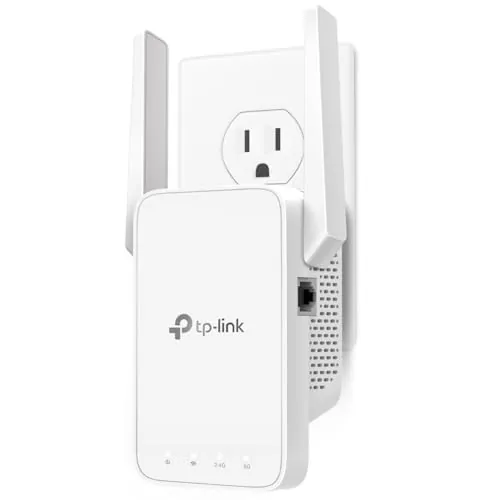
TP-Link AC1200 WiFi Extender (RE315)

#1 Overall Winner

TP-Link AC1200 WiFi Extender (RE315)

84/100
  • Very affordable way to reduce Wi‑Fi dead zones in a room or section of a home
View review
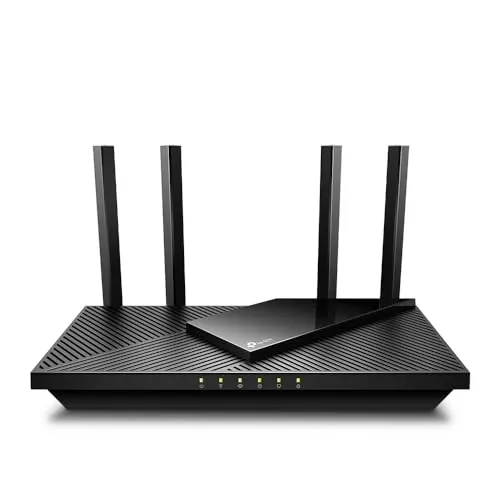
TP-Link AX1800 WiFi 6 Router (Archer AX21 V5)

Contender

TP-Link AX1800 WiFi 6 Router (Archer AX21 V5)

86/100
  • Wi‑Fi 6 router designed to handle more devices with less congestion (OFDMA) versus older Wi‑Fi generations
View review

Quick verdict

Pick the TP-Link RE315 if you want the cheapest, simplest way to extend Wi‑Fi into one weak room and optionally wire a single device nearby. Choose the TP-Link Archer AX21 if you want to replace your router for Wi‑Fi 6 benefits, more control, and multiple gigabit Ethernet ports—especially in a multi-device household.

Overall winner

Depends on your needs

At-a-glance comparison

Feature TP-Link AC1200 WiFi Extender (RE315) TP-Link AX1800 WiFi 6 Router (Archer AX21 V5) Winner
Product type Plug-in Wi‑Fi range extender Main Wi‑Fi 6 router Depends
Typical use case Extend coverage to weak rooms Whole-home Wi‑Fi foundation Depends
Wi‑Fi generation (per listing) Wi‑Fi 5 class (802.11ac) Wi‑Fi 6 (802.11ax) TP-Link AX1800 WiFi 6 Router (Archer AX21 V5)
Rated class speed (per listing) AC1200 (867+300 Mbps bands) AX1800 (1200+574 Mbps bands) TP-Link AX1800 WiFi 6 Router (Archer AX21 V5)
Coverage claim (per listing) Up to ~1500 sq ft (listing varies) “Wide and reliable” coverage (no sq ft given) Depends
Ethernet ports 1 Ethernet port (listed 100 Mbps) 5 ports total; gigabit LAN bandwidth listed TP-Link AX1800 WiFi 6 Router (Archer AX21 V5)
Mesh / single-SSID options (per listing) EasyMesh/EasyMesh-compatible; OneMesh mentioned Easy Mesh mentioned Tie
App management TP-Link Tether app with cloud management, LED control, access control TP-Link app; also manageable via browser UI Depends
Security protocols (specs provided) Not specified in provided specs WPA/WPA2, WPA2-Enterprise, WPA3 TP-Link AX1800 WiFi 6 Router (Archer AX21 V5)
Extra features Access point mode; wireless statistics; access control VPN server support (OpenVPN, PPTP); parental controls (listing) TP-Link AX1800 WiFi 6 Router (Archer AX21 V5)
Setup effort Typically quick plug-in setup; signal indicator for placement Router replacement setup; modem required for most ISPs TP-Link AC1200 WiFi Extender (RE315)
Reliability (buyer feedback summary) Generally reliable; some report drops/slowdowns Generally reliable; some report disconnections Tie
Price Lower-cost option Higher-cost option TP-Link AC1200 WiFi Extender (RE315)
Best value approach Cheapest way to improve a dead zone Better long-term upgrade if your router is limiting performance Depends

Detailed comparison

Home Use

In everyday home use, the RE315 is best thought of as a “coverage patch”: you place it between your router and a weak area to make Wi‑Fi usable for work, streaming, or smart devices. The Archer AX21 is a “foundation device”: it determines the overall quality, settings, and wired connectivity of your home network. If your home struggles everywhere (or you want more control), start with the router; if only one area is weak, add the extender.

Performance

For raw network performance, the Archer AX21 has the advantage because it’s a Wi‑Fi 6 router designed to manage your entire network, with higher listed class bandwidth and better support for busy, multi-device homes (OFDMA per listing). The RE315 can improve performance where signal is weak by making connections more stable, but it’s still dependent on the quality and placement of your main router, and extenders can reduce throughput depending on where they’re installed. Buyer feedback reflects this: many see strong improvement, but some report slowdowns or drops.

Reliability

Both products are generally viewed as reliable, but neither is immune to real-world network issues. The RE315 gets frequent praise for stability and for fixing weak rooms, yet a minority of users report connection drops, slow performance, or inconsistency—particularly when used in access point mode with Ethernet involvement. The Archer AX21 is widely praised for range and speed, but some buyers report internet disconnections. In both cases, placement, interference, and ISP line stability can be the deciding factors.

Security Monitoring

Both can play a role in home monitoring setups, but in different ways. The RE315 can be placed to improve Wi‑Fi reach to security cameras in garages, basements, or exterior-adjacent rooms (as some reviewers describe). The Archer AX21 can improve overall network stability and provides router-level security options in the provided specs (including WPA3), which may matter for a more connected home.

Security Monitoring Analysis

For monitoring and cameras, the RE315’s biggest benefit is simply extending usable Wi‑Fi to locations where cameras drop offline, and reviewers mention using it to reach devices in garages or exterior-adjacent areas. The Archer AX21 contributes more indirectly: it’s the central point that can offer stronger whole-home coverage and includes explicit security protocol support (WPA3 listed), which can matter in a home with many connected devices. If cameras are failing due to a dead zone, start with extender placement; if the whole network is shaky, start with the router.

TP-Link AC1200 WiFi Extender (RE315)

Pros

  • Very affordable way to reduce Wi‑Fi dead zones in a room or section of a home
  • Simple setup and day-to-day management through the TP-Link Tether app
  • Dual-band extender with adjustable external antennas to help with placement and coverage
  • Includes an Ethernet port for wiring a smart TV, desktop, or streamer where Wi‑Fi is weak
  • EasyMesh/EasyMesh-compatible approach for keeping a single network name when paired with compatible gear
  • Strong customer sentiment for coverage improvement and “works out of the box” experience

Cons

  • Designed to extend coverage, not guarantee higher speeds; throughput can drop depending on placement and conditions
  • Some buyers report connection drops or slower-than-expected performance
  • Ethernet port is listed as 100 Mbps, which can bottleneck wired devices versus gigabit gear
  • Not a full router replacement; you still rely on your existing router’s quality and placement
  • Access point mode can be inconsistent for a minority of users (reported Ethernet dropouts)
TP-Link AC1200 WiFi Extender (RE315)

TP-Link AX1800 WiFi 6 Router (Archer AX21 V5)

Pros

  • Wi‑Fi 6 router designed to handle more devices with less congestion (OFDMA) versus older Wi‑Fi generations
  • Gigabit Ethernet ports for faster wired connections and better fit for a main home network hub
  • Strong range-focused hardware (4 antennas, beamforming, FEM chipset per listing)
  • More router-grade features than an extender (including VPN server support per listing)
  • Can be managed by app or via a browser-based admin interface, which some users prefer
  • Generally high buyer satisfaction for speed, coverage, and overall value

Cons

  • Requires a separate modem for most ISPs; it’s not a modem-router combo
  • Connectivity is mixed for a minority of buyers who report internet disconnections
  • App experience feedback is less positive than the router’s hardware performance suggests
  • Dual-band only (no 6 GHz band)
TP-Link AX1800 WiFi 6 Router (Archer AX21 V5)

Final verdict

The TP-Link Archer AX21 is the better all-around pick if you’re building or upgrading a home network: it’s a Wi‑Fi 6 router with stronger core features, gigabit ports, and explicit security protocol support (including WPA3). Its main limitation is that a minority of users report disconnections, and setup is more involved because you’ll need a modem and may have to reconnect devices.

The TP-Link RE315 is the practical budget choice when the problem is coverage in one part of the home. It’s easy to set up, compact, and well-reviewed for eliminating dead zones, but it won’t necessarily increase speeds and can be inconsistent for some users depending on placement or mode. The right choice depends on whether you need a patch or a full upgrade.


Overall winner

Depends on your needs

Frequently asked questions

Which is better: TP-Link RE315 or TP-Link Archer AX21?

They solve different problems. The TP-Link RE315 is best when your current router is acceptable but you have a dead zone and want a low-cost way to extend coverage. The TP-Link Archer AX21 is better if you want to replace your main router, get Wi‑Fi 6 benefits, and add multiple gigabit Ethernet connections for wired devices.

Do I need a modem with the TP-Link Archer AX21?

Yes, for most internet providers you’ll need a separate modem. The Archer AX21 is a router, not a modem-router combo. If you currently use an ISP gateway, you may be able to use it as the modem (or bridge it), but the exact setup depends on your provider and equipment.

Will the TP-Link RE315 increase my internet speed?

Not necessarily. The RE315 is designed to extend coverage into weak-signal areas, which can make connections more stable and usable in those spots. However, extenders don’t guarantee higher speeds, and throughput can be lower than near your router depending on placement, interference, and backhaul signal strength.

Which is easier to set up for most homes?

The RE315 is typically the quickest setup because it plugs into a wall outlet and is meant to join an existing Wi‑Fi network. The Archer AX21 is still considered easy to set up, but replacing a router usually takes more steps (modem connection, network names/passwords, and reconnecting devices).

Which is better for wired devices like a PC or smart TV?

The Archer AX21 is generally the better fit for wired setups because it offers multiple gigabit Ethernet ports. The RE315 includes a single Ethernet port, but it’s listed as 100 Mbps, which can limit wired speeds. The extender port is still useful for stability in a weak Wi‑Fi room.

Which is better for lots of devices in a busy household?

The Archer AX21 is designed for higher device capacity and reduced congestion with Wi‑Fi 6 features like OFDMA (per listing). The RE315 can help add coverage for more devices in a weak area, but it won’t upgrade the underlying capabilities of an older router the way a Wi‑Fi 6 router replacement can.

Are connection drops a concern with either product?

Both listings and review summaries mention that a minority of buyers report connection issues. With the RE315, some users report drops or slower performance (and some report instability in access point mode). With the Archer AX21, some users report internet disconnections. Placement, firmware, and ISP line stability can affect results.

Which is better for small spaces like apartments?

For small spaces where the current router is mostly fine, the RE315 is a compact, low-cost way to fix a single weak room. If your apartment’s router is old or limited and you want better overall performance and control, the Archer AX21 can be a stronger foundation—especially if you can place it centrally.

Can either one help with smart home and Alexa use?

The Archer AX21 lists compatibility with Alexa and includes smart-router style controls, which can be helpful in smart homes. The RE315 is primarily a coverage extender and is listed as not smart home compatible, but it can still improve Wi‑Fi reach to smart devices that struggle in low-signal areas.

Related comparisons

Still not sure which one to choose?

Check our rankings and expert guides to find the best home lifestyle products for your goals.

View all rankings