
#1 Overall Winner
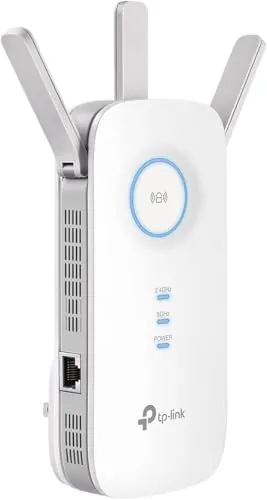
TP-Link AC1900 WiFi Range Extender RE550
- Strong Wi‑Fi range extension for filling dead zones in larger homes
Comparison
The TP-Link RE550 is a plug-in Wi‑Fi range extender designed to push your existing router’s signal into dead zones, while the TP-Link Archer AX21 is a Wi‑Fi 6 router meant to run your whole home network. If your current router is fine but coverage is patchy, the RE550 is a targeted fix—especially if you can use its Ethernet port or AP mode. If you want a more capable primary router with Wi‑Fi 6 features and router-level controls, the Archer AX21 is the better starting point.
#1 Overall Winner
Contender
Pick the TP-Link RE550 if you like your current router but need to extend coverage to a back room, upstairs, or patio—and especially if you can use its Gigabit port or AP mode. Choose the TP-Link Archer AX21 if you’re replacing an ISP router or older router and want Wi‑Fi 6 capacity, stronger router settings, and multiple Ethernet ports for a more complete home network setup.
Overall winner
Depends on your needs
| Feature | TP-Link AC1900 WiFi Range Extender RE550 | TP-Link AX1800 WiFi 6 Router (Archer AX21 V5) | Winner |
|---|---|---|---|
| Product type | Wi‑Fi range extender / repeater (plus AP mode) | Wi‑Fi router | Depends |
| Primary use case | Fix dead zones by extending router signal | Replace/upgrade your router for better network control | Depends |
| Wi‑Fi generation (as listed) | Wi‑Fi 5 class (AC1900) | Wi‑Fi 6 (AX1800) | TP-Link AX1800 WiFi 6 Router (Archer AX21 V5) |
| Dual-band support | 2.4 GHz + 5 GHz | 2.4 GHz + 5 GHz | Tie |
| Ethernet capability | 1× Gigabit Ethernet port | Multiple Ethernet ports (5 total listed) | TP-Link AX1800 WiFi 6 Router (Archer AX21 V5) |
| Access Point (AP) mode | Yes (explicitly supported) | Not stated in provided data | TP-Link AC1900 WiFi Range Extender RE550 |
| Mesh / EasyMesh mention | EasyMesh compatible (note: not compatible with Deco per listing) | Easy Mesh / EasyMesh mentioned | Tie |
| Security protocol support (listed) | Not specified in provided data | WPA/WPA2, WPA2-Enterprise, WPA3 | TP-Link AX1800 WiFi 6 Router (Archer AX21 V5) |
| Smart home/voice control | Not specified beyond general compatibility with Wi‑Fi devices | Works with Alexa (listed) | TP-Link AX1800 WiFi 6 Router (Archer AX21 V5) |
| Setup options | WPS, app, and browser interface | App and browser interface | Tie |
| Buyer rating and volume (provided) | 4.3/5 with 20,251 reviews | 4.4/5 with 24,168 reviews | Tie |
| Typical performance expectations | Improves coverage; may reduce throughput vs source router when used wirelessly | Acts as the main router; designed for smoother multi-device performance | Depends |
In everyday home use, these products solve different pain points. The RE550 is most useful when your home already has working Wi‑Fi but certain areas suffer from weak signal that causes buffering, dropouts, or smart device disconnects. The Archer AX21 is the better fit when the whole network feels limited—especially in busy households—because it replaces the router and becomes the foundation for all devices, wired and wireless.
Performance looks strong for both within their intended roles. The Archer AX21 is designed to deliver smoother multi-device networking with Wi‑Fi 6 features such as OFDMA, and reviews often describe it as fast with strong range. The RE550 is frequently praised for effectively extending coverage and improving usability in dead spots, but it comes with the standard extender trade-off: when repeating wirelessly, real-world throughput can be meaningfully lower than the main router. Where possible, using the RE550’s Ethernet port (or AP mode with a wired feed) can deliver a bigger performance improvement in far rooms.
Reliability feedback is generally positive for both, with important caveats. RE550 reviews frequently describe stable day-to-day use after setup, including better reconnect behavior for smart devices and streaming, though some mention mesh compatibility quirks depending on the rest of the network. Archer AX21 buyers often call it reliable, but a minority report internet disconnections. Because a router sits at the center of everything, any instability feels more disruptive than an extender issue. Keeping firmware current (as suggested in the product info) and ensuring a stable modem/ISP line can be key for router reliability.
Both products are low-risk household electronics when used as intended, but there are a few practical considerations. The RE550 is a plug-in device, so it should be placed where it won’t be bumped or strained in the outlet, and it should have adequate airflow (avoid covering it). The Archer AX21 should also be kept in a well-ventilated spot and free from dust buildup to reduce heat-related issues. If you use either device near entryways or high-traffic areas, cable management matters to avoid snagging Ethernet cords and power leads.
The RE550 tends to be easier for a quick fix because you can pair it (often via WPS), place it using the signal indicator, and immediately extend coverage. The Archer AX21 is still considered easy to set up by many buyers, but replacing a router is a bigger change: you’ll connect it to a modem, configure Wi‑Fi names/settings, and reconnect devices. Both can be managed via app or browser, with some users preferring the browser interface for deeper settings.
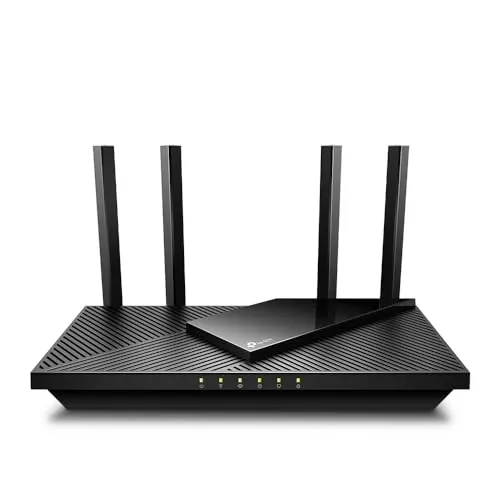
The RE550’s design is about placement convenience: it plugs into an outlet and can be moved room to room to find the best relay point, with visible antennas that help with positioning. The Archer AX21 is a flat, tabletop router with four antennas and multiple ports, intended to sit near a modem and any wired devices. If you need something compact and easy to relocate, the RE550 is simpler; if you want a central “network hub” with ports, the AX21’s layout is more practical.
Capacity is where the two differ most. The Archer AX21 is designed to handle many devices at once using Wi‑Fi 6 capacity features, which can help in busy households. The RE550 can extend coverage to additional devices in weak areas and is marketed for up to 32 devices, but an extender’s capacity and speeds still depend heavily on the strength and quality of the router signal it is repeating (or whether it’s used as a wired access point).
For space efficiency, the RE550 is easier to fit into tight homes because it uses a wall outlet and doesn’t need shelf space, though it will occupy an outlet location and has protruding antennas. The Archer AX21 needs a stable surface near your modem and benefits from open space around it for signal and airflow. In small flats where the modem is in an awkward corner, a single well-placed router can be cleanest; in multi-floor homes, an extender can be a space-efficient way to reach upstairs without adding more furniture.
Installation is generally simpler for the RE550 because it’s designed to plug in, pair, and place. It can also be installed as an access point if you have Ethernet available, though that may take a bit more configuration. The Archer AX21 installation is more involved because it becomes your main router: it must be connected correctly to a modem, and you’ll likely need to reconnect devices and configure Wi‑Fi settings. If you want the least disruption, an extender is the lighter-touch install.
Both products are generally seen as solid for the price based on buyer feedback, without obvious red flags in the provided reviews. The RE550 is a plug-in wall device with external antennas, so long-term sturdiness can depend on outlet placement and avoiding bumps. The Archer AX21 is a lightweight desktop router with multiple fixed antennas; as with most routers, keeping it clean and well-ventilated is a practical part of preserving performance over time.
Based on the provided data, there aren’t consistent reports of early physical failure for either product. The RE550 is a wall-plug extender, so avoiding physical stress on the outlet and antennas is important for longevity. The Archer AX21 is a desktop router; long-term durability tends to be helped by good ventilation and dust control (a practical point also reflected in buyer advice). If you want fewer moving/relocated parts, a stationary router setup may be easier to keep in good condition.
Maintenance is light for both: keep firmware updated, and occasionally check placement and connected device behavior. The RE550 may need occasional repositioning if you change furniture, add devices, or notice new dead spots; its app tools and signal indicator can help with this. The Archer AX21 maintenance is mostly “set and monitor”: periodic firmware updates, reviewing connected devices, and keeping the unit clean and well-ventilated. Neither has consumables like filters, which keeps ongoing costs low.
The RE550 is more portable in day-to-day use because it’s a plug-in extender that can be moved to different rooms to solve specific coverage problems. The Archer AX21 is still relatively light, but it’s not designed to be moved often since it needs to stay connected to the modem and any wired devices. If you expect to change layouts or use Wi‑Fi in different parts of the home seasonally (for example, a patio), the RE550 is easier to reposition.
The RE550’s key features center on extending: dual-band operation, adjustable external antennas, a Gigabit Ethernet port, AP mode, EasyMesh compatibility, and app tools like access control and LED control. The Archer AX21’s features are broader because it’s a router: Wi‑Fi 6 capability, multiple Ethernet ports, beamforming, WPA3 support, parental controls (mentioned), and VPN server options (OpenVPN/PPTP). If you want network-wide controls and security protocol options, the router has the richer feature set; if you want extension plus a simple wired drop, the RE550 is purpose-built.
Both products reference TP-Link’s Tether app for setup and management. For the Archer AX21, some users are cautious about app ratings and choose to configure through the browser interface instead, especially when changing deeper settings like band steering options. The RE550 also supports app management but can be set up quickly with WPS, and users mention the web interface can provide more options than the app. If app usability is important, it’s worth confirming you’re comfortable using browser configuration as a backup.
For smart home setups, the Archer AX21 has the advantage of being the main router and it explicitly lists “Works with Alexa,” plus it supports WPA3 and router-level access controls that can matter in connected homes. The RE550 can still help smart devices that sit at the edge of coverage (cameras, garage devices, smart speakers) by strengthening signal in that area, and it can be used to provide a wired connection to a single device via Ethernet. If smart devices are dropping only in one zone, the extender is often the most targeted fix.
The Archer AX21 is the stronger smart-home foundation because it acts as the main router and offers router-level options like WPA3 support and settings that can help manage connected devices. The RE550 plays a supporting role: it can stabilize connectivity for smart devices located in weak-signal areas and can provide a wired link via its Gigabit port to a single device. If your smart home is spread across outbuildings or a patio, the extender can be the practical add-on once the router is solid.
Neither product is a “home automation” device, but both include management tools that can reduce hands-on work. The RE550 supports features like access control and LED control and is intended to help devices roam to a stronger signal in compatible setups. The Archer AX21 offers router-level controls and can integrate with Alexa (listed), which may matter in some smart home routines. For most households, the real “automation” benefit is fewer reconnects and less manual troubleshooting.
The RE550 is typically praised for maintaining solid connections once placed well, and it offers both wireless extension and a Gigabit Ethernet option for a single device or AP uplink. The Archer AX21 provides Wi‑Fi plus multiple Ethernet ports, making it better for mixed wired/wireless households. Buyer feedback for the AX21 includes some reports of disconnections, so placement, firmware updates, and ISP/modem stability can matter. In general, the router is the connectivity “core,” while the extender is a connectivity “bridge.”
On efficiency, the Archer AX21 has an edge on paper because Wi‑Fi 6 is designed to reduce congestion and handle multiple devices more efficiently (for example via OFDMA). The RE550 can be “efficient” in the sense that it avoids a full router replacement and targets only the problem area, but repeating wirelessly can be a less efficient way to deliver high throughput than improving the router or using a wired access point. If you can run Ethernet, RE550 in AP mode is typically the more efficient setup for a far room.
Privacy and security considerations apply more directly to the Archer AX21 because it’s the main router and explicitly lists WPA3 support and router-level access controls. It also supports VPN server options (OpenVPN/PPTP), which can be relevant for remote access use cases. The RE550 mentions cloud management within the Tether app and includes access control features, but detailed protocol claims are not provided in the data. If you are privacy-sensitive, prioritize clear security protocol support and strong admin password practices on whichever device is your network core.
Value depends on whether you’re buying the “right tool.” The RE550 is inexpensive for a well-reviewed extender and can be excellent value when it fixes a specific weak zone without replacing anything else—especially if you take advantage of the Gigabit Ethernet port or AP mode. The Archer AX21 costs more, but it can replace an ISP router rental and offers Wi‑Fi 6 features, multiple ports, and router-level security settings like WPA3. If your current router is the bottleneck, the AX21 can be the better value; if only one area is weak, RE550 usually wins on cost-to-impact.
This is effectively a tie because both products are from TP-Link and both reference the brand’s security positioning and support resources in their listings. Buyer feedback indicates broad adoption and generally positive long-term experiences with TP-Link networking gear. Practical brand-trust differentiators here come down to what’s explicitly stated: the Archer AX21 listing includes a clearly described warranty period and support availability, while the RE550 listing provides less warranty detail in the provided data.
Both products have very high review volumes and strong average ratings, suggesting they meet expectations for many households. RE550 feedback often highlights easy setup and meaningful improvement in coverage, with some users reporting big gains when using AP mode via Ethernet; there are also mentions of mesh compatibility not behaving as hoped in certain setups. Archer AX21 reviews commonly praise range, speed, and value, but connectivity feedback is mixed, with some reporting disconnections. Overall satisfaction looks strong for both, with the usual networking caveat that results depend on layout, placement, and ISP equipment.
Only the Archer AX21 listing provides clear warranty/support information in the provided data, including a stated warranty period and 24/7 technical support phone access. The RE550 data provided does not include comparable warranty/support detail. If support access and warranty clarity are priorities, the AX21 has the clearer documentation based on what’s listed here.
Neither product is universally “better” because they do different jobs, but the Archer AX21 is the stronger all-around upgrade if you’re looking to improve your network at the core. Its main strength is being a Wi‑Fi 6 router with useful router-level features (including WPA3 and VPN server support) and strong buyer satisfaction; its main limitation is that a minority of users report disconnections.
The RE550’s main strength is cost-effective coverage expansion with easy setup, plus a Gigabit Ethernet port and AP mode that can meaningfully improve a far room; its main limitation is that wireless extending can reduce throughput versus the main router and mesh behavior can vary by setup. Pick the AX21 for a foundation upgrade, and the RE550 for targeted coverage fixes.
Overall winner
Depends on your needs
They solve different problems. The Archer AX21 is a full Wi‑Fi 6 router meant to run your whole home network (with a separate modem for most ISPs). The RE550 is a plug-in range extender designed to expand coverage from an existing router into weak areas. If your router is fine but you have dead zones, the RE550 can be the simpler fix.
Not typically. The RE550 is designed to improve coverage and connection reliability, but it can reduce throughput compared with the main router, especially when used wirelessly. If you need higher speeds in a far room, using the RE550 in Access Point mode with an Ethernet feed is often a better approach than relying on a wireless relay.
The Archer AX21 is usually the more appropriate foundation for many devices because it is a Wi‑Fi 6 router and includes capacity-focused features like OFDMA. The RE550 can help if the issue is that devices are located in areas with weak signal, but it depends on the quality of the main router it is extending and where you can place it.
Both are generally positioned as straightforward. The RE550 can be especially quick if you use WPS near the router, then move it to a better location. The Archer AX21 setup is also commonly described as easy, but it may require more steps because it becomes your primary router and must be connected correctly to your modem and configured for your home network.
If your current router is still meeting your needs except for coverage in one or two spots, the RE550 can be a low-cost way to improve usability. If you are using ISP-provided equipment you can’t control well, or you want Wi‑Fi 6 capacity and router features (like WPA3 and VPN server support), replacing the router with the Archer AX21 may be better value.
Yes. The RE550 includes a Gigabit Ethernet port that can be used to give a stable wired connection to a device in a room with weak Wi‑Fi, or to feed the extender in Access Point mode. The Archer AX21 includes multiple Gigabit Ethernet ports so you can wire several devices directly at the router location.
Both reference TP-Link’s Tether app for setup and management, but buyer feedback suggests some users prefer using a browser-based interface (especially for the Archer AX21) depending on the settings they want to access. If you care about deeper configuration, confirm the settings you need are available in your preferred management method before buying.
In many small homes, the Archer AX21 alone may be enough if placed well, since it’s the main router and is designed to deliver wide, reliable coverage. The RE550 is more situational: it’s useful when a flat has awkward layouts, thick walls, or a router location you can’t change, and you need to push signal into a specific bedroom or office area.
Check our rankings and expert guides to find the best home lifestyle products for your goals.