HouseholdRanker
Menu

Review

TP-Link AC1900 WiFi Range Extender RE550 Review

The TP-Link AC1900 WiFi Range Extender RE550 is a home networking accessory designed to improve Wi-Fi coverage in rooms where the main router struggles. It stands out for simple setup, a gigabit Ethernet port, and flexible use as either an extender or access point. Its main limitation is typical of this category: coverage improves more than raw speed, and compatibility can vary depending on the router or mesh setup.
Expert reviewed
84
Overall score
Data-driven scoring Expert reviewed Updated analysis

Why we ranked it highly

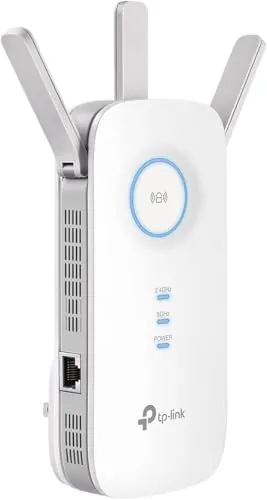
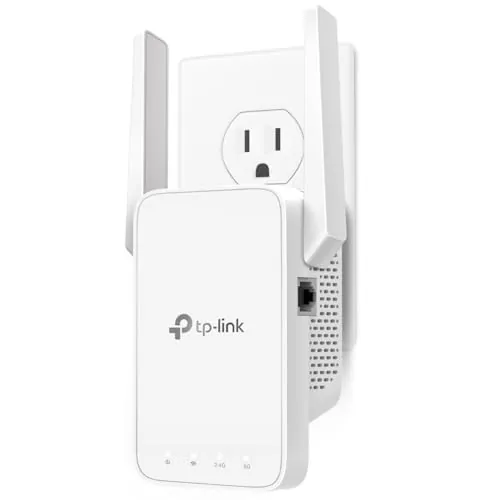
The TP-Link AC1900 WiFi Range Extender RE550 is a dual-band Wi-Fi extender built to push an existing home network into weak-signal areas such as upstairs bedrooms, back rooms, garages, or patios. It supports both 2.4GHz and 5GHz bands, includes three adjustable external antennas, and adds a gigabit Ethernet port for a wired device in a low-coverage area. It can also work in Access Point mode, which is useful if you already have an Ethernet run and want to create a local wireless hotspot. This product appears aimed at households that want a lower-cost fix for dead zones without moving straight to a full mesh replacement. The setup options through WPS, browser, or TP-Link’s Tether app make it approachable for non-technical users, while the added network controls and AP mode give more flexibility to users who want a bit more control.
90-day review Expert reviewed User feedback Data scoring

Key specs

Features & Specs

Wireless Compability
802.11a, 802.11ac, 802.11b, 802.11g, 802.11n
Data Transfer Rate
1900 Megabits Per Second
Frequency Band Class
Dual-Band
Special Features
Access Point Mode
Frequency
5 GHz
Compatible Devices
Game Console, Laptop, Personal Computer, Smartphone, Tablet
Frequency Bands Supported
2.4 GHz, 5 GHz
Range
2800 Square Feet
Connector Type
RJ45

Measurements

Item Weight
0.51 Pounds
Item Dimensions D x W x H
4.9"D x 7.9"W x 3.4"H

Additional details

Color
White

Item details

Brand
TP-Link
Built-In Media
AC1900 Wi-Fi Range Extender RE550, Quick Installation Guide
Manufacturer
TP-Link
UPC
840030701504
Mfr Part Number
RE550
Model Number
RE550
Item Type Name
WiFi Extender
Unit Count
1.0 Count

Scores breakdown

85 /100

Performance

88 /100

Features

82 /100

Safety

78 /100

Comfort

86 /100

Ease of use

84 /100

Space efficiency

100 /100

Noise

75 /100

Design

Strengths

  • Strong Wi-Fi coverage extension for dead zones, upper floors, patios, and back rooms.
  • Easy setup through WPS, web interface, or the TP-Link Tether app.
  • Dual-band design with a gigabit Ethernet port for wired devices.
  • Access Point mode adds flexibility where an Ethernet run is available.
  • EasyMesh compatibility broadens placement and network expansion options with supported routers.
  • Compact plug-in format is easy to reposition around the home.
  • High buyer satisfaction with many reports of improved signal reliability.
  • Competitive pricing for the feature set and review profile.

Limitations

  • As a range extender, it is designed to improve coverage rather than increase source internet speed.
  • Real-world speeds can be notably lower than the main router connection.
  • Some users report compatibility limits with certain mesh or AiMesh setups.
  • Roaming behavior may depend heavily on router compatibility and placement.
  • Build and styling are functional rather than especially premium.
  • Single Ethernet port may be limiting for users with several wired devices.

Ideal user profiles

  • Households with weak Wi-Fi in bedrooms, upstairs rooms, garages, or patios.
  • Users who want a low-cost fix before replacing their whole router system.
  • People who need to connect one wired device such as a TV, console, or PC in a weak-signal area.
  • Home users with an existing Ethernet run who can benefit from Access Point mode.
  • Renters or families who want simple setup without major installation work.

Use cases

  • Extending Wi-Fi to upstairs bedrooms or a basement-connected home layout.
  • Improving streaming reliability for TVs and media devices in dead zones.
  • Providing stronger Wi-Fi on a patio, in a yard-facing room, or for outdoor movie nights.
  • Connecting a console, PC, or smart TV through the gigabit Ethernet port.
  • Creating a local wireless hotspot in AP mode from a wired Ethernet connection.
  • Supporting phones, tablets, laptops, and smart home devices in weak-signal areas.

Fit and positioning

Who this works for

Category positioning

This is a smart home and home networking accessory rather than a general appliance. Its role is simple: extend usable wireless coverage into parts of the home where the router signal drops off. In daily use, that can mean more reliable streaming, fewer disconnects on phones and tablets, and a better connection for devices in bedrooms, offices, or outdoor areas. Within its category, it sits as a practical coverage upgrade for users who want to improve network reach without replacing their entire router setup.

Best for

The RE550 is best suited to households with clear Wi-Fi dead zones and users who want an affordable, straightforward fix. It makes most sense for people who need better signal in upstairs rooms, back sections of the house, or outdoor-adjacent spaces, and for anyone who can benefit from the gigabit Ethernet port or Access Point mode. Buyers who value easy setup and broad compatibility should find it a sensible fit.

Not best for

This model is less suitable for buyers expecting extender mode to deliver the same speeds as the main router. It may also be a weaker fit for users with brand-specific mesh expectations, especially where roaming behavior or compatibility with systems such as AiMesh matters. Those who need multiple wired ports or a fully integrated mesh experience may want a more network-focused alternative.

Home use

In everyday home use, the RE550 is aimed at fixing common coverage gaps rather than changing the entire network. That makes it useful in multi-floor homes, longer layouts, or homes where the router is stuck in a poor location. Reviews point to better streaming, more stable mobile connections, and improved signal for devices that previously dropped in weak-signal rooms.

Performance analysis

How it performs in practice

Each scoring dimension is separated into a compact card so the strengths and tradeoffs are easier to compare without reading one long block.

Performance analysis

The RE550 performs well when judged by its main purpose: extending usable Wi-Fi coverage into dead zones. Customer feedback repeatedly describes stronger signal reach, more stable streaming, and better wireless access in distant rooms and outdoor-adjacent areas. The inclusion of dual-band support, three external antennas, and a gigabit Ethernet port strengthens its practical performance profile. At the same time, the product information properly notes that extenders do not raise source internet speed, and some loss versus the main router is expected. A few reviews also point to compatibility or roaming limitations in certain mixed-brand or mesh-like setups.

Feature analysis

The feature set is strong for this price range. In addition to dual-band extension, the RE550 offers a gigabit Ethernet port, Access Point mode, EasyMesh compatibility with supported routers, LED control, access control, signal indication, and app-based management. These extras make it more versatile than a very basic plug-in extender, especially for households that need either a wired device connection or a simple path into a broader home network layout.

Safety

There are no major safety concerns indicated in the provided data for normal indoor use. The device is specified for standard indoor operating temperature and humidity ranges, and regulatory compliance information includes CE and RoHS. As with any plug-in networking hardware, buyers should use it in a dry indoor location and avoid blocking ventilation around the unit. There is no provided evidence here of overheating or electrical faults as a repeated review trend.

Comfort

The comfort benefit comes from reducing everyday frustration rather than changing the physical environment. Better Wi-Fi in weak areas can make streaming, browsing, calls, and connected device use feel more dependable around the home. For households with poor signal in bedrooms, upstairs spaces, or outdoor-adjacent rooms, that can noticeably improve day-to-day convenience.

How it compares

Within the Wi-Fi extender category, the RE550 looks stronger than average for practical household use. It offers a more complete feature set than entry-level extenders thanks to its Ethernet port, AP mode, and EasyMesh support, and it also benefits from a large and generally positive review profile. Compared with many basic repeaters, it appears easier to recommend for larger homes or users with mixed wireless and wired needs. Its main comparative weakness is not unusual: it still cannot avoid the speed trade-offs that come with extender mode, and buyers needing a seamless high-performance mesh experience may prefer a different category altogether.

Ranking summary

This product ranks well because it combines strong practical coverage improvement with an approachable setup process and a useful set of extras. The gigabit Ethernet port, Access Point mode, app support, and EasyMesh compatibility make it more flexible than a basic extender, while the very large review base reinforces that it works for many everyday home layouts. It does not rank at the very top of the category without caveats, because extender mode still involves speed loss compared with the main router and some users report compatibility limits in more complex mesh-style environments. Even so, for straightforward dead-zone fixes, it is a strong overall option.

Buying advice

Consider the RE550 if your main problem is weak Wi-Fi coverage in a few rooms, on another floor, or near an outdoor area, and you want a lower-cost solution than replacing your whole network. It is especially worth considering if you can use the Ethernet port for a TV, console, or PC, or if AP mode fits your layout. Avoid it if you expect full router-level speed in extender mode or need guaranteed compatibility with a specific mesh ecosystem. Before buying, check your router placement, your dead-zone distance, whether EasyMesh applies to your setup, and whether one Ethernet port is enough for your needs.
84
Overall score

Final verdict

The TP-Link AC1900 WiFi Range Extender RE550 is a strong option in the home Wi-Fi extender category. Its main strength is the combination of solid range extension, easy setup, and useful extras such as a gigabit Ethernet port and Access Point mode. Its main limitation is the standard trade-off of extenders: broader coverage does not mean unchanged speed, and performance can vary with placement and router compatibility. For households trying to fix dead zones without spending heavily on a full mesh replacement, it looks like a practical and cost-effective choice.
Back to review

Key topics

TP-Link RE550 review, TP-Link AC1900 WiFi range extender, WiFi extender for dead zones, dual-band wireless repeater, WiFi booster with Ethernet port, EasyMesh compatible extender, home WiFi coverage extender, TP-Link Tether app setup, range extender for large homes, access point mode WiFi extender

Frequently asked questions

Is the TP-Link RE550 good for improving Wi-Fi coverage at home?
It appears well suited to homes with weak-signal rooms, upstairs areas, or patio coverage gaps. Buyer feedback frequently highlights stronger signal reach and more reliable connections, though it is still an extender, so the main benefit is broader coverage rather than full router-level speed in every location.
Does the TP-Link RE550 increase internet speed?
No. The product information clearly states that range extenders are designed to improve coverage, not raise the speed coming from your internet plan or router. In practice, it can make weak areas much more usable, but throughput is still often lower than the main router connection.
Is the TP-Link RE550 easy to set up?
For most users, yes. The setup options include WPS, the Tether app, and browser-based configuration, and many reviews describe installation as quick and straightforward. A few users may need extra time when changing advanced settings such as Access Point mode or custom network naming.
Can the TP-Link RE550 be used with wired devices?
Yes. It includes a gigabit Ethernet port, which can be useful for a smart TV, console, desktop PC, or similar device in an area with weak wireless coverage. It also supports Access Point mode, letting a wired Ethernet connection create a local Wi-Fi hotspot.
Is the TP-Link RE550 suitable for larger homes?
It is intended for wider home coverage and is marketed for multi-room use, with support for many connected devices. Real results will depend on wall thickness, router placement, and interference, but reviews suggest it can be a practical option for larger layouts with dead zones.
How well does the TP-Link RE550 work with mesh systems?
It supports EasyMesh with compatible routers, which can help create a more seamless network experience under one Wi-Fi name. However, the listing also notes that it is not compatible with mesh systems like Deco, and some customer feedback mentions limitations with AiMesh-style setups.
What are the main drawbacks of the TP-Link RE550?
The main trade-off is that extending coverage does not mean matching the router’s full speed. Some users also report mixed experiences with mesh roaming behavior or brand-specific compatibility, so placement and network setup matter a lot to getting the best results.
Is the TP-Link RE550 good value for money?
Based on its price, feature set, and large volume of positive reviews, it appears to offer solid value for users trying to fix dead zones without replacing their entire home network. Its Ethernet port, dual-band support, and AP mode add practical flexibility at a relatively low cost.

Related Guides & Rankings

Comparisons featuring this product