#1 Overall Winner
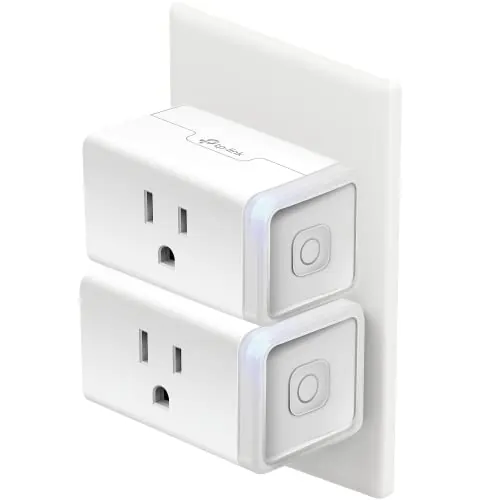
Kasa Smart Plug HS103P2 (2-Pack)
- Very easy setup with clear in-app guidance for pairing and voice assistants.
Comparison
The Kasa HS103P2 and Kasa KP115 are Wi‑Fi smart plugs designed to add app control, schedules, and voice control to everyday outlets. The biggest difference is that the KP115 includes energy monitoring, while the HS103P2 is focused on simple, affordable on/off automation—especially attractive as a two-pack. Both rely on 2.4GHz Wi‑Fi and use the Kasa app for setup and control.
#1 Overall Winner
Contender
Choose the Kasa HS103P2 if you want an affordable, easy-to-use smart plug for lamps and routines and you like the value of a two-pack. Choose the Kasa KP115 if you want energy monitoring for higher-use devices and prefer a plug that can better suit bedrooms (LED control mentioned in reviews). Either way, plan for 2.4GHz Wi‑Fi and place the plug where signal strength is solid.
Overall winner
Depends on your needs
| Feature | Kasa Smart Plug HS103P2 (2-Pack) | Kasa Smart Plug Mini with Energy Monitoring KP115 | Winner |
|---|---|---|---|
| Category / type | Wi‑Fi smart plug (2-pack) | Wi‑Fi smart plug with energy monitoring | Depends |
| Primary strength | Simple setup + strong scheduling/voice control | Energy monitoring + local-control oriented use cases in reviews | Depends |
| Voice assistant support (as described) | Alexa, Google Assistant | Alexa, Google Home | Tie |
| Hub required | No hub required | No hub required | Tie |
| Wi‑Fi band requirement (noted) | 2.4GHz required | 2.4GHz-only (noted in reviews) | Tie |
| Energy monitoring | Not provided | Yes (energy monitoring) | Kasa Smart Plug Mini with Energy Monitoring KP115 |
| App experience themes | UI/readability and timer-flow complaints | Energy totals reset + scheduling/time-change complaints | Depends |
| Indicator LED at night | Often described as bright (may need covering) | LED can be disabled (per review) | Kasa Smart Plug Mini with Energy Monitoring KP115 |
| Noise when switching | Clicking noted by users | Clicking noted (not too loud per review) | Tie |
| Reliability sentiment | Mixed: many reliable reports, some early failures/stop working | Generally strong; still location/Wi‑Fi dependent | Kasa Smart Plug Mini with Energy Monitoring KP115 |
| Space efficiency / outlet blocking | Compact, but some wish it were smaller for power strips | Sleek; doesn’t block second receptacle (per review) | Kasa Smart Plug Mini with Energy Monitoring KP115 |
| Best use case examples from reviews | Plant lights, lamps, holiday lights, routines | Electric blankets, irrigation control, dehumidifier, energy tracking | Depends |
| Price (provided) | $13.51 (pack of 2) | $12.01 (single) | Depends |
| Customer feedback volume | Very high review count | High review count, but much lower than HS103P2 | Kasa Smart Plug HS103P2 (2-Pack) |
For everyday home use, both plugs cover the essentials: remote on/off control, voice commands, and schedules for common household devices. The HS103P2 is more of a “set it and forget it” choice for lights and simple routines, backed by a huge volume of user feedback. The KP115 brings extra usefulness when you want to understand what a device costs to run or confirm when it’s actually drawing power, which can be handy for utility rooms, seasonal equipment, or electronics.
Neither plug is kitchen-specific, but both can automate small countertop appliances that are safe to be switched at the outlet (for example, turning a device off after a set time). If you want to track energy use for a kitchen device, the KP115’s monitoring is the differentiator. For simple timed control (like turning something off remotely), the HS103P2 delivers the same core functionality without the monitoring layer.
Both plugs are frequently used for comfort-related devices like fans, humidifiers, dehumidifiers, and electric blankets (all mentioned across the provided data). HS103P2 owners often focus on convenience schedules (on at dusk/off at bedtime). KP115 is the more informative option when you want energy monitoring for devices that run for long periods, such as dehumidifiers or electric blankets, but it still needs good Wi‑Fi coverage where it’s plugged in.
As switchable outlets, both models generally deliver fast response for turning devices on and off through the Kasa app and voice assistants. HS103P2 stands out for simple, dependable scheduling in many reviews, but there’s also mixed feedback around Wi‑Fi connectivity and some reports of units stopping working early. KP115 performs similarly for switching while adding energy monitoring; user feedback suggests the switching reliability is strong, though placement and Wi‑Fi reception can still affect consistency.
HS103P2 reliability is good for many households, but it’s not universally consistent: aggregated feedback includes reports of Wi‑Fi connection issues and some units stopping working after a short period, even while many others report stable operation and reconnection after internet outages. KP115 shows stronger reliability sentiment overall, including multi-year use in a review, but it can still be affected by Wi‑Fi reception and outlet location. For either model, weak signal areas are where problems are most likely to appear.
Neither product directly controls temperature or humidity sensors, but both can automate plug-in climate/comfort devices like humidifiers, fans, dehumidifiers, and electric blankets (all mentioned in the provided data). HS103P2 is the straightforward choice for recurring schedules (on/off times). KP115 is better when you want to track how much energy a climate/comfort device is using, which can be helpful for long runtimes or troubleshooting.
Both products are designed for indoor outlet switching and include a physical on-device control button. The HS103P2 listing specifies a maximum resistive load rating and notes UL certification, which is relevant when you’re running plug-in appliances. KP115 reviews reference 15A suitability and describe stable switching behavior, but you should still avoid using either plug in ways your appliance manufacturer warns against (for example, devices that shouldn’t be hard-switched at the outlet).
For safety, also consider placement: keep plugs accessible, avoid overloading circuits, and ensure good Wi‑Fi coverage so you’re not repeatedly power-cycling devices to recover connectivity.
Comfort improvements mainly come from automation convenience: not having to reach behind furniture, having lights turn on before you arrive, and shutting devices off from bed. HS103P2 is often used for these quality-of-life routines (plant lights, living-room lamps, “goodnight” scenes). KP115 adds peace of mind when running comfort devices for long periods because you can monitor energy use, but some users may find the energy-tracking limitations in the app reduce that benefit.
Both are generally easy to use: plug in, add in the Kasa app, then link to Alexa or Google Home. HS103P2 gets especially strong feedback for guided setup, while KP115 is also commonly described as straightforward and may include a quick firmware update during onboarding (per review). The biggest ease-of-use friction for both is the 2.4GHz Wi‑Fi requirement and occasional app workflow annoyances.
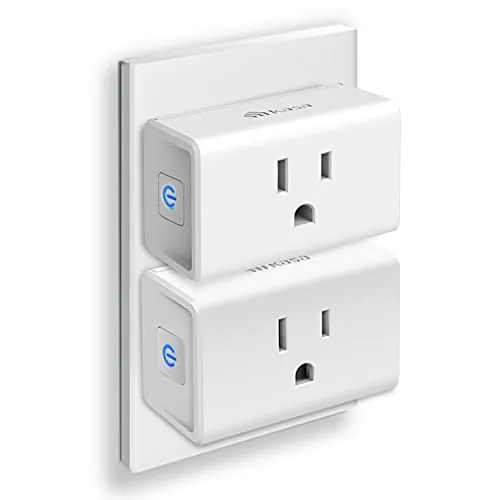
Design-wise, both aim to be small and unobtrusive. HS103P2 is compact, but some users still wish it were smaller for tight power-strip layouts. KP115 is repeatedly described as sleek and is specifically noted (in a review) as not blocking the second receptacle on a duplex outlet. If visual distraction matters, KP115 has an edge thanks to the option to disable the indicator LED (per review).
For tight outlets and crowded power strips, size matters. HS103P2 is compact, but users still mention wishing it were a bit smaller for certain setups. KP115 is noted in a review as not blocking the other receptacle in a duplex outlet, giving it an edge for standard wall outlets. If your setup uses adjacent sockets (or you dislike bulky adapters), KP115 is generally the safer bet.
Neither plug is silent in all situations. HS103P2 users note an audible click when switching, and KP115 reviews also mention a mechanical click (described as not too loud). In most homes it’s minor, but if you plan to toggle devices frequently in a quiet bedroom or office, the switching sound can be noticeable compared with “always on” devices.
Installation is simple on both: plug into an outlet, pair in the Kasa app, then connect to Alexa or Google Home. HS103P2 is frequently described as especially guided and beginner-friendly. KP115 setup is also reported as easy, sometimes with a quick firmware update during onboarding. The biggest installation requirement is 2.4GHz Wi‑Fi access; homes with only 5GHz enabled may need a router setting change or separate SSID.
Neither plug is positioned as a heavy-duty industrial device; they’re compact, snap-together style smart outlets typical of the category. HS103P2’s build feedback is mostly positive in day-to-day use, though some long-term reliability complaints appear in the aggregated overview. KP115 reviews describe decent construction and reference internal relay rating in a technical review, with overall sentiment leaning steady, but still dependent on good placement and power/outlet conditions.
Long-term durability is difficult to guarantee from listings alone, but buyer feedback provides some signals. HS103P2 has some reports of early failure, which raises risk if you’re placing plugs in hard-to-reach spots. KP115 has reviews describing years of use and a generally sturdy impression, though it’s still typical consumer plastic construction. If durability matters most, prioritize stable power and good Wi‑Fi placement to avoid frequent resets and troubleshooting.
Maintenance is minimal for both: there are no filters, bins, or consumables. Most upkeep is software-side—keeping the Kasa app updated and occasionally updating firmware (noted in a KP115 review). HS103P2 and KP115 both include a physical button for quick manual control, which helps if your phone isn’t handy. KP115 can add “data maintenance” frustration if you care about resetting energy totals and your workflow depends on the Kasa app.
Both plugs are highly portable because they’re small, plug-in devices with no tools required. Moving either one to a new room is as simple as unplugging and relocating it, though performance may change if Wi‑Fi signal is weaker in the new location. HS103P2’s two-pack can be convenient if you frequently reassign plugs around the home. KP115 remains easy to move while keeping energy monitoring available wherever you place it.
The HS103P2 covers the core feature set most households want: remote control, voice control, and timer/countdown scheduling, plus a physical side button. The KP115 includes those essentials and adds energy monitoring, which is useful for tracking usage over time. Reviewers also mention KP115 can support local-control oriented setups and that its indicator LED can be disabled—practical for bedrooms. HS103P2 users more often mention bright LED behavior and app UI quirks.
Both rely on the Kasa app for setup and control, and both get “works well” feedback overall with a few recurring complaints. HS103P2 buyers mention UI/readability issues and a less elegant timer workflow (separate on/off timers). KP115 buyers more often point to energy-monitoring limitations in the app—especially resetting totals—and some scheduling quirks around time changes. If app polish is critical, neither is perfect.
Both smart plugs integrate well into a broader smart home by adding voice control and app-based switching to ordinary outlets. HS103P2 reviews highlight smooth Alexa setup and routines, including multi-device scenes (e.g., “goodnight”). KP115 reviews emphasize energy monitoring and mention integrations beyond basic voice control (such as Home Assistant-style use), which can be valuable if you build more advanced automations and want feedback data from the plug.
For smart home use, HS103P2 has very strong routine-oriented feedback: quick Alexa pairing, responsive voice control, and straightforward schedules for lights and appliances. KP115 supports those same basics while adding energy monitoring, which can be used as extra context in more advanced setups (as described by reviewers using Home Assistant-style integrations). If you want to build automation around “usage awareness,” KP115 is the more capable device.
HS103P2 is frequently praised for practical automation—timers, countdowns, and routines through Alexa/Google—making it a strong choice for lighting schedules and daily patterns. KP115 supports similar automations and adds the option to build energy-aware routines in external platforms (as referenced by reviewers). If you plan to automate many plugs at once, HS103P2’s multi-pack value can make scaling simpler.
Connectivity is a key trade-off for both. HS103P2 reviews are split: many users report stable connections, while others report trouble connecting to Wi‑Fi or losing reliability over time. KP115 is also described as 2.4GHz-only and sensitive to outlet location and reception; at least one reviewer improved consistency by adding a closer Wi‑Fi router. In short, both work best with strong 2.4GHz coverage where the plug will live.
Both plugs are meant to be always-available controllers rather than major energy consumers themselves, and neither listing provides detailed power draw figures. Practically, KP115 can improve “household efficiency” in a different way: it exposes energy data so you can spot high-usage devices or confirm run time and consumption. HS103P2 doesn’t provide that visibility, but it still supports schedules that can reduce wasted on-time for lights and appliances.
Privacy-sensitive buyers may prefer KP115 based on review discussion of local network control and the ability to block internet access while retaining core usability (LAN control). HS103P2 is more commonly used in standard cloud/app-and-voice-assistant setups, and the data provided doesn’t describe similar local-control emphasis. If you’re concerned about IoT privacy, think through whether you need cloud integrations (Alexa/Google) or can rely on local/home automation control.
Value depends on what you’re trying to achieve. HS103P2 is compelling if you want multiple smart outlets for lights and basic schedules at a low cost per plug, and it has extremely broad buyer adoption. KP115 is priced lower per unit here and adds energy monitoring, which can pay off if you actively use the data (tracking a dehumidifier, electric blanket, or electronics standby usage). If you’ll never check energy stats, HS103P2’s simpler feature set and multi-pack approach is often the more straightforward value.
Both products come from the same Kasa/TP-Link ecosystem, so the brand experience is similar: Kasa app setup, familiar device behavior, and widely reported compatibility with major voice assistants. HS103P2’s huge review volume and long market presence can be reassuring, while KP115 is described in reviews as a newer model with energy monitoring. Brand trust here is less about “which company” and more about which model best fits your needs and Wi‑Fi environment.
Both plugs have strong star ratings and high review counts, suggesting broad customer satisfaction. HS103P2 buyers repeatedly praise ease of setup, usefulness for lighting routines, and smooth Alexa/Google control; common negatives include occasional Wi‑Fi pairing problems, mixed reliability reports, app UI complaints, and a bright LED. KP115 feedback is also largely positive, focusing on easy setup, reliable switching, and energy monitoring, with recurring complaints around 2.4GHz-only Wi‑Fi, energy-total reset limitations in the Kasa app, and some scheduling/time-change quirks.
Warranty/support specifics aren’t detailed in the provided product listings. One KP115 reviewer describes a replacement experience that was quick and straightforward when a unit failed to connect, which is a positive signal, but it doesn’t establish a consistent support outcome. If warranty support is a deciding factor, check the seller/manufacturer warranty terms for your region and confirm the return window for your retailer.
The better choice depends on whether you want energy data. The Kasa HS103P2 is the more straightforward everyday smart plug: it’s widely used, quick to set up, and excellent for voice control and schedules for lights and small appliances. Its main drawback is mixed connectivity and long-term reliability feedback, plus minor app/UI and bright-LED complaints.
The Kasa KP115 is the better option when energy monitoring is genuinely useful, and reviews also highlight local-control oriented setups and a disable-able LED. Its main limitations are 2.4GHz-only Wi‑Fi and app friction around energy resets and occasional time-change scheduling issues. If you just want dependable switching in multiple rooms, HS103P2 is usually the better fit; if you want usage visibility, pick KP115.
Overall winner
Depends on your needs
If you mainly want reliable on/off control, voice commands, and straightforward schedules for lights and small appliances, the HS103P2 (two-pack) is the simpler buy and is widely used. If you want to track power and energy use and prefer features like a disable-able LED (mentioned in reviews), the KP115 is the better fit—assuming you have solid 2.4GHz Wi‑Fi coverage.
Some reviewers describe using the KP115 with local network control and accessing energy data over the LAN, even when blocking internet access at the router. Cloud-based features (like voice assistants) generally depend on external services, but local control use cases are specifically mentioned by buyers who prioritize privacy and long-term usability.
Most buyer feedback for both models describes setup as quick: plug in, use the Kasa app, then link to Alexa or Google Home. The most common setup snag is Wi‑Fi band support—both models are described as 2.4GHz-only. If your phone or router steers devices to 5GHz, you may need to adjust Wi‑Fi settings during pairing.
The KP115 has an advantage for bedroom placement because a reviewer notes the indicator LED can be disabled. With the HS103P2, multiple buyers mention the LED is bright enough that they’d cover it in darker rooms. Both can still make a small clicking sound when switching, which may matter for light sleepers.
Both products have mixed connectivity experiences in reviews. Many HS103P2 owners say it stays connected and works reliably, while others report Wi‑Fi connection issues or early failures. KP115 feedback also notes the plug can be sensitive to outlet location and Wi‑Fi reception; some users improved reliability by strengthening coverage near the plug.
HS103P2 owners commonly use schedules for daily lighting routines and mention dependable automation once configured. KP115 also supports scheduling, but at least one review reports issues around time changes that required reprogramming. If schedules are critical, it’s worth testing your routine after setup and after any time-zone or daylight-saving changes.
Value depends on whether you’ll use energy monitoring. The HS103P2 is priced as a two-pack and is focused on core smart-plug functions like scheduling and voice control, making it a strong everyday value. The KP115 costs less per plug here and adds energy monitoring, which can be valuable if you’ll actually use the usage data.
Yes. Both product listings and multiple reviews describe working with Alexa and Google Home after linking through the Kasa app. Some users prefer setting up routines in Alexa or Google Home once the plug is added. Keep in mind that voice control typically relies on the account/app integration being set up correctly.
Check our rankings and expert guides to find the best home lifestyle products for your goals.