#1 Overall Winner
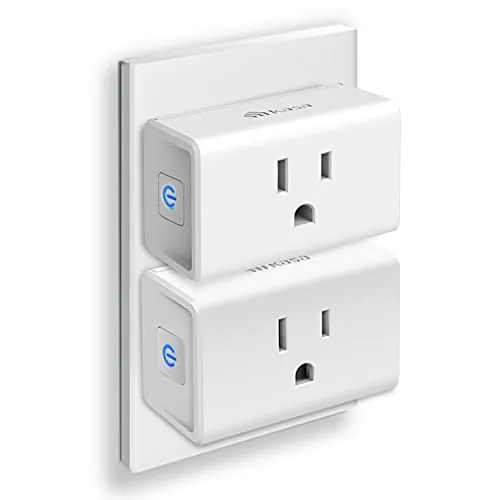
Kasa Smart Plug Mini with Energy Monitoring (KP115)
- Energy monitoring for tracking power and usage over time
Comparison
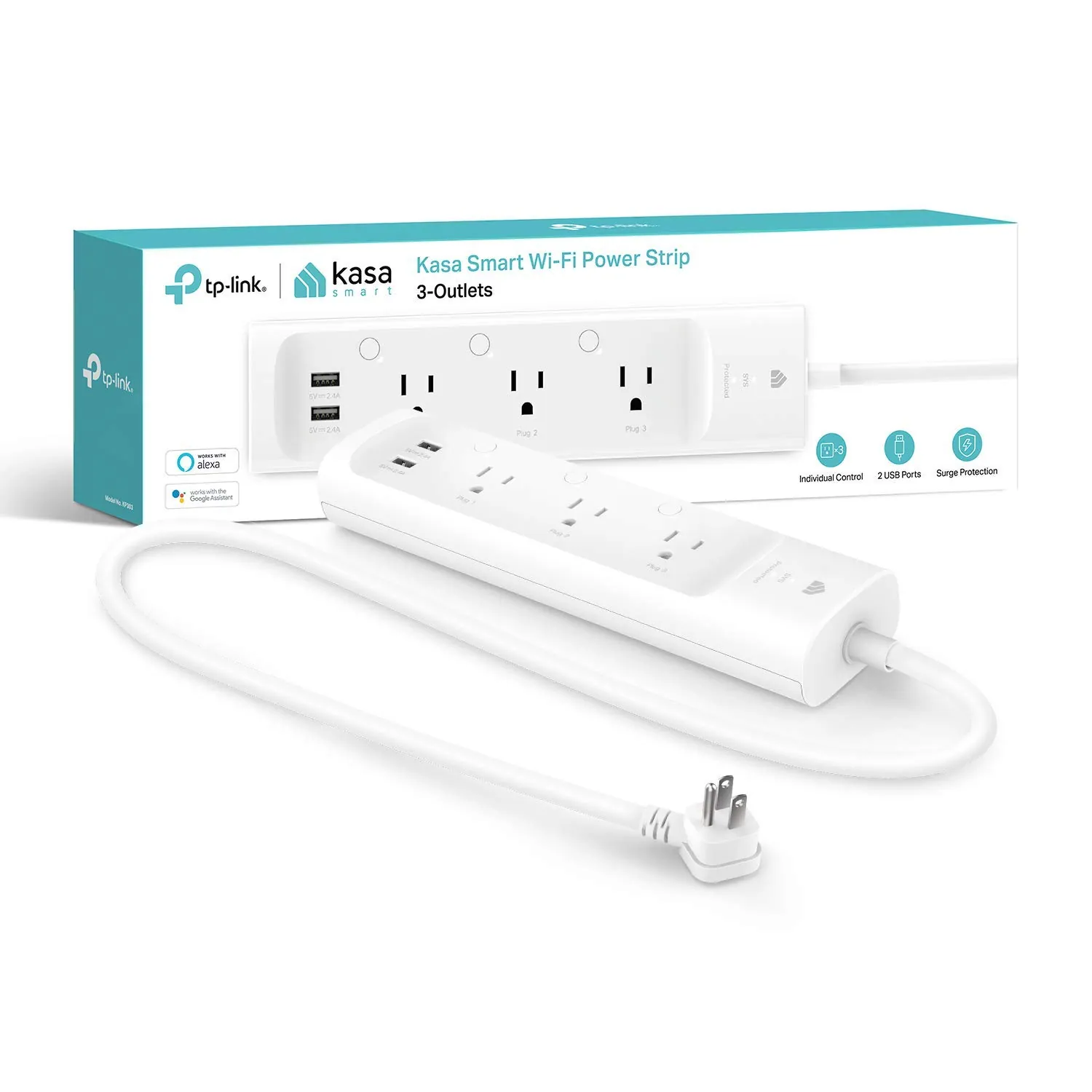
The Kasa KP115 is a compact smart plug built for controlling one device while tracking energy use, while the Kasa KP303 is a smart power strip designed to manage multiple devices with three individually controlled outlets plus USB charging. Both work with the Kasa app and support voice control with Alexa and Google Assistant, but each has different trade-offs around placement, Wi‑Fi stability, and what you can control from a single location.
#1 Overall Winner
Contender
Choose the Kasa KP115 if you need one controlled outlet and want energy monitoring for a specific device. Choose the Kasa KP303 if you want to control several devices from one spot, want surge protection, and like having USB charging built in. Both are easiest to live with when you have strong 2.4 GHz Wi‑Fi where the device will sit.
Overall winner
Depends on your needs
| Feature | Kasa Smart Plug Mini with Energy Monitoring (KP115) | Kasa Smart Plug Power Strip (KP303) | Winner |
|---|---|---|---|
| Type | Single smart plug | Smart power strip | Depends |
| Energy monitoring | Yes (energy monitoring) | No (not included) | Kasa Smart Plug Mini with Energy Monitoring (KP115) |
| Number of controllable AC outlets | 1 | 3 (independent control) | Kasa Smart Plug Power Strip (KP303) |
| USB charging ports | Not listed | 2 (always on) | Kasa Smart Plug Power Strip (KP303) |
| Surge protection | Not listed in provided data | Yes (listed surge protection) | Kasa Smart Plug Power Strip (KP303) |
| Voice assistant support | Works with Alexa/Google Home (from reviews) | Works with Alexa/Google Assistant (listed + reviews) | Tie |
| Wi‑Fi band support | 2.4 GHz required (per reviews) | 2.4 GHz required (per reviews) | Tie |
| App scheduling/timers | Supported; some scheduling/time-change complaints in reviews | Supported; widely used for schedules in reviews | Kasa Smart Plug Power Strip (KP303) |
| Manual control | Single side button | Per-outlet buttons + status LEDs | Kasa Smart Plug Power Strip (KP303) |
| Reliability (buyer feedback themes) | Generally reliable; Wi‑Fi/outlet placement sensitivity noted | Mostly reliable; some reports of occasional Wi‑Fi/app unresponsiveness | Kasa Smart Plug Mini with Energy Monitoring (KP115) |
| Portability | Very compact; easy to move between outlets | Portable but larger strip form factor | Kasa Smart Plug Mini with Energy Monitoring (KP115) |
| Space use | Low-profile plug; may avoid blocking adjacent socket (per review) | Strip needs surface/floor space but can reduce clutter for multi-device areas | Depends |
| Privacy/local control (from provided info) | Local-control use described by an advanced user review | Not specified in provided data | Kasa Smart Plug Mini with Energy Monitoring (KP115) |
| Typical use fit | One appliance (e.g., dehumidifier/blanket) + monitoring | Desk/TV stand/bedside multi-device management + surge protection | Depends |
For general home use, the KP115 is the cleaner solution when you’re automating one item at a time—like a dehumidifier, electric blanket, or a single lamp—and you also want to see how much power that device uses. The KP303 fits better when several devices share the same corner of a room (TV accessories, lamps, chargers), because one strip can reduce outlet clutter while still letting you control each outlet separately.
Both can be used for basic on/off control of kitchen devices, but they solve different problems. The KP115 is better when you want to monitor a single appliance’s usage over time. The KP303 is better for a kitchen counter or coffee station where multiple small devices share one location, and surge protection may be a plus for electronics. Either way, confirm your device’s power requirements and ensure strong 2.4 GHz Wi‑Fi coverage in the kitchen.
If your goal is controlling cleaning-related appliances (for example, turning a dehumidifier on/off remotely as mentioned in KP115 reviews), the KP115’s single-outlet approach and energy monitoring can be more informative. The KP303 is more about convenience for multi-device areas rather than tracking usage, though it can still automate multiple small devices involved in home routines.
Both products can support comfort routines by powering devices like electric blankets, mattress heating pads, fans, or small humidifiers/dehumidifiers—provided the device’s power draw is within safe limits for the outlet. KP115 reviews include examples like electric blankets and a crawl space dehumidifier, and its energy monitoring can help you understand runtime and consumption. KP303 reviews include using schedules to auto-shut off a mattress heating pad for peace of mind, and it’s convenient when multiple comfort devices share one bedside setup.
In terms of doing the core job—reliably switching power—both products are generally reviewed as effective once they’re properly connected. The KP115 earns its keep when you want power control plus energy readings (voltage/current/power/energy are referenced by a reviewer), while staying compact on the wall. The KP303 performs best as a multi-device controller, with three outlets that can be toggled individually in the app or by voice. Performance concerns are mostly network-related: KP115 reviews mention sensitivity to outlet location and Wi‑Fi reception, while KP303 reviews include occasional app/network unresponsiveness despite showing as connected.
Both products are widely reported to work reliably day-to-day, but neither is immune to home network realities. KP115 reliability feedback includes sensitivity to Wi‑Fi reception and even outlet location—one user thought a unit was defective until relocating it, and another improved consistency by adding closer Wi‑Fi coverage. KP303 reliability is strong for many owners, yet there are recurring mentions of occasional network/app unresponsiveness where the strip appears connected but can’t be reached until it’s unplugged and restarted. If you need always-on remote control, plan for strong 2.4 GHz coverage and consider how you’ll recover if the network hiccups.
Both products can improve practical safety when used as intended by allowing scheduled shutoffs and remote power control—useful for devices you don’t want left running unintentionally (for example, heating pads are mentioned in KP303 reviews). The KP303 adds a clear safety-oriented feature: built-in surge protection, which can help protect electronics from sudden power surges (as listed). For both devices, the main real-world safety consideration is using them with appropriate loads and in appropriate locations: don’t overload outlets, avoid using them where they can be exposed to moisture, and ensure cords aren’t pinched or creating trip hazards (especially with a power strip placement).
Both products can improve “comfort” mainly through convenience: schedules, voice control, and not having to reach awkward outlets. KP115 is helpful when you’re controlling a hard-to-access device (like a dehumidifier in a crawl space, per a review) and want added insight from energy monitoring. KP303 can make a room feel more streamlined by consolidating several devices and letting you shut them down automatically—useful for bedtime routines or morning auto shutoff of heating pads, as mentioned in reviews.
Both products are designed around simple Kasa app setup and tend to be easy day-to-day once connected. KP115 reviews frequently describe quick pairing and easy Alexa integration, with a convenient side button for manual toggling. KP303 is also described as easy to organize in-app (naming outlets, favorites, grouping), and the physical buttons/LEDs make it easier to see what’s on at a glance. The main ease-of-use friction for both is 2.4 GHz Wi‑Fi setup on certain routers.
The KP115 is the better design when you need something compact at a wall outlet—especially in tight spaces or when you don’t want to block neighboring sockets. The KP303 is designed to live behind furniture or under a desk, trading wall compactness for a cleaner multi-device layout. Practical touches on KP303 include per-outlet status lights and independent buttons, while KP115’s simplicity and single control button are easier when you only have one device to manage.
Capacity is where these products differ most. The KP115 is a single controlled outlet, so it’s “capacity” is essentially one device per plug. The KP303 supports five devices in total via three smart-controlled outlets plus two USB ports, which better suits setups with multiple small electronics. If you’re trying to avoid stacking adapters or filling every wall socket, the KP303’s multi-port layout is typically the more scalable option.
Space efficiency depends on your setup. KP115 is the better choice when wall outlet space is tight and you want to keep things neat without a strip on the floor. KP303 uses more physical space than a single plug, but it can be more space-efficient overall in a device cluster because it replaces multiple adapters/smart plugs and can tuck behind furniture. If your goal is reducing visible clutter around a desk or TV stand, the strip can actually look cleaner.
Neither device has a motor or fan, so operational noise is not usually a deciding factor. KP115 reviews note an audible click when toggling, but describe it as not too loud. KP303 is typically silent in normal use, and noise isn’t a common complaint in the provided feedback. If you’re placing one by the bed, the KP115’s indicator light can be relevant since at least one review notes the LED can be disabled.
Neither product requires hardwiring, but setup still matters. KP115 is typically simple: plug in, add in the Kasa app, and connect to Alexa/Google if desired. KP303 is similarly plug-and-play, but some users with band-steering routers report a more involved setup process to ensure the strip joins the 2.4 GHz network (sometimes requiring guidance or extra steps). For either device, placement is part of “installation”—choose an outlet with good Wi‑Fi reception and enough physical clearance.
Build quality impressions are broadly positive for both, but with different form-factor considerations. KP115 is described as decently constructed in a technical review and designed to look sleek and avoid blocking adjacent outlets. KP303 reviews often mention it feels solid and practical as a strip, with useful physical buttons and LEDs per outlet. Neither set of provided data includes detailed long-term failure rates, but KP303’s occasional connectivity glitches can affect perceived “quality” in daily use even if the hardware is fine.
Long-term durability signals are generally positive in the provided feedback, with KP303 users saying it “lasts for years” and KP115 users describing multi-year use as reliable. On the other hand, KP115 construction is described as typical snap-together manufacturing, and KP303’s physical form factor (a strip that may be moved or tugged) can face more real-world cable stress than a plug that stays in one wall socket. Connectivity glitches shouldn’t be confused with hardware wear, but they can affect long-term satisfaction.
Maintenance is minimal for both: there are no filters, tanks, or consumables. Most “maintenance” is software-related—keeping the Kasa app updated, handling occasional firmware updates, and ensuring your Wi‑Fi network remains compatible with 2.4 GHz devices. KP303 may need occasional reconnection after long outages (per review) or a power-cycle if it becomes unresponsive. KP115’s ongoing hassle is more about energy tracking workflows, since users note the Kasa app may not reset cumulative totals cleanly.
The KP115 is notably more portable: it’s small, easy to move between rooms, and ideal when you want to temporarily automate an appliance. The KP303 is still movable, but it’s a larger strip intended to live in a dedicated spot like a desk, bed, or entertainment center. If you frequently rearrange rooms or travel with smart devices, the mini plug form factor is usually the easier one to live with.
The KP115’s standout feature is energy monitoring, making it useful for tracking a single appliance’s consumption. It also includes on-device control and app-based automation. The KP303 is the feature leader for multi-device setups: three independently controlled outlets, two always-on USB ports, per-outlet buttons and indicator LEDs, plus built-in surge protection. Both support app control, schedules/timers, and Alexa/Google voice control, but only the KP115 is positioned (in the provided data) as the monitoring-focused option.
The Kasa app experience differs mainly by what each device exposes. KP303 reviewers often describe the app as intuitive for naming outlets, setting schedules, and organizing favorites/groups. KP115 reviews are positive about setup and basic control, but multiple users highlight a friction point around energy monitoring totals not being easily reset within the Kasa app. If you care about clean energy tracking workflows, that specific limitation is worth factoring into the KP115 decision.
Both KP115 and KP303 are designed for smart home control through the Kasa app and voice assistants, and both are commonly used for routines like turning lights on/off or shutting down devices on a schedule. The KP303 adds more smart-home utility per installation because you can control three outlets independently and organize them in the app (including naming and grouping). The KP115’s smart-home advantage is more focused: it adds energy monitoring to a single device, and at least one advanced review highlights local-control use cases.
In smart-home terms, KP303 is the more versatile “one install, multiple devices” option: you can automate three outlets independently, set schedules, and use voice assistants to control each outlet by name. KP115 is more specialized: it’s best when a single appliance matters and you want energy monitoring data for that specific load. Both devices are reported to work well inside the Kasa ecosystem, but both can be limited by 2.4 GHz-only Wi‑Fi and, in some homes, by router configuration (band steering vs separate SSIDs).
Both support schedules and timers, but KP303 tends to be used more heavily for multi-device routines (for example, shutting off TVs/lights or managing several desk devices). KP115 supports automation too, but its strongest “automation” value is pairing schedules with energy monitoring on one device. Some reviews note time-change/scheduling quirks with KP115, while KP303 automation feedback is mostly positive, with occasional reconnection needs after outages mentioned.
Connectivity is a key consideration for both. Reviews for KP115 and KP303 repeatedly highlight that they need 2.4 GHz Wi‑Fi, which can be a snag if your home setup is 5 GHz-only or uses aggressive band steering. KP115 feedback suggests performance can vary by outlet location and Wi‑Fi reception, sometimes improving simply by moving the plug or improving coverage. KP303 feedback is more mixed, with several users reporting occasional dropouts or app unresponsiveness that may require unplugging to restore control.
Neither product’s provided data includes detailed energy consumption figures for the devices themselves, but both can improve practical household efficiency by shutting devices off when not needed (reducing standby/phantom draw). KP303 reviews explicitly mention using it to cut phantom power from chargers and adapters. KP115 adds efficiency insight by measuring energy use, which can help you identify high-usage devices or validate how long something runs. Actual savings will depend on what you plug in and how consistently you use schedules.
Privacy and data security considerations are clearer for the KP115 in the provided reviews: one advanced user highlights using local control and even blocking internet access for the plug while keeping it usable on the LAN, which can reduce cloud dependency. For the KP303, the provided data emphasizes app and voice assistant control but doesn’t specify local-only operation or data-handling options. If minimizing cloud reliance is important, confirm what level of local control is available in your current ecosystem before buying.
Value depends on whether you need monitoring or multi-device control. KP115 is priced like an entry-level smart plug but adds energy monitoring, which can replace a separate plug-in meter for some households—useful if you’re trying to understand a device’s consumption. KP303 costs more, but it can replace buying several individual smart plugs, adds surge protection, and includes USB charging ports, which can be cost-effective in a desk or entertainment setup. That said, the KP303’s occasional Wi‑Fi/app unresponsiveness reported by some owners can reduce value if you rely on dependable remote control every day.
Both products sit within the Kasa/TP-Link ecosystem, and buyer feedback suggests many users own multiple devices and continue expanding their setups. KP303 reviews include a positive example of helpful TP-Link support resolving setup issues, which can matter when router configurations get tricky. KP115 reviews emphasize dependable day-to-day use and strong community/enthusiast interest in local control. Overall, the brand trust picture here is steady, with the biggest caveat being Wi‑Fi environment sensitivity rather than widespread hardware faults.
Customer satisfaction is strong for both, reflected in high star ratings and very large review counts. KP115 feedback trends toward “easy setup, works great,” with repeated mentions of energy monitoring usefulness and some recurring app-related complaints (notably around resetting energy totals and occasional scheduling quirks). KP303 sentiment highlights practical convenience—individual outlet control, easy scheduling, USB ports, and surge protection—while mixed connectivity feedback shows up more clearly, with some users describing rare but frustrating disconnects that require a reset.
Warranty and support specifics are limited in the provided data, but KP303 reviews include a concrete support story where TP-Link tech support helped resolve a difficult 2.4 GHz setup scenario. For both products, the most practical “support” check before purchase is confirming your router/network setup can reliably support 2.4 GHz IoT devices and that you’re comfortable using the Kasa app for setup, firmware updates, and device management.
The Kasa KP303 is the stronger overall choice for most rooms because it delivers more practical day-to-day utility: three independently controlled outlets, two USB ports, and surge protection in a single strip—ideal for desks and entertainment setups. Its main limitation is that some users report occasional Wi‑Fi/app unresponsiveness that may require a reset.
The Kasa KP115 is the better specialist option when you want a compact plug for one appliance and you care about energy monitoring. Its main downsides are 2.4 GHz-only Wi‑Fi and app limitations around energy tracking/resetting and some scheduling quirks reported in reviews. If you’re deciding between them, pick KP115 for measurement and minimal footprint, and KP303 for managing multiple devices cleanly.

Overall winner
Depends on your needs
It depends on what you’re trying to control. The KP115 is the better pick when you want a compact, single-outlet smart plug with energy monitoring for one appliance. The KP303 makes more sense when you need to control multiple devices from one location, want surge protection, and like having three independently controlled outlets plus two always-on USB ports.
No. The provided product details and multiple reviews call out that the KP303 does not include energy monitoring. If tracking power usage is important (for example, monitoring a dehumidifier or an appliance’s consumption), the KP115 is the model in this comparison that’s designed for that job.
Yes. The KP303 listing states compatibility with Alexa and Google Assistant, and reviews describe successful integrations. KP115 reviews also describe easy Alexa setup and Google Home use. Your experience can still depend on Wi‑Fi coverage and having a compatible 2.4 GHz network available during setup.
Yes. Reviews for both products repeatedly mention that setup/connectivity is based on 2.4 GHz Wi‑Fi, and users note that 5 GHz-only networks won’t work. If your router uses band steering, you may need to ensure your phone and the device can complete setup on 2.4 GHz.
The KP303 power strip is usually the better fit for a desk, TV stand, or bedside table because it controls three outlets independently and adds two USB charging ports. The KP115 is better when you only need to control one device at that location, or when you specifically want energy monitoring on a single outlet.
Both products can be sensitive to Wi‑Fi signal quality and outlet location, based on user feedback. KP303 reviews include reports of occasional network/app unresponsiveness that may require unplugging and plugging back in, while KP115 reviews mention inconsistent behavior improving after relocating the plug or improving Wi‑Fi coverage.
Some KP115 reviews report that the Kasa app doesn’t provide an easy reset for cumulative energy totals, leading users to rely on alternatives (for example, third-party apps on iOS) or local-control methods mentioned by advanced users. If easy in-app resets are essential, double-check current app behavior before buying.
The KP303 is explicitly described as a surge protector power strip, which can be important for sensitive electronics in home office or entertainment setups. The KP115 listing and review excerpts provided here don’t mention surge protection, so if surge protection is a requirement, the KP303 has the clearer claim in the available data.
For a first smart control device, the KP115 can feel simpler because it’s a single plug with one outlet to name and automate. The KP303 is still beginner-friendly, but it adds more configuration (three outlets, naming/grouping, and placement). Both rely on the Kasa app and typically straightforward setup on 2.4 GHz Wi‑Fi.
Check our rankings and expert guides to find the best home lifestyle products for your goals.