#1 Overall Winner
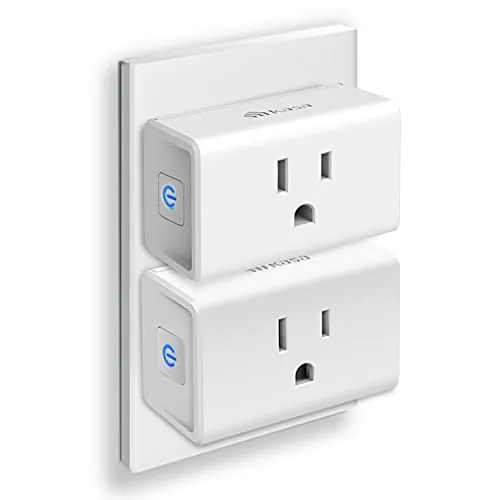
Kasa Smart Plug Mini with Energy Monitoring (KP115)
- Energy monitoring for tracking power and usage over time.
Comparison
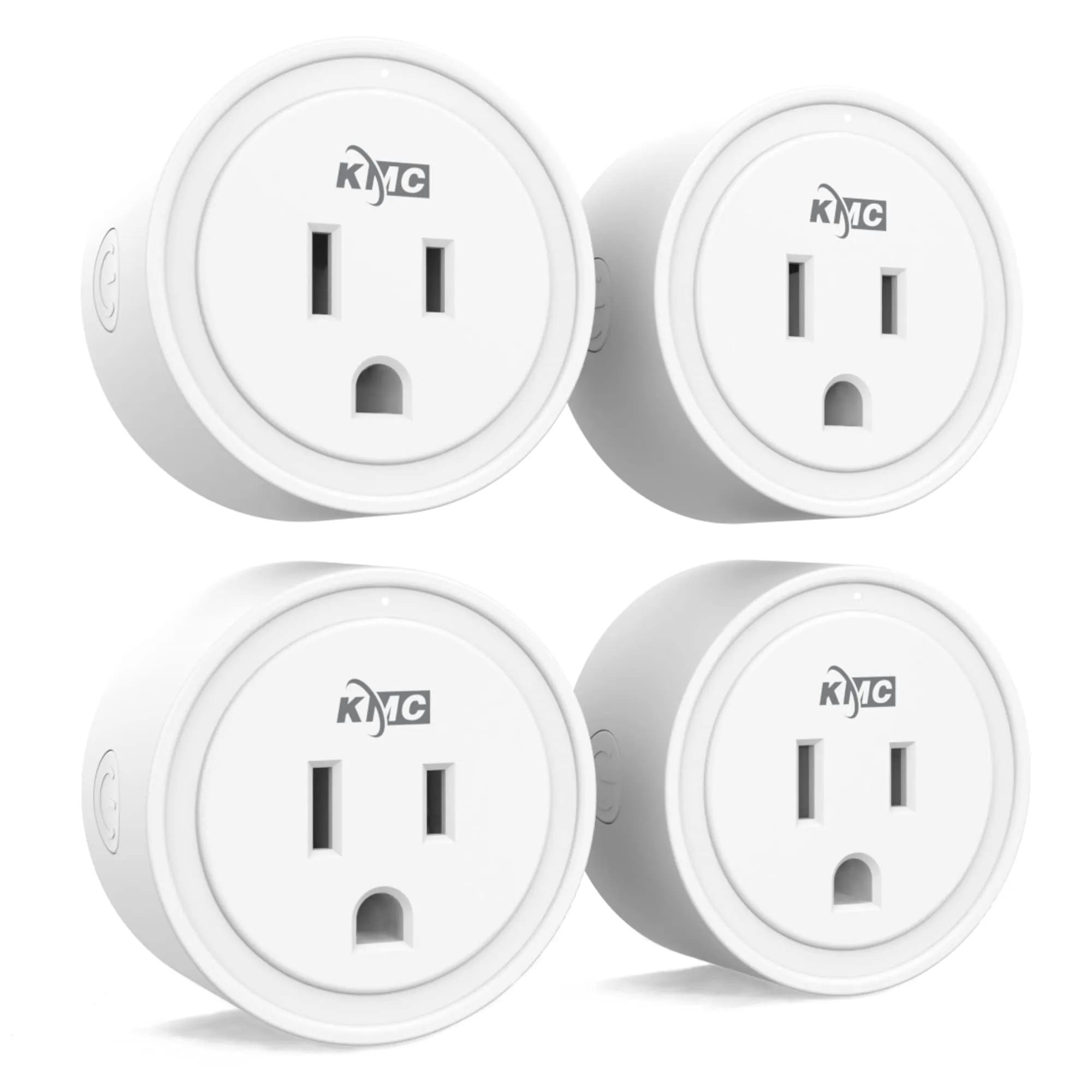
The Kasa Smart Plug Mini KP115 and the KMC Smart Plug Mini 4-Pack both add Wi‑Fi on/off control for lamps and small appliances, with Alexa and Google Assistant support and no hub required. KP115 stands out for built-in energy monitoring and strong user feedback on consistent control, while the KMC 4-pack focuses on adding multiple outlets cheaply with scheduling features. The main trade-off is KP115’s app limitations around energy totals and KMC’s mixed reports of connectivity and app glitches.
#1 Overall Winner
Contender
Choose the Kasa KP115 if you want energy monitoring and more consistently positive feedback on reliability and compact fit. Choose the KMC Smart Plug Mini 4-pack if you want the lowest cost per outlet and plan to automate several lamps or simple devices, but be prepared for more mixed reports around app glitches and connectivity depending on your Wi‑Fi setup.
Overall winner
Depends on your needs
| Feature | Kasa Smart Plug Mini with Energy Monitoring (KP115) | KMC Smart Plug Mini 4-Pack | Winner |
|---|---|---|---|
| Typical pack size | Single plug (listing shown) | 4-pack | KMC Smart Plug Mini 4-Pack |
| Energy monitoring | Yes (energy monitoring highlighted) | Not stated in provided data | Kasa Smart Plug Mini with Energy Monitoring (KP115) |
| Voice assistants | Alexa, Google Home (buyer feedback) | Alexa, Google Assistant (listing) | Tie |
| Wi‑Fi requirement | 2.4 GHz required (reviews) | 2.4 GHz required (listing) | Tie |
| Automation options | Scheduling/automation available (app + integrations) | Scheduling & automation emphasized (time, sunrise/sunset and more per listing) | KMC Smart Plug Mini 4-Pack |
| Connectivity stability (sentiment) | Generally stable; can be outlet/Wi‑Fi sensitive | Mixed; some reports of dropouts/offline issues | Kasa Smart Plug Mini with Energy Monitoring (KP115) |
| Physical size/fit | Compact; typically doesn’t block adjacent socket | Some users say bulky on crowded outlets/strips | Kasa Smart Plug Mini with Energy Monitoring (KP115) |
| Manual control | Physical on/off button mentioned | Physical on/off button mentioned | Tie |
| App limitations (reported) | Energy totals reset not available in Kasa app (reported) | Pairing glitches/offline status and routine issues (reported) | Depends |
| Local control without internet (mentioned) | Yes (reviewer reports LAN-only use) | Not stated in provided data | Kasa Smart Plug Mini with Energy Monitoring (KP115) |
| Warranty/support (stated) | Not provided in data | Lifetime warranty; US-based support (listing) | KMC Smart Plug Mini 4-Pack |
| Value approach | Strong value for a monitored single plug | Strong value for multiple outlets in one purchase | Tie |
For everyday home use, both plugs handle the basics well: turning devices on/off from your phone and integrating with Alexa/Google for voice control. KP115 is better when you want to manage a few important appliances and also see what they cost to run, while the KMC 4-pack is better when you want to quickly add smart control across multiple rooms (lamps, fans, seasonal lighting). In either case, plan on placing them where 2.4 GHz Wi‑Fi coverage is strong for smoother operation.
Neither plug is kitchen-specific, but both can work for simple on/off control of countertop devices where it’s safe and appropriate to do so (for example, scheduled lighting or turning a device off remotely). KP115’s energy monitoring can be helpful if you want to track usage on a specific appliance. Keep in mind both are standard smart plugs, so avoid using scheduling in ways that could create unattended appliance risks.
Both plugs can support comfort routines by automating devices like fans, electric blankets, or a dehumidifier. In the provided reviews, KP115 is specifically used for electric blankets and a crawl space dehumidifier, and energy monitoring can help you understand how often those devices run. The KMC 4-pack is practical if you want comfort automation in several rooms, but reliability feedback is more mixed, which matters for overnight or away-from-home routines.
As basic on/off smart outlets, both appear to deliver responsive switching when Wi‑Fi conditions are good. KP115 receives more consistently positive feedback for stable control and is often described as “works great,” including integrations with Alexa and Home Assistant setups. The KMC 4-pack is frequently described as fast and convenient, but a noticeable subset of users report pairing difficulties, plugs showing offline, or needing resets. If performance for critical devices matters, KP115 has fewer red flags in the provided data.
Reliability is a key separator. KP115 reviews are largely positive, describing stable switching and consistent integrations, with the main reliability caveat being sensitivity to Wi‑Fi reception and outlet location (which can usually be solved by improving coverage or moving the plug). The KMC 4-pack has more polarized feedback: many users report stable operation, but others describe plugs going offline, pairing issues, or needing resets, and one reviewer reports a disruptive app/device disappearance experience. For critical devices, KP115 is the lower-risk choice.
For controlling comfort appliances, the KP115 has the advantage of being used and discussed in reviews for dehumidifiers and electric blankets, plus it adds energy monitoring to understand runtime and consumption. The KMC 4-pack is better if you want to automate fans or heaters across multiple rooms, but reliability feedback is mixed, so it’s worth testing each plug in its intended location before relying on schedules.
Both products are intended for standard plug-in use and both are used by owners with everyday household devices. The KMC listing explicitly states an electrical rating (15A/1875W) and notes ETL certification; KP115 reviews also discuss 15A suitability, but certifications are not provided in the data. Regardless of model, avoid using smart plugs in ways that leave high-risk appliances unattended, and ensure the outlet and Wi‑Fi placement don’t encourage unsafe extension-cord setups. If you’re switching devices like heaters or blankets, test schedules carefully and use common-sense supervision.
Both plugs can improve day-to-day comfort by removing small annoyances like getting up to turn off a lamp or managing devices in hard-to-reach spots. KP115 is especially helpful when comfort devices have meaningful running costs (like dehumidifiers or electric blankets) because energy monitoring adds visibility. The KMC 4-pack can add comfort across several rooms cheaply, but occasional offline/app issues could reduce the “set it and forget it” benefit.
Both smart plugs are commonly described as straightforward: plug in, install the app, connect to Wi‑Fi, and then link to Alexa/Google if desired. KP115 feedback is especially strong for smooth setup, though the energy-monitor “reset totals” limitation can be confusing. KMC is generally easy once connected, but some users report slower pairing, needing retries, or occasional offline status that requires app restarts.
KP115’s design advantage is its compact footprint and the fact that it typically won’t block the adjacent socket on a duplex outlet. Reviewers also mention an indicator light that can be disabled, which helps for bedrooms or living rooms. The KMC plugs are sometimes described as large, which can be frustrating on power strips or tight wall plates. If placement flexibility is important, KP115 is easier to live with.
KP115 is the more space-efficient choice for most homes because it’s commonly described as compact and less likely to block adjacent sockets. The KMC plugs can work well on open wall outlets, but some users report they’re bulky in tight spaces and may not fit well on crowded strips. For flats, dorm rooms, or behind-furniture outlets where every socket matters, KP115 is easier to place.
Noise is rarely a deciding factor for smart plugs, but KP115 reviewers mention the mechanical switching click isn’t too loud. The KMC scoring context suggests quiet operation as well, and user feedback doesn’t flag noise as an issue. For bedrooms, the bigger practical difference is likely LED behavior and overall reliability rather than sound.
Installation is simple for both: plug into an outlet, then follow in-app steps to connect over 2.4 GHz Wi‑Fi and optionally add to Alexa/Google. KP115 setup is frequently described as smooth and quick. KMC setup is often quick too, but some users mention initial pairing can be slow or require repeating. In either case, planning plug placement around strong Wi‑Fi coverage reduces setup friction.
KP115 build feedback is generally positive, with one reviewer noting decent construction and a rating suitable for typical household circuits. KMC is specified as plastic with metal contacts, and its electrical rating is clearly stated; however, some user feedback points to longer-term stability issues that can feel like “quality” problems even if the casing is fine. On balance, KP115 looks a bit more confidence-inspiring from the provided data.
Long-term durability is hard to confirm from limited data, but KP115 has strong multi-year reliability comments and a large base of satisfied owners. KMC has many happy reviews too, yet the reports of dropouts and resets can become a “durability” problem in practical terms, especially if you plan to deploy multiple units across properties. If you want fewer long-term surprises, KP115 looks more dependable based on the provided feedback.
Maintenance is minimal for both: there are no filters or consumables, and most upkeep is digital (app updates, occasional re-pairing, and checking Wi‑Fi coverage). KP115 may require extra attention if you rely on energy tracking and want to manage cumulative totals, since resetting in the Kasa app is a known pain point. KMC may require more occasional troubleshooting if a unit goes offline or an automation doesn’t run as expected.
Both plugs are portable in the sense that you can move them between outlets easily. KP115’s smaller design makes it more convenient to relocate without disrupting neighboring sockets. The KMC units can be less convenient to move around crowded strips or tight wall plates due to size. If you expect to reposition plugs often (seasonal lights, temporary setups), KP115 is a bit easier to handle.
KP115’s standout feature is energy monitoring, with users discussing tracking power and energy and even accessing data through local control methods. It also includes practical touches like a physical button and an indicator light that can be disabled (per review). The KMC 4-pack focuses more on scheduling and automation options in its app (including time and sunrise/sunset triggers per listing), plus sharing control with others. If you need metering, KP115 wins; if you want more plugs and lots of routine options, KMC is attractive.
KP115’s app experience is generally seen as functional and easy for setup, but there’s repeated frustration about energy totals not being easily reset within the Kasa app. KMC’s app is praised for ease and features, yet multiple reviewers mention pairing retries, devices showing offline, and at least one report of devices disappearing after an app change. If you want the most predictable app behavior, KP115 appears safer from the provided data.
Both are designed for mainstream smart home setups, working with Alexa and Google Assistant without a hub. KP115 gets stronger feedback for integration and offers energy monitoring, which can add useful context for automations (even if you mostly use it for reporting). KMC leans into app-based scheduling and automation features, which is useful when you want multiple routines across several plugs. For either product, 2.4 GHz Wi‑Fi is a must.
In smart home setups, both products support voice control and app control without a hub, and both rely on 2.4 GHz Wi‑Fi. KP115 stands out for users who want deeper control options (including local/LAN control mentioned by a reviewer) and energy monitoring data for dashboards or home automation software. KMC stands out for scale and routine-building in its app, but user reports of offline status and device disappearance in the app suggest it may need more hands-on troubleshooting in some homes.
KMC emphasizes automation conditions such as time and sunrise/sunset, and reviews describe routines for lights and daily convenience. KP115 supports scheduling, but some users prefer to run automations from platforms like Alexa or home automation software, using the plug mainly as a reliable switch and meter. If you want a feature-heavy routine builder in the manufacturer app, KMC has the edge; if you want dependable switching under external automations, KP115 looks stronger.
Both plugs require 2.4 GHz Wi‑Fi, which is normal for many smart home devices and often helps range. KP115 reviews note it can be sensitive to outlet placement and Wi‑Fi reception, but also describe strong stability once placed well (including solutions like adding a router closer to an outbuilding). KMC feedback is more mixed, with some users reporting no dropouts and others reporting connection failures or offline behavior.
Neither product includes detailed energy consumption figures for the plug itself in the provided data. Practically, KP115 can improve “household efficiency” by making it easier to spot always-on devices or high-usage appliances through its energy monitoring. The KMC 4-pack focuses on automation convenience, which can reduce wasted runtime if your schedules are reliable. If tracking and trimming usage is your goal, KP115 provides more direct tools.
Privacy-sensitive users may lean toward KP115 because a reviewer specifically describes successful local/LAN control while blocking internet access, reducing reliance on cloud connectivity for basic operation. The KMC product details don’t mention local-only operation, and the provided scoring context suggests weaker privacy/security positioning. If account access, cloud reliance, and long-term support are major concerns, KP115 has more explicit user feedback supporting a more controlled setup.
Value depends on what you’re buying the plug for. KP115 offers strong value when you specifically want energy monitoring and a compact, dependable smart plug—especially if you’re replacing a standalone meter plus a timer. The KMC 4-pack offers strong value when you need multiple smart outlets at once and want broad scheduling/automation features, and it also includes a stated lifetime warranty in the listing. If you end up troubleshooting offline behavior, the KMC “cheap per plug” advantage can shrink in real-world convenience.
Based on the provided data, KP115 benefits from a very large number of reviews and consistent owner satisfaction, plus specific enthusiast feedback about control options. KMC earns trust mainly through value, the stated lifetime warranty, and many positive reviews, but brand confidence is tempered by mixed reports of connectivity/app stability and some support frustration. If you prioritize predictable long-term experience, KP115 looks more reassuring in this dataset.
Both products are well-rated with high review counts, but the tone differs. KP115 feedback is strongly positive around setup, reliability (with good Wi‑Fi), compact fit, and energy monitoring usefulness, with repeated complaints focused on app limitations for resetting energy totals and 2.4 GHz-only requirements. KMC reviews praise value and convenience, but include more frequent negatives about pairing difficulties, plugs showing offline, and occasional app/device management issues. Overall sentiment is strong for both, with fewer “systemic” complaints for KP115.
The KMC listing explicitly claims a lifetime warranty and US-based customer support, which is useful if you’re buying a multi-pack for broad deployment. However, at least one reviewer describes support as slow and primarily email-based. Warranty/support details for the KP115 are not provided in the data, so a direct comparison on terms isn’t possible here; if support matters, check the seller/manufacturer warranty details before purchasing.
The Kasa KP115 is the clearer all-around pick in this matchup because it combines energy monitoring, compact design, and stronger reliability sentiment in the provided reviews. Its biggest downside is software friction around managing energy totals in the Kasa app, plus the usual 2.4 GHz-only constraint.
The KMC Smart Plug Mini 4-pack is a practical alternative when you want to add smart control to several outlets at once and you like the idea of app-driven schedules and automation. The trade-off is more mixed feedback on connectivity and app stability, and a bulkier fit in some setups. If you want fewer hassles and better monitoring, choose KP115; if you want maximum coverage per dollar, choose KMC.
Overall winner
Depends on your needs
The Kasa KP115 is the stronger choice if you want more consistent day-to-day reliability and built-in energy monitoring for a specific device. The KMC 4-pack makes more sense when you want to add several smart outlets cheaply and focus on schedules and routines across rooms. If your Wi‑Fi coverage is spotty, the KP115 has fewer negative reports in the provided feedback.
Yes. The KP115 is described in reviews as pairing to 2.4 GHz Wi‑Fi, and users specifically warn it won’t work on 5 GHz-only setups. The KMC listing also states it requires a secured 2.4 GHz Wi‑Fi network. If your router splits bands, you may need to ensure your phone can complete setup on the correct network.
The Kasa KP115 is the clear option here because energy monitoring is part of the product and is a key reason buyers choose it. Reviewers discuss accessing voltage/current/power/energy readings, but also mention the Kasa app may not let you reset cumulative totals easily. The KMC 4-pack details provided don’t highlight energy monitoring as a feature.
Both are commonly described as easy to set up: plug in, install the app, and connect to Wi‑Fi. In day-to-day use, the KP115 feedback is more consistently positive, while the KMC 4-pack has a subset of reviews mentioning slow pairing, random offline status, or routines not behaving as expected. Your Wi‑Fi coverage and outlet placement can influence either plug.
The KMC 4-pack leans heavily into scheduling and automation in its product details, including time and sunrise/sunset style triggers. The KP115 supports scheduling in the Kasa ecosystem, but reviews mention some scheduling quirks (for example around time changes) and also note that some users prefer running schedules in separate home automation software rather than relying on the plug’s app.
The KP115 has stronger reliability sentiment in the provided reviews, with several users describing stable operation once the plug is placed where Wi‑Fi reception is solid. The KMC 4-pack has mixed feedback: many users report stable use, but others report disconnects, offline status, or needing resets. If you’re managing multiple properties, those app/device dropouts can matter more.
Yes. KP115 reviews mention a side button that makes it easy to cycle power without a phone. The KMC reviews also mention a button for turning the outlet on and off. A physical button is helpful for quick overrides, troubleshooting, or when guests need to operate a lamp without using your smart home setup.
The KP115 is more often described as compact and less likely to block the second socket in a duplex outlet. For the KMC 4-pack, at least one reviewer calls the plugs “a bit large,” especially on power strips or tight wall plates. If you’re outfitting a behind-the-TV power strip or a crowded kitchen counter outlet, size can be a deciding factor.
Check our rankings and expert guides to find the best home lifestyle products for your goals.