
HouseholdRanker
Menu
Kasa EP10P2 vs KMC Smart Plug Mini 4-Pack

Comparison

Kasa EP10P2 vs KMC Smart Plug Mini 4-Pack

The Kasa Smart Plug Ultra Mini EP10P2 and the KMC Smart Plug Mini 4-Pack are Wi‑Fi smart outlets designed to add app and voice control to everyday devices like lamps, fans, and small appliances. Kasa focuses on an ultra-compact plug body and is widely praised for easy setup and a polished app, while KMC competes with a larger multi-pack and automation options that include conditions like sunrise/sunset. Both require 2.4 GHz Wi‑Fi and can be used with Alexa or Google Assistant.

Expert tested Data driven Unbiased reviews Updated 18 May 2026
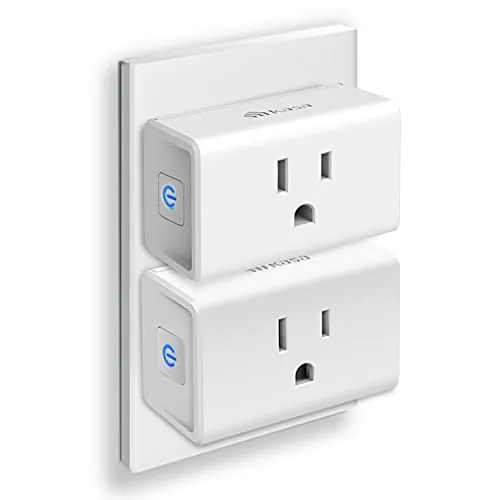
Kasa Smart Plug Ultra Mini 15A (EP10P2) 2-Pack

#1 Overall Winner

Kasa Smart Plug Ultra Mini 15A (EP10P2) 2-Pack

88/100
  • Ultra-compact plug design that’s intended not to block the second outlet on a wall socket.
View review
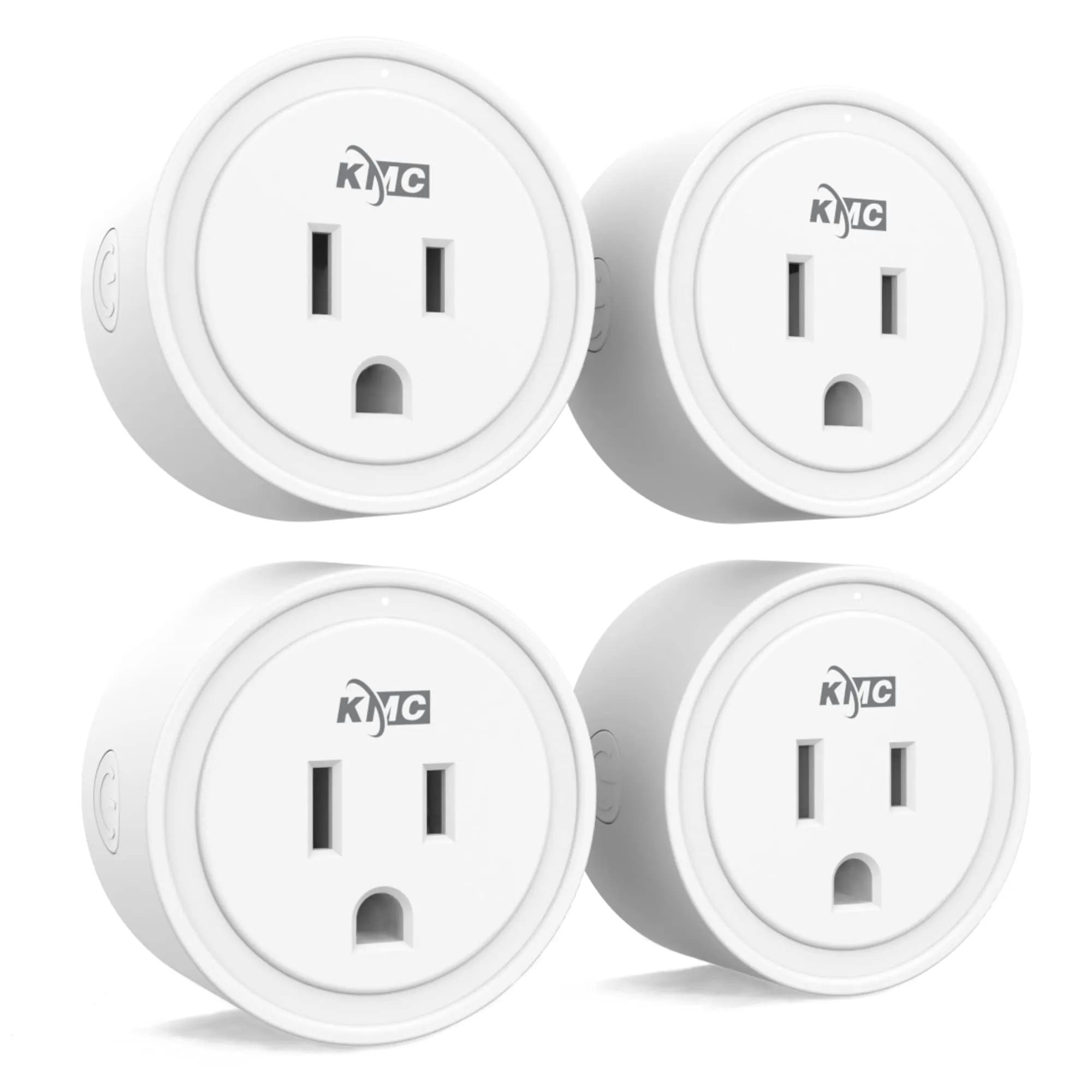
KMC Smart Plug Mini 4-Pack (30153)

Contender

KMC Smart Plug Mini 4-Pack (30153)

82/100
  • Good bundle value with a 4-pack, useful for expanding multiple outlets at once.
View review

Quick verdict

Choose the Kasa EP10P2 if you want a compact smart plug with very strong ease-of-use feedback and dependable schedules for everyday lighting and device control. Choose the KMC 4-pack if you want more plugs per purchase and like the idea of broader app automation triggers—while accepting that some owners report more app/connectivity hiccups and a bulkier fit.

Overall winner

Depends on your needs

At-a-glance comparison

Feature Kasa Smart Plug Ultra Mini 15A (EP10P2) 2-Pack KMC Smart Plug Mini 4-Pack (30153) Winner
Type Wi‑Fi smart plug (2-pack) Wi‑Fi smart plug (4-pack) Depends
Pack size 2 plugs 4 plugs KMC Smart Plug Mini 4-Pack (30153)
Price (as listed) $8.54 $19.52 Depends
Average rating (as listed) 4.5/5 4.4/5 Kasa Smart Plug Ultra Mini 15A (EP10P2) 2-Pack
Review volume (as listed) 39,988 reviews 11,694 reviews Kasa Smart Plug Ultra Mini 15A (EP10P2) 2-Pack
Voice assistants Alexa, Google Assistant (plus IFTTT listed) Alexa, Google Assistant Kasa Smart Plug Ultra Mini 15A (EP10P2) 2-Pack
Hub requirement No hub required No hub required Tie
Wi‑Fi requirement 2.4 GHz Wi‑Fi only 2.4 GHz Wi‑Fi required Tie
Physical fit / outlet blocking Ultra-mini design intended not to block adjacent outlet Some reviewers report it’s a bit large in tight spaces Kasa Smart Plug Ultra Mini 15A (EP10P2) 2-Pack
Rated electrical load (stated) 15A, 120V, 1800W 15A, 125V, 1875W Depends
Scheduling/automation Schedules, timers, Away Mode Scheduling + conditions like sunrise/sunset (per listing) Depends
Connectivity feedback Mixed (some router/integration issues reported) More mixed (offline/pairing issues mentioned) Kasa Smart Plug Ultra Mini 15A (EP10P2) 2-Pack
App experience Often praised as intuitive/robust Easy for many, but more reports of glitches/offline status Kasa Smart Plug Ultra Mini 15A (EP10P2) 2-Pack
Warranty (as listed) 2-year warranty stated Lifetime warranty stated KMC Smart Plug Mini 4-Pack (30153)
Certifications (as listed) UL (also RoHS/FCC/IC mentioned) ETL (UL/ETL stated) Depends

Detailed comparison

Home Use

For everyday home routines (lamps, fans, holiday lights, and “did I leave that on?” peace of mind), both plugs cover the basics: remote on/off, schedules, and voice control. Kasa’s compact body is more forgiving behind furniture and on two-outlet wall plates, making it easier to use throughout a home without sacrificing the second socket. KMC’s advantage is scale—four plugs in one box can quickly automate multiple rooms—but you’ll want to be more mindful of physical clearance and be prepared for occasional app/pairing troubleshooting noted by some owners.

Kitchen Use

Both smart plugs can be useful in kitchen routines for simple on/off control (for example, lamps, some small appliances, or switching a device off after a set time) as long as the appliance is appropriate for plug-level control and stays within the stated electrical ratings. Kasa’s smaller footprint tends to be easier on crowded backsplash outlets. KMC can be a cost-effective way to add multiple controlled outlets at once, but its larger body may be awkward next to other plugs or on power strips.

Climate Comfort

For comfort-related devices like fans, humidifiers, or other plug-in home comfort gear that only needs basic on/off scheduling, either plug can work well. Kasa stands out for straightforward scheduling and a compact design that’s easier to place near bedsides or behind furniture. KMC’s app describes more automation triggers (like sunrise/sunset), which can be useful for matching household routines, but some users report offline/app quirks that can be frustrating if you rely on routines daily.

Performance

As simple on/off smart outlets, both appear to perform well when Wi‑Fi connectivity is stable: reviewers for each describe responsive control and helpful scheduling for lights and small devices. Kasa has more consistently positive feedback around “set it and forget it” operation, and users report it’s effective for automating power cycles for certain electronics. KMC also gets praise for quick response, but a subset of reviews mention pairing friction, devices showing offline, or units stopping working, which can undermine performance if you depend on daily routines.

Reliability

Both products receive generally positive reliability feedback, but the “problem patterns” differ in frequency and impact. Kasa reviews and the aggregated summary note some connectivity/Alexa compatibility issues for certain setups, especially when changing routers, but many users report stable operation once configured. KMC reviews include stronger warnings from a subset of owners about plugs going offline, failing to connect, or losing device listings in the app, which can be disruptive when you depend on remote access. For reliability-sensitive uses (travel, rentals, critical routines), Kasa appears to be the safer bet.

Security Monitoring

Neither plug is a security sensor, but both can contribute to basic “occupied home” patterns by controlling lights on schedules. Kasa explicitly includes an Away Mode feature for this use, which makes the security-style use case more straightforward. With KMC you can still create lighting routines, but some reviewers mention app/offline issues—worth considering if you plan to rely on it while traveling.

Kasa Smart Plug Ultra Mini 15A (EP10P2) 2-Pack

Pros

  • Ultra-compact plug design that’s intended not to block the second outlet on a wall socket.
  • Very straightforward setup flow for many owners using the Kasa app.
  • Strong scheduling tools (timers, countdowns, and recurring schedules) that work well for everyday routines.
  • Wide voice-assistant support listed (Alexa, Google Assistant) plus IFTTT support.
  • Away Mode option for basic “occupied home” lighting patterns.
  • Helpful for automated reboot/power-cycling of finicky devices (common real-world use in reviews).
  • High buyer satisfaction with a very large review sample.
  • UL certification and 15A/1800W electrical rating stated.

Cons

  • No Apple HomeKit support mentioned; one review explicitly flags the absence of HomeKit.
  • Connectivity/Alexa integration is mixed: some households report smooth use, others report connection issues.
  • 2.4 GHz Wi‑Fi only, so it won’t join 5 GHz-only networks.
  • After router/network changes, some users report needing a full remove-and-readd/reset sequence.
  • For the heaviest loads, some reviewers recommend staying well under the maximum rating in practice.
Kasa Smart Plug Ultra Mini 15A (EP10P2) 2-Pack

KMC Smart Plug Mini 4-Pack (30153)

Pros

  • Good bundle value with a 4-pack, useful for expanding multiple outlets at once.
  • Scheduling and automation options described in the app, including time and sunrise/sunset triggers.
  • Works with Alexa and Google Assistant for voice control.
  • Sharing controls with family/friends is called out as an app feature.
  • ETL certification and 15A/1875W electrical rating stated.
  • Many reviewers describe quick, responsive on/off control in the app.
  • Lifetime warranty and US-based support are claimed by the brand listing.

Cons

  • Physical size can be an issue on crowded power strips or tight outlet layouts (reviewed).
  • Reliability and Wi‑Fi connectivity feedback is mixed; some reports of plugs going offline or failing to connect.
  • Pairing can be slow or may require retries for some users (reviewed).
  • Some app glitches are reported (devices showing offline, schedules not behaving as expected for some).
  • Support is described as slow and email-based by at least one reviewer.
KMC Smart Plug Mini 4-Pack (30153)

Final verdict

Verdict: The Kasa EP10P2 is the clearer overall winner for most households because it combines a space-saving design with consistently strong ease-of-use feedback and a generally well-regarded app experience. Its main limitation is that connectivity can still be finicky in certain network situations, and it doesn’t add Apple HomeKit support in the provided data.

The KMC Smart Plug Mini 4-Pack is a solid alternative when you want more plugs per purchase and like the promise of broader in-app automation triggers and sharing. Its biggest drawback is more mixed reliability/app feedback (offline and pairing complaints) and a bulkier fit in tight outlet layouts. If you want the lowest-hassle smart plug, go Kasa; if you want bulk coverage and can troubleshoot, KMC can fit well.

Overall winner

Depends on your needs

Frequently asked questions

Which is better overall: Kasa EP10P2 or KMC Smart Plug Mini 4-Pack?

Based on the provided scores and review themes, the Kasa EP10P2 comes across as the safer all-round pick for most homes, mainly due to its compact design and consistently strong ease-of-use feedback. The KMC 4-pack is appealing if you want more plugs per purchase and like the idea of app automation triggers, but buyer reports include more pairing/offline quirks.

Which smart plug is less likely to block the second outlet?

The Kasa EP10P2 is specifically described as ultra-compact and designed not to block the second outlet on a standard wall socket. KMC reviewers more often mention the plugs being large or difficult to fit on crowded power strips or tight outlet layouts, so placement can take a bit more planning.

Do both work with Alexa and Google Home?

Yes. Both listings state compatibility with Alexa and Google Assistant for voice control. Reviews for both mention successful voice control, but each also has some mixed feedback on connectivity depending on the home network setup. If voice control is a must, plan on a stable 2.4 GHz Wi‑Fi signal where the plug will be used.

Which app experience seems smoother for everyday use?

Kasa’s app experience is described by many owners as intuitive and robust, and setup is often reported as quick. KMC’s app is also described as easy by many buyers, but there are more mentions of pairing taking longer, devices showing “offline,” and occasional scheduling/app quirks. Your Wi‑Fi environment can heavily influence either experience.

Which is better for schedules and automation?

Both support scheduling. Kasa is frequently praised for timers, countdowns, and dependable recurring schedules. KMC’s listing emphasizes broader automation conditions (including sunrise/sunset and other triggers), which may appeal if you want more types of routines. However, some KMC reviewers report schedule or app glitches, so it may require more troubleshooting.

What Wi‑Fi do these smart plugs require?

Both are specified as requiring a secured 2.4 GHz Wi‑Fi network, with no hub required. If your router separates 2.4 GHz and 5 GHz bands, you’ll typically need to connect your phone to the 2.4 GHz band during setup. Mixed connectivity reviews for both suggest router changes can sometimes require re-adding devices.

Which is better value: a Kasa 2-pack or KMC 4-pack?

Value depends on how many outlets you want to automate and how important a compact body is in your home. KMC provides more plugs per box, which can be cost-effective for expanding quickly. Kasa costs more per plug in this listing but often wins on compact placement and ease-of-use feedback, which can reduce setup friction over time.

Are either of these good for power-cycling devices like modems or electronics?

Kasa reviews include real-world examples of using schedules to automatically reboot devices (like a treadmill console) and to avoid manual unplugging. KMC is also used for lights and small devices with quick on/off response. In both cases, stay within the stated electrical ratings and use on/off control for appropriate devices.

What should I check before buying either smart plug?

Confirm you have reliable 2.4 GHz Wi‑Fi coverage at the outlet location, and consider physical fit—especially if you’re using a crowded wall plate or power strip. Also check your intended device’s power needs against the plug’s stated 15A rating, and decide whether you prefer Kasa’s compact design and app reputation or KMC’s larger multi-pack and automation options.

Related comparisons

Still not sure which one to choose?

Check our rankings and expert guides to find the best home lifestyle products for your goals.

View all rankings