#1 Overall Winner
Kasa Smart Plug Mini with Energy Monitoring (KP115)
- Energy monitoring built in for tracking power and energy use.
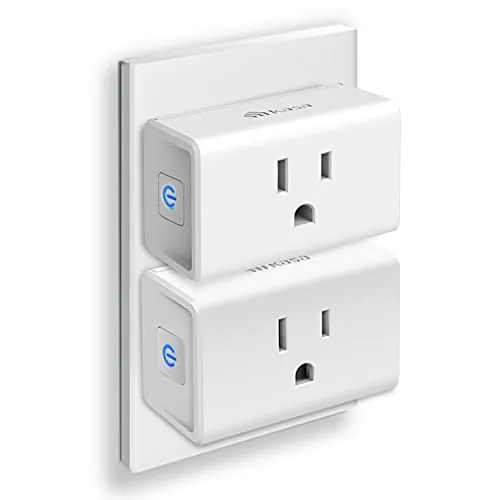
Comparison
The Kasa KP115 and Kasa EP10P2 are compact Wi‑Fi smart plugs designed for simple on/off control, schedules, and voice assistants. The KP115 stands out for built-in energy monitoring, while the EP10P2 focuses on ultra-compact design and a cost-effective 2-pack. Both rely on 2.4 GHz Wi‑Fi, so network coverage and placement matter.
#1 Overall Winner
Contender
Choose the Kasa KP115 if you want a smart plug that can also monitor energy use and you like the idea of local/LAN control. Choose the Kasa EP10P2 if you want the easiest setup, ultra-compact plugs for tight outlets, and a good-value 2-pack for schedules and everyday on/off control. Both require 2.4 GHz Wi‑Fi, so placement and signal strength can make or break reliability.
Overall winner
Depends on your needs
| Feature | Kasa Smart Plug Mini with Energy Monitoring (KP115) | Kasa Smart Plug Ultra Mini 15A 2-Pack (EP10P2) | Winner |
|---|---|---|---|
| Type | Wi‑Fi smart plug with energy monitoring | Wi‑Fi smart plug (2-pack) | Depends |
| Energy monitoring | Yes (energy monitoring feature) | Not listed | Kasa Smart Plug Mini with Energy Monitoring (KP115) |
| Pack size | Single plug listing | 2-pack included | Kasa Smart Plug Ultra Mini 15A 2-Pack (EP10P2) |
| Wi‑Fi band requirement | 2.4 GHz required | 2.4 GHz only | Tie |
| Voice assistants | Works with Alexa and Google Home (reviews) | Works with Alexa and Google Home; IFTTT listed | Kasa Smart Plug Ultra Mini 15A 2-Pack (EP10P2) |
| App experience | Works well overall; energy-total reset limitation noted | Commonly praised as intuitive/robust; some mixed connectivity reports | Kasa Smart Plug Ultra Mini 15A 2-Pack (EP10P2) |
| Scheduling reliability | Scheduling mentioned; some time-change/clock caveats noted | Scheduling and timers widely praised; can keep schedule during Wi‑Fi outages (per review) | Kasa Smart Plug Ultra Mini 15A 2-Pack (EP10P2) |
| Local control / offline-minded use | Reviewer reports usable over LAN with internet blocked | Not specifically described in provided data | Kasa Smart Plug Mini with Energy Monitoring (KP115) |
| Compactness / outlet blocking | Compact; does not block second outlet (review) | Ultra-compact; designed not to block second outlet | Kasa Smart Plug Ultra Mini 15A 2-Pack (EP10P2) |
| Connectivity stability sensitivity | Some reports of Wi‑Fi/outlet location sensitivity | Mixed reports; often resolved with proper reset/setup after router changes | Depends |
| Manual on-device control | Physical side button mentioned | Push button switch listed | Tie |
| Value for money | Strong value especially with energy monitoring | Strong value due to 2-pack and ease of use | Depends |
For everyday home use, both plugs handle the core job well: turning devices on/off remotely, setting schedules, and adding voice control. The EP10P2 is the more straightforward “deploy a few around the house” option thanks to the 2-pack and ultra-mini footprint, making it easy to automate several lamps or seasonal lights at once. The KP115 is better when you want the plug to do more than switching—its energy monitoring is useful for understanding what certain appliances cost to run or for spotting unusually high usage.
In kitchens, both can be useful for simple on/off control of small appliances (within appropriate ratings and safe use), but the KP115 has an edge if you want to monitor consumption for devices that run frequently. The EP10P2 is more about convenient scheduling (for example, turning countertop lights on/off) and fitting into crowded outlets without blocking the second socket.
Both plugs can support comfort routines like turning on fans or managing seasonal devices via schedules. Reviews specifically mention using Kasa plugs with electric blankets and a crawl space dehumidifier, which makes the KP115 especially attractive if you also want to see energy use trends. The EP10P2 is a strong choice if you mainly want dependable schedules (like timed shutdowns) and easy control across multiple rooms.
As switchable outlets, both models appear to perform well for day-to-day on/off control, with many reviews reporting responsive switching and stable operation once set up correctly. The KP115 adds performance in a different way: energy monitoring data (voltage/current/power/energy) is repeatedly discussed by owners as a practical benefit. Where performance can suffer for both is connectivity environment—KP115 reviewers note that some outlets/locations behave better than others, and EP10P2 reviews also include occasional connection issues, often linked to router changes or setup steps.
Both products have strong overall buyer sentiment and many reports of reliable operation, but neither is immune to real-world Wi‑Fi complications. KP115 reliability feedback includes a recurring theme: behavior can be sensitive to outlet placement and Wi‑Fi reception, with improvements after relocating the plug or strengthening coverage. EP10P2 reviews also mention connectivity trouble in some setups—especially around router changes—yet also show that reliability can return once devices are removed, reset, and re-added in the correct sequence. For either model, stable 2.4 GHz coverage is the best reliability “upgrade.”
Neither plug controls temperature directly, but both can support climate/comfort devices through timed operation (fans, dehumidifiers, blankets) as long as the connected device is suitable for smart-plug switching. KP115 stands out for tracking energy use on devices that run for long periods, which can be helpful for dehumidifiers. EP10P2 stands out for scheduling reliability and ease, which suits simple routines like timed fan shutoff or daily power cycling.
Neither product is a security sensor, but both can contribute to simple “lived-in” automation. The EP10P2 listing mentions an Away Mode concept (occupancy simulation), which can be useful for lights when you’re away. The KP115 can also run schedules, but reviews focus more on energy tracking and local control than security-style routines. For basic presence simulation, EP10P2 has the clearer positioning in the provided information.
Smart plugs are generally low-risk when used correctly, but safety still depends on using the right device for the right load and environment. EP10P2’s provided listing includes UL certification and a stated 15A maximum load, plus notes about operating temperature range. KP115 reviews also reference a 15A-rated design. For either model, avoid using damaged outlets, don’t exceed your device or circuit limits, and be cautious with continuous high-load appliances. If you plan to use schedules for heating/comfort devices, confirm the connected device is appropriate for unattended switching.
Comfort benefits come from convenience: automated routines for lights, fans, and seasonal comfort devices. KP115 can add peace of mind when running items like electric blankets by making it easier to set schedules while also keeping an eye on energy use trends. EP10P2 is better if you want lots of “set it and forget it” schedules across rooms, like having lights turn off at bedtime or rebooting equipment early in the morning without thinking about it.
Both are generally easy to use: plug in, add in the Kasa app, then connect to Alexa/Google. The EP10P2 tends to be the smoother choice for first-time users, with repeated feedback about fast setup and an intuitive app. KP115 setup is also described as straightforward, but owners mention a couple of usability snags—especially around energy totals in the app and occasional schedule/time-change friction. If you want the least “fiddly” experience, EP10P2 has the edge.
The EP10P2 is designed around being ultra-compact to avoid blocking adjacent outlets, which is a practical win for busy wall plates and power strips. KP115 is also described as sleek and compact, and reviewers note it doesn’t block the second receptacle either, but the EP10P2’s form factor and 2-pack format make it easier to “standardize” around the home. Both include on-device control buttons and indicator lighting (KP115’s indicator can be disabled per review).
Space efficiency is a strength for both, but EP10P2 is the more space-optimized choice thanks to its ultra-compact design intent and multi-pack convenience. KP115 is also described as not blocking the second receptacle, but if you’re working with crowded outlets behind furniture or using multiple devices on one wall plate, EP10P2 is the safer bet for minimizing interference and keeping the second outlet usable.
Noise isn’t a major issue for either, since they’re not motor-driven devices. KP115 reviewers mention a mechanical click when toggling, but describe it as not too loud, and also note that it won’t click during power loss/restoration in the same way. EP10P2 reviews don’t highlight audible noise, and for most homes either should be fine in bedrooms and offices unless you’re particularly sensitive to relay clicking.
Both are true plug-and-play devices with no hub required: plug in, open the Kasa app, and follow prompts to join a 2.4 GHz Wi‑Fi network. EP10P2 reviews frequently describe completing setup and voice-assistant linking in minutes. KP115 is also reported as easy to install, but with more potential “tuning” around placement if your Wi‑Fi is weak in certain rooms. If you’re installing several at once, EP10P2’s 2-pack format can speed up rollout.
Build impressions are positive for both, with KP115 described as decently constructed in a detailed review and EP10P2 specifying polycarbonate materials in the listing. Neither product’s reviews indicate a widespread physical failure pattern in the provided sample, but both are compact electronics that can be sensitive to environment and use. If you prioritize certification details, EP10P2 explicitly lists UL certification in the product information provided.
Long-term durability is hard to prove from limited data, but both appear built for typical indoor use as compact plug-in devices. KP115 has a detailed review noting decent construction and a rated switching design, while EP10P2 lists polycarbonate materials and certification information. Neither set of provided reviews suggests a consistent pattern of physical breakage, though day-to-day longevity will still depend on heat buildup at the outlet, how often you toggle high loads, and general electrical conditions.
Maintenance is minimal for both: there are no filters or consumables, and day-to-day care is mostly keeping them accessible and occasionally power-cycling or re-adding them if you change Wi‑Fi hardware. EP10P2 appears easier to “set and forget” for scheduling once configured, while KP115 adds the ongoing task of interpreting energy data—and potentially dealing with the app’s limitations around resetting totals if that matters to you. Firmware updates are mentioned in KP115 reviews as part of setup.
Both are highly portable because they simply plug into a standard outlet and can be moved room-to-room. EP10P2’s ultra-mini footprint makes it especially easy to relocate without blocking neighboring sockets in tight spaces. KP115 is also compact and is often moved to find the best Wi‑Fi reception, which can be a practical advantage if you’re troubleshooting connectivity or reassigning plugs to seasonal tasks.
The biggest feature gap is energy monitoring: the KP115 is built for it, while the EP10P2 description centers on remote control, schedules/timers, and voice assistants. EP10P2 also lists IFTTT compatibility and highlights ultra-compact design and multi-plug grouping in the app (per reviews). KP115 gets a notable “power-user” feature in reviewer feedback: the ability to keep the device usable over the local network even if internet access is blocked, which can matter for privacy-focused setups.
Both use the Kasa app for setup and control, and both can be linked into Alexa/Google Home. EP10P2 feedback is more consistently positive on day-to-day app usability (scheduling, grouping, remote control). KP115’s app experience is generally fine for switching and viewing data, but multiple reviewers highlight a specific frustration: the Kasa app doesn’t make it easy to reset cumulative energy totals, and some users work around this with other tools or local-control methods.
Both KP115 and EP10P2 fit well into a basic smart home: app control, voice assistants, and scheduling are the core benefits. EP10P2’s feature set emphasizes schedules, timers, grouping, and listed IFTTT support, while KP115 stands out by pairing smart control with energy monitoring and reviewer-described local/LAN control options. Neither is described as supporting Apple HomeKit in the provided data, and both depend on a solid 2.4 GHz Wi‑Fi network for consistent performance.
In a smart home, KP115 is a strong fit when you want both control and insight—energy monitoring plus the option (per reviewer feedback) to keep control local on your LAN. EP10P2 is the easier “scale-out” smart plug: it’s a compact 2-pack with widely praised schedules/timers and broad voice-assistant support, plus IFTTT listed in the specs. For both, your experience will depend heavily on 2.4 GHz Wi‑Fi stability and how you organize devices in the Kasa app.
EP10P2 is the stronger pick for automation-heavy households because schedules, timers, and grouping multiple plugs are repeatedly praised, and the product description emphasizes these features. KP115 can automate too, but its standout is using automation alongside energy monitoring—useful when you want a routine (like limiting runtime) and also want to observe what that device is consuming. If your goal is lots of simple routines across the home, EP10P2 is usually the better match.
Connectivity is the main shared constraint: both are described as 2.4 GHz Wi‑Fi devices, which can be limiting in homes that only broadcast 5 GHz. KP115 owners specifically note that performance can vary by outlet location and reception, sometimes improving simply by relocating the plug or improving Wi‑Fi coverage. EP10P2 has mixed reports too, with examples where re-adding devices after router changes and following the proper reset sequence restored stable performance.
Neither product is primarily about saving energy by itself; efficiency mostly comes from using schedules and timers to reduce unnecessary runtime. The KP115 can indirectly help you run a tighter household by showing energy usage patterns so you can spot waste or unexpected draw. The EP10P2 focuses more on automation features (schedules, countdown timers, grouping) that make it easy to ensure devices aren’t left on. Actual savings will depend on what you plug in and how consistently you use automation.
KP115 has unusually detailed reviewer feedback around privacy: one owner reports blocking the plug from internet access and still controlling it locally over the home network, which can reduce cloud dependency for basic switching and energy data access. EP10P2’s provided information focuses on app and voice assistants, without specific privacy/local-control detail. If minimizing cloud reliance is important, KP115 has clearer supporting feedback in the data provided.
Value depends on what you need the plug to do. EP10P2 is priced as a 2-pack and is repeatedly praised for easy setup, compact design, and scheduling—good value if you want to automate multiple outlets without paying extra for monitoring. KP115 typically earns its keep when you’ll actually use energy monitoring to understand running costs or spot energy-heavy devices; without that need, it may feel like paying for a feature you won’t use. Both have strong review volumes and ratings, which supports the idea that each can be a cost-effective upgrade in the right home.
Both products come from the same Kasa/TP-Link ecosystem and use the same core app experience, which simplifies managing multiple devices. EP10P2’s listing includes clearer support signals like a stated warranty and certification details, while KP115 reviews emphasize technical transparency in practice (local control and firmware updates). In both cases, brand trust will largely come down to how well the Kasa app fits your routines and how stable your Wi‑Fi environment is.
Both products have very high review counts and similar star ratings, suggesting broad satisfaction overall. KP115 buyers frequently praise easy setup, reliable switching, and the usefulness of energy monitoring, while recurring complaints focus on app limitations (especially resetting cumulative totals) and sensitivity to Wi‑Fi location. EP10P2 buyers frequently praise quick setup, compactness, scheduling, and value, with the most common negative theme being occasional connectivity issues in certain networks and the lack of Apple HomeKit support.
Warranty/support information is clearer for the EP10P2 in the provided data, which states a 2-year warranty and indicates certification details. For KP115, the provided information does not include explicit warranty terms, though at least one review mentions a replacement experience for a unit that wouldn’t connect. If warranty length and support process are important, EP10P2 has more explicit details to reference before purchase.
Between these two Kasa smart plugs, there isn’t a single universal winner—your best choice depends on whether you want data or deployment. The Kasa KP115 is the better option when energy monitoring is a priority and you like the flexibility highlighted by reviewers around local control; its main drawback is app friction around resetting energy totals and some sensitivity to Wi‑Fi placement. The Kasa EP10P2 is the better everyday buy for most homes thanks to its ultra-compact design, very easy setup, and strong scheduling in a 2-pack; its main limitations are 2.4 GHz-only operation, no HomeKit, and mixed connectivity experiences in certain network setups. If you’ll use energy monitoring, choose KP115; otherwise, EP10P2 is the more practical default.
Overall winner
Depends on your needs
If you want to track power and energy use, the KP115 is the more suitable choice because energy monitoring is part of its core feature set. If you mainly want simple, compact on/off control with strong scheduling and a money-saving multi-pack, the EP10P2 2-pack is often the better fit. Both are 2.4 GHz Wi‑Fi smart plugs with Alexa/Google support.
Based on the provided product information, energy monitoring is a key feature of the KP115, while the EP10P2 listing focuses on remote control, schedules/timers, and voice assistant support. If energy tracking is a priority (measuring usage over time for appliances), the KP115 is the clearer match for that need.
Yes. Reviews for both models frequently mention quick setup through the Kasa app, then linking to Alexa or Google Home. The main caveat is that both products are described as 2.4 GHz Wi‑Fi devices, so homes that are 5 GHz-only may need to enable a 2.4 GHz network. Some users also note that the setup sequence matters after router changes.
The EP10P2 is marketed as an “ultra mini” plug designed not to block the second outlet, and reviewers commonly praise its compactness. The KP115 is also described as compact in review feedback, but if your main concern is fitting two plugs side-by-side or keeping outlets accessible, the EP10P2’s size-focused design is the safer pick.
Many buyers report smooth Alexa and Google Home integration on both models, but connectivity can depend on your Wi‑Fi setup. KP115 reviews mention that outlet location and reception can affect stability, while EP10P2 reviews include mixed reports—often improving after re-adding devices and following the reset/setup sequence when changing routers.
Several KP115 reviewers note that the Kasa app doesn’t provide an easy way to reset cumulative energy totals. One reviewer references using a separate iOS app to reset totals, and another mentions local commands for reset when using local control. If resetting totals inside the main app is important, it’s worth checking current app behavior before you buy.
Both support scheduling, but the EP10P2 gets more consistently positive feedback for schedules, timers, grouping multiple devices, and hands-off routines (like daily power cycling). KP115 can be scheduled too, but reviews highlight some time/clock-related quirks (for example, around time changes) and app limitations that may matter if you rely heavily on in-app automation.
The EP10P2 listing specifies a 15A rating and UL certification details, while KP115 reviews reference a 15A-rated design as well. Even with suitable ratings, smart plugs should be used within the limits of your circuit and device, and for appropriate indoor use. For higher-load appliances, confirm your device’s draw and avoid pushing near maximum continuously.
Check our rankings and expert guides to find the best home lifestyle products for your goals.