#1 Overall Winner
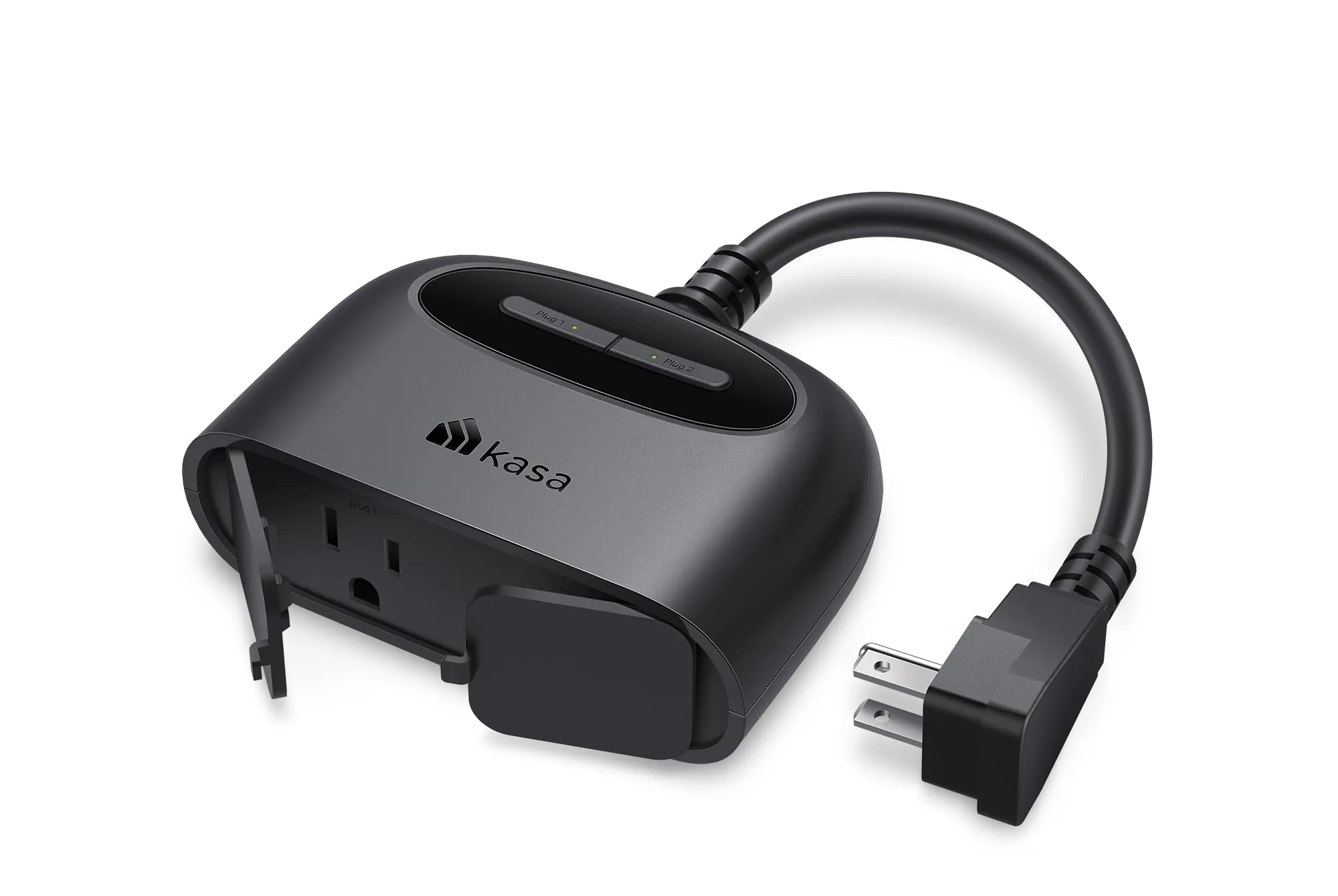
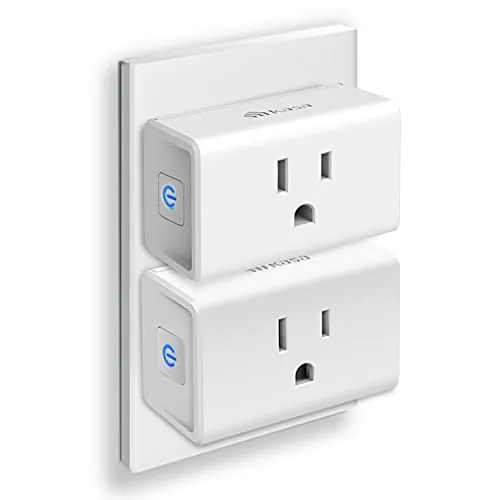
Kasa Outdoor Smart Plug EP40
- Designed for outdoor use with IP64 weather resistance and an attached protective outlet cover.
Comparison
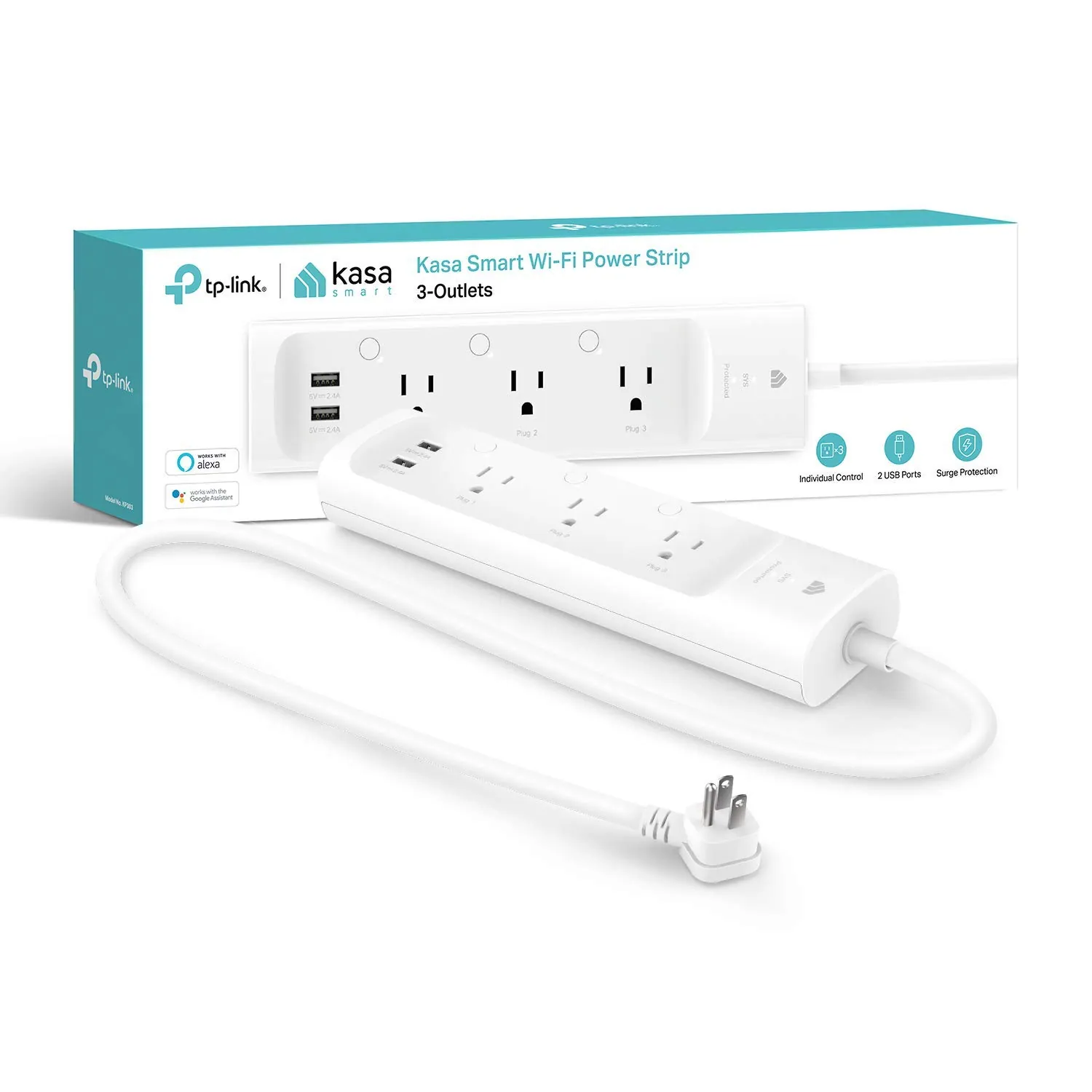
The Kasa EP40 and Kasa KP303 both add Wi‑Fi control, schedules, and voice assistant support to everyday devices, but they’re built for different places in the home. The EP40 is an outdoor smart plug with two independently controlled sockets and IP64 weather resistance, while the KP303 is an indoor smart power strip with three smart outlets, two always-on USB ports, and surge protection.
#1 Overall Winner
Contender
Choose the Kasa EP40 if you need a smart plug outdoors for lights, décor, or other exterior devices and want sunrise/sunset scheduling. Choose the Kasa KP303 if you want to control several indoor devices from one strip, value built-in surge protection, and would benefit from always-on USB charging alongside smart outlets.
Overall winner
Depends on your needs
| Feature | Kasa Outdoor Smart Plug EP40 | Kasa Smart Plug Power Strip KP303 | Winner |
|---|---|---|---|
| Best placement | Outdoor-rated (IP64) | Indoor power strip (no outdoor rating listed) | Kasa Outdoor Smart Plug EP40 |
| Smart-controlled AC outlets | 2 (independent control) | 3 (independent control) | Kasa Smart Plug Power Strip KP303 |
| USB charging ports | Not listed | 2 (always on) | Kasa Smart Plug Power Strip KP303 |
| Surge protection | Not listed | Included (ETL-certified surge protection) | Kasa Smart Plug Power Strip KP303 |
| Weather resistance | IP64 weather resistance | Not listed | Kasa Outdoor Smart Plug EP40 |
| Voice assistant support | Alexa, Google Assistant (also mentions IFTTT) | Alexa, Google Assistant (also mentions Cortana) | Tie |
| Scheduling options | Schedules/timers + sunrise/sunset offset | Schedules/timers | Kasa Outdoor Smart Plug EP40 |
| No-hub requirement | No hub required | No hub required | Tie |
| Wi‑Fi band requirement | 2.4GHz required | 2.4GHz required | Tie |
| Connectivity feedback | Mixed; some connection issues reported | Mixed; some Wi‑Fi disconnects reported | Depends |
| Reliability feedback | Mixed; some report early failure | Mostly positive with occasional glitches/disconnects mentioned | Kasa Smart Plug Power Strip KP303 |
| Best for small spaces | Outdoor outlet use; compact plug body with short cable | Compact strip for behind furniture/desk (per reviews) | Depends |
| Price (listed) | $17.64 | $22.52 | Kasa Outdoor Smart Plug EP40 |
| Customer rating and volume | 4.6/5 from 17,325 reviews | 4.6/5 from 16,357 reviews | Tie |
For everyday home use, these solve different problems. The EP40 is about extending smart control to an outdoor outlet so you can run two outside devices on separate schedules without going outdoors. The KP303 is about simplifying indoor “device clusters” (TV accessories, desk gear, bedside lamps) by giving you multiple smart-controlled outlets in one strip, plus USB charging. If your routine involves lots of indoor plugs in one place, the strip is usually more convenient; if your routine is seasonal lighting or outdoor equipment, the outdoor plug is the practical choice.
The KP303 can be useful in a kitchen for controlling countertop gadgets on schedules (within the limits of a shared power strip and its amperage rating) and keeping phone/tablet charging via its USB ports. The EP40 is less kitchen-focused unless you’re powering outdoor cooking accessories or patio lighting. For kitchen routines, prioritize safe placement away from water sources and keep in mind that only the KP303 lists surge protection.
Both can support comfort routines indirectly by switching devices like fans, heaters, or seasonal accessories on schedules, but the best fit depends on location. The EP40 is better for outdoor comfort use cases (for example, controlling an outdoor bird bath heater as mentioned in reviews), while the KP303 is better for indoor comfort devices clustered near a bed or desk (such as a heating pad routine referenced by users). Always follow device instructions and avoid exceeding electrical limits.
In core performance, the KP303 tends to be more capable for indoor setups because it can control three outlets independently and adds USB charging alongside them, making it effective for multi-device areas like desks and entertainment centers. The EP40 performs best when used as intended—outdoors—where two separate sockets and sunrise/sunset scheduling are practical for lighting and exterior appliances. Real-world performance for both is closely tied to Wi‑Fi conditions: reviews for each mention that some homes see stable connections while others run into disconnects or setup friction on certain router configurations.
Both products have generally strong buyer ratings, but reliability feedback isn’t perfectly uniform. The EP40 has mixed reliability reports, including some customers saying it stopped working within a short period, even though many others describe it as stable and dependable outdoors. The KP303 is often described as reliable in daily routines, but some reviews mention occasional network responsiveness issues or needing to reconnect after long power outages. If you need high confidence for critical loads, consider how you’ll handle a rare disconnect (manual buttons, reboots, or redundant control).
Neither device provides climate control on its own, but both can automate climate-related accessories. The EP40 is better suited to outdoor climate-adjacent use (for example, seasonal outdoor devices) because it’s rated for outdoor use. The KP303 is better for indoor accessories that share a power area—like a fan and a lamp—where you want separate schedules. In both cases, safe use depends on the appliance you connect and staying within electrical limits.
Safety features and risks differ by product type. The KP303 includes surge protection (ETL-certified), which is relevant when powering sensitive indoor electronics, and users also mention using schedules for automatic shutoff to reduce the chance of leaving certain devices running. The EP40 is designed for outdoor electrical use with an IP64 weather-resistance rating and an attached cover, but IP64 is generally better treated as splash resistance rather than full protection from heavy, direct exposure. For both, safe use also depends on not exceeding electrical ratings and placing cords to avoid strain, water exposure, or trip hazards.
Comfort improvements come from convenience rather than changing the environment directly. The EP40 can make outdoor spaces more pleasant by automating exterior lighting or switching outdoor accessories without going outside, especially in bad weather. The KP303 can improve indoor comfort by simplifying bedside or living-room routines—turning lamps on/off by voice, and using schedules to avoid leaving devices running. If your comfort routines are mostly indoors around a single area, KP303 is usually the smoother fit.
Both are generally described as straightforward to set up in the Kasa app, with users often highlighting quick pairing and easy scheduling. That said, both require 2.4GHz Wi‑Fi, and KP303 reviews in particular mention setup complications on routers that use band steering, sometimes needing extra steps. Day-to-day use is simple on both: you can control outlets individually, create schedules, and use voice commands once integrated with your assistant.
The EP40’s design is about practical outdoor placement: a compact body with a short cable and an attached cover to help protect outlets when not in use. The KP303 is designed to sit behind furniture or along a wall, consolidating several devices into one strip; users mention it tucks neatly in tight spaces and is easy to manage outlet-by-outlet. If you’re trying to reduce adapter clutter indoors, the strip format is typically more ergonomic.
Capacity depends on what you mean by “how many things can it run.” The EP40 offers two independently controlled AC outlets, which is often enough for typical outdoor needs like lights plus one additional device. The KP303 supports three smart-controlled AC outlets and adds two USB charging ports, letting you handle a larger cluster of small electronics in one location. If you need to manage several devices together, KP303 has the higher practical device capacity.
For space efficiency, the KP303 usually wins indoors because it reduces adapter clutter and provides multiple controlled outlets in a slim strip format that can sit behind furniture. The EP40 is space-efficient in a different way: it turns one outdoor outlet location into two independently controlled sockets without extra indoor gear. If your goal is decluttering a desk or media center, KP303 is the cleaner solution; if your goal is adding control outside with minimal hardware, EP40 is more direct.
Installation for both is essentially plug-and-play, followed by Wi‑Fi pairing in the Kasa app. The most common “installation” hurdle is networking: both require 2.4GHz Wi‑Fi, and KP303 reviews specifically describe issues with combined 2.4/5GHz networks that needed extra steps to complete setup. For EP40, placement is part of installation—choosing a spot with strong Wi‑Fi and appropriate shelter for its IP64 rating. Neither requires hardwiring.
Build expectations differ because the products serve different environments. The EP40 uses a polycarbonate housing and is designed for outdoor exposure, with buyers often describing it as robust and weather resistant, though the IP64 rating suggests it’s best treated as splash-resistant rather than fully weatherproof in all conditions. The KP303 is a plastic-enclosure indoor strip; reviews often describe it as solid for desk and furniture placement, and surge protection is part of its safety-oriented design.
Durability expectations differ by environment. The EP40 is designed for outdoor placement, and reviews frequently describe its housing as sturdy, but long-term durability is harder to generalize because some buyers report early failures. The KP303 is an indoor plastic power strip, and several users mention owning multiples over years, though there are also reports of occasional glitches that require a reset. For either, avoiding strain on the cord, keeping connections dry/clean, and placing it where it won’t be bumped can help longevity.
Maintenance is light for both products. The EP40 mainly needs sensible outdoor upkeep: keep the cover closed when outlets aren’t used, check for dirt or moisture, and ensure it’s placed where water doesn’t pool or run directly onto it. The KP303 requires typical indoor power-strip care—keeping it dust-free, not overloading it, and occasionally checking cable routing behind furniture. For software maintenance, both may require the occasional reconnection if your Wi‑Fi changes, and app/firmware updates if prompted.
The EP40 is fairly portable for outdoor use—you can move it between outlets for seasonal décor or different yard areas, though its usefulness depends on Wi‑Fi reach at the new location. The KP303 is easy to relocate indoors and can replace multiple individual plugs at once, but it’s still a power strip you’ll likely keep anchored behind a desk or TV stand. If you frequently change setups, the strip can be simpler because it moves several devices together.
The EP40’s standout features are outdoor suitability (IP64 rating, protective cover) and sunrise/sunset scheduling with offset, which is especially useful for exterior lighting. It also offers two independently controlled outlets for running different outdoor devices. The KP303 focuses on indoor convenience: three individually controlled outlets, two always-on USB ports, and surge protection. Both support schedules, timers, remote control in the Kasa app, and voice control through Alexa and Google Assistant.
Both use the Kasa app for setup and daily control, and reviews frequently describe the interface as intuitive for scheduling, naming outlets, and managing devices. KP303 feedback highlights organizing multiple outlets and building routines; EP40 feedback highlights outdoor scheduling convenience. Some users mention ecosystem crossover (Kasa/Tapo) with a pairing quirk for EP40, suggesting app flow can vary by household setup. Overall, app experience is generally positive, with most issues tied to connectivity rather than controls.
Both products are part of the Kasa Smart ecosystem and support app control, scheduling, and voice assistants without a hub. The EP40 adds outdoor-oriented scheduling (sunrise/sunset offset) and is commonly used for exterior lighting automation. The KP303 is stronger for indoor smart-home organization because it controls three separate outlets and can reduce the number of separate smart plugs you need in one area. If you already use multiple Kasa devices, either can slot into the same control approach.
For smart-home routines, both support app control, schedules, timers, and voice assistants without a hub. The KP303 is typically more flexible for indoor automation because you can automate three outlets independently while still charging devices via USB, reducing the need for multiple smart plugs. The EP40 is more specialized: its sunrise/sunset offset and outdoor-rated body make it a better choice for outdoor automation like lighting that should follow daylight changes. If your automations depend on reliable Wi‑Fi, both benefit from strong 2.4GHz coverage.
Automation is a strong point for both, with schedules, timers, and remote control. The EP40 has an advantage for outdoor automation because it supports sunrise/sunset timing with offset, which is useful for lighting that should follow real daylight. The KP303’s advantage is multi-device automation in one spot: three outlets can each have their own schedule, and users commonly automate shutoffs for TVs, lamps, and accessories. If you need “one place, many devices,” KP303 is more flexible.
Both products rely on 2.4GHz Wi‑Fi, which can be a deciding factor if your router uses band steering or if the signal is weaker at the placement spot (outdoors for EP40; behind furniture for KP303). Customer feedback for both is mixed: many report stable connections, but some KP303 users mention occasional Wi‑Fi disconnects or needing reconnection after outages, and EP40 feedback includes some reports of trouble connecting to certain networks. Planning placement near a strong signal helps reduce frustration.
Neither product provides energy monitoring in the provided information, so efficiency is mainly about reducing wasted runtime through scheduling and remote control. The KP303 is often used to shut off multiple devices on a routine, which can help reduce “always-on” usage for chargers and small electronics when you don’t need them. The EP40 can reduce unnecessary outdoor lighting runtime by aligning schedules to sunrise/sunset. Actual power savings will depend on what you plug in and how consistently you automate it.
Both are app-controlled smart devices that require network connectivity and an account/app environment to enable remote control and voice assistant integration. The provided data does not include details about encryption, local-only control, or data retention, so privacy comparison is limited. Practically, if you’re privacy-sensitive, consider where you place them (especially if controlling devices tied to daily routines), use strong Wi‑Fi passwords, and limit account sharing. Both have similar privacy considerations as Kasa app-connected devices.
Value depends on whether you need outdoor capability or multi-device indoor control. The EP40 is lower priced and can be excellent value if it replaces the need to manually manage outdoor lights or seasonal décor, especially with two independently controlled sockets and sunrise/sunset scheduling. The KP303 costs more but can replace multiple separate smart plugs in one area and adds surge protection plus USB charging, which may justify the price in an office or living room. Because both have some connectivity/reliability complaints in reviews, value improves most when your Wi‑Fi setup is stable at the device location.
This is effectively a brand tie: both products are sold under Kasa Smart (TP-Link) and use the same app ecosystem. Review sentiment for each frequently mentions straightforward setup and good integration with Alexa/Google Assistant. Support is mentioned explicitly in KP303 reviews (helpful tech support in one case), while EP40’s brand trust notes include broad user adoption claims in the listing. Since both share the same ecosystem, trust differences come down more to product type and your placement conditions.
Both products show strong overall buyer satisfaction, with the same star rating and very high review volumes. EP40 reviews often praise outdoor suitability, independent dual-socket control, and reliable scheduling, while the aggregated summary notes that some customers report it stopped working within a couple of months. KP303 reviews highlight convenience for desks and entertainment areas, surge protection peace of mind, and easy app scheduling; the main repeated complaint is occasional Wi‑Fi disconnects or needing to reconnect after outages. Overall sentiment is positive for both, with connectivity being the most common friction point.
Warranty information is clearer for the EP40, which lists a 2-year warranty. For the KP303, the provided data does not specify a warranty length, though one review mentions positive TP-Link tech support during setup. If warranty coverage is important, it’s worth checking the current warranty/returns details at the retailer for the KP303 and confirming how support is handled for Wi‑Fi connectivity troubleshooting.
The better choice depends on where you need smart power control, but the Kasa KP303 is the more versatile option for most indoor homes because it manages three outlets independently, adds two USB charging ports, and includes surge protection. Its main limitation is occasional Wi‑Fi disconnects or reconnection needs reported by some users, especially after outages.
The Kasa EP40 is the clear pick for outdoor automation: it’s designed for exterior use with IP64 weather resistance and offers two independently controlled sockets plus sunrise/sunset offset scheduling that’s well-suited to outdoor lighting. Its main drawbacks are mixed connectivity experiences and some reports of early failure. If you’re buying for indoors, go KP303; for outdoors, go EP40.

Overall winner
Depends on your needs
It depends on where and how you’ll use it. The Kasa EP40 is purpose-built for outdoor control with two independently controlled sockets and sunrise/sunset scheduling that suits exterior lighting. The Kasa KP303 is better for indoor setups where you want three smart outlets plus two USB charging ports and built-in surge protection for electronics.
Yes. Both the Kasa Outdoor Smart Plug EP40 and the Kasa Smart Plug Power Strip KP303 connect directly to your home Wi‑Fi and don’t require a separate hub. You control them in the Kasa app, and both support voice control through Alexa and Google Assistant once linked.
The EP40 is the better fit for outdoor holiday lights because it’s designed for outdoor use with IP64 weather resistance and includes two independently controlled sockets for separate light zones. It also supports sunrise/sunset scheduling with offsetting, which is useful when you want decorations to match changing daylight.
The KP303 is typically better for desks and home offices because it consolidates multiple devices into one strip, with three individually controlled outlets and two USB ports for charging. Reviews also highlight organizing outlets in the app and using schedules to shut off equipment automatically, which can simplify daily routines.
Buyer feedback for both products is mixed on connectivity. Some users report stable connections, while others mention occasional Wi‑Fi disconnects. The KP303 also has reports of needing reconnection after outages, and the EP40 has some reports of difficulty connecting on certain networks. Both require 2.4GHz Wi‑Fi.
No. The KP303’s three AC outlets are individually controllable in the app, but the two USB ports are listed as always on. If you need USB charging to switch off on a schedule, you’d need to use one of the smart AC outlets with a compatible USB charger instead.
Both are generally described as easy to set up in the Kasa app, but beginners should be aware that each requires 2.4GHz Wi‑Fi. Several KP303 reviews mention setup challenges on routers that combine 2.4GHz/5GHz under one name, though support and workarounds helped. EP40 setup feedback is mostly straightforward, with some mixed connectivity reports.
The KP303 is the better choice for protecting indoor electronics because it includes built-in surge protection and is designed for indoor power-strip use. The EP40 is aimed at outdoor switching and weather resistance; surge protection isn’t listed in the provided details, so it’s not the one to pick specifically for surge-related peace of mind.
Confirm you have a strong 2.4GHz Wi‑Fi signal where the device will be used, since both require it. For EP40, plan placement with IP64 weather resistance in mind and consider whether your outlets are exposed to heavy rain. For KP303, consider whether always-on USB is acceptable and whether surge protection is a priority for your electronics.
Check our rankings and expert guides to find the best home lifestyle products for your goals.