#1 Overall Winner
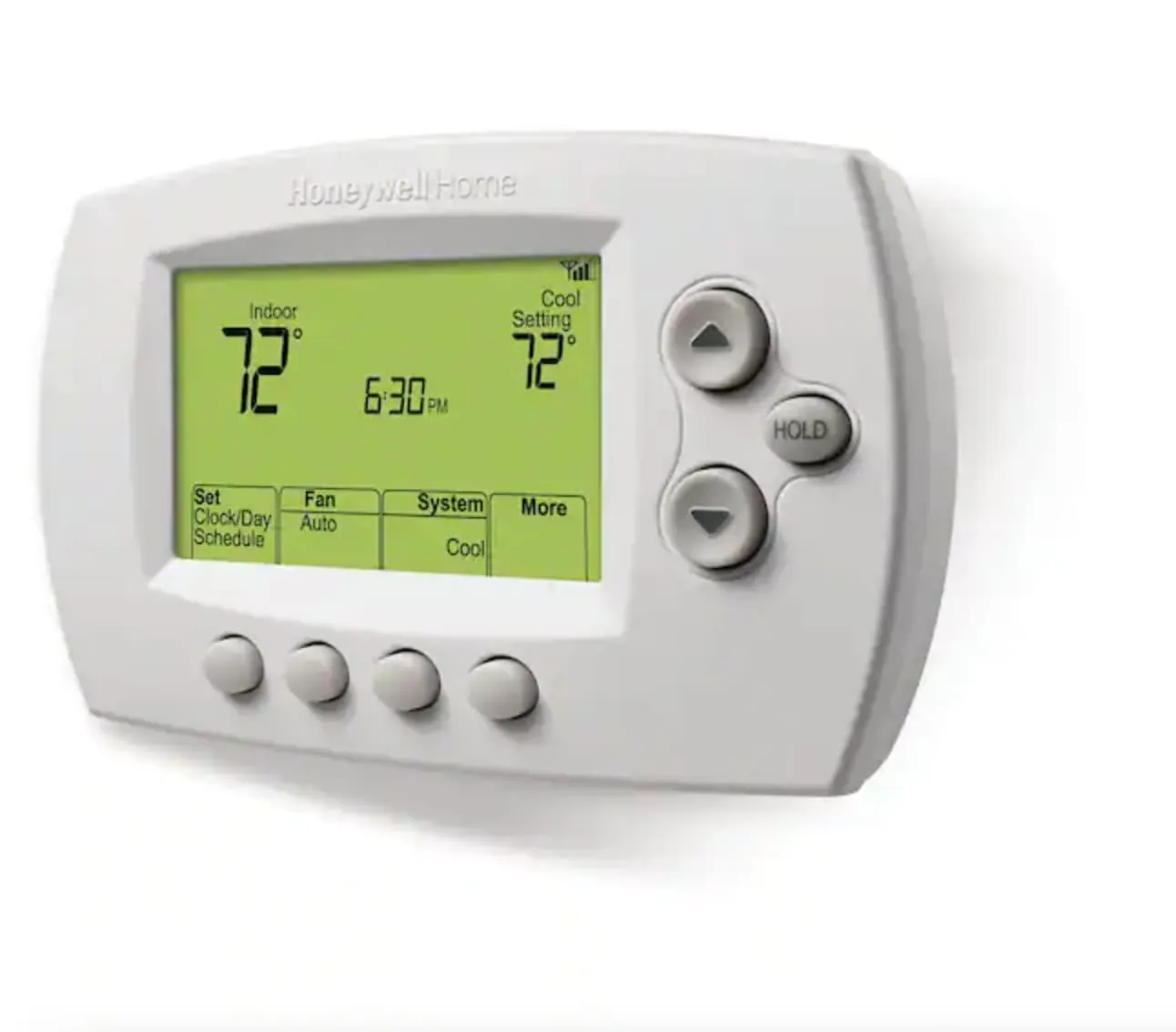
Honeywell Home RTH6580WF Wi-Fi 7-Day Programmable Thermostat
- Lower upfront price for a Wi‑Fi thermostat with scheduling and app control.
Comparison
The Honeywell Home RTH6580WF and Sensi ST55 are Wi‑Fi programmable thermostats designed to make heating and cooling easier to manage from your phone. Honeywell focuses on practical scheduling and remote control at a lower price, while Sensi adds more app-driven features and a privacy-forward stance. Both receive generally positive ease-of-use feedback, with mixed reports around Wi‑Fi setup and connectivity.
#1 Overall Winner
Contender
Pick the Sensi ST55 if you want an easier DIY path (often without a C-wire), stronger app features, and broader smart-home options. Choose the Honeywell RTH6580WF if your wiring is compatible and you want dependable core scheduling and remote control for less money. For both, expect that Wi‑Fi setup can be smooth for many households but frustrating for some networks.
Overall winner
Depends on your needs
| Feature | Honeywell Home RTH6580WF Wi-Fi 7-Day Programmable Thermostat | Sensi Smart Thermostat ST55 | Winner |
|---|---|---|---|
| Typical price (listing) | Lower cost | Higher cost | Honeywell Home RTH6580WF Wi-Fi 7-Day Programmable Thermostat |
| Customer rating (stars) | 4.3/5 | 4.4/5 | Sensi Smart Thermostat ST55 |
| Review volume | 15,523 reviews | 22,670 reviews | Sensi Smart Thermostat ST55 |
| C-wire requirement | C-wire required | Not required in most applications | Sensi Smart Thermostat ST55 |
| HVAC compatibility notes | Not for electric baseboard (120–240V); supports common HVAC types listed | Compatible with most residential HVAC systems (per listing) | Depends |
| Smart-home integrations (listed) | Alexa, Google Assistant, Cortana (listing); Vera (spec) | Alexa, Google Assistant, SmartThings, Vera | Sensi Smart Thermostat ST55 |
| App and remote control options | Honeywell Home app or Total Connect Comfort app; web interface mentioned in reviews | Sensi app with scheduling and reports/alerts | Sensi Smart Thermostat ST55 |
| On-device controls | Button-based controls; large backlit display | Button control; “looks and feels like a thermostat” | Tie |
| Efficiency positioning | ENERGY STAR certified; utility program participation mentioned | ENERGY STAR certified; energy-saving features and usage reports mentioned | Depends |
| Wi‑Fi setup/connectivity feedback | Mixed; some setup difficulties reported | Mixed; some units stop connecting reported | Tie |
| Reliability signals in reviews | Mixed; some failures reported after a few months | Generally positive but with some connectivity-related complaints | Sensi Smart Thermostat ST55 |
| Privacy positioning | No explicit privacy promise in provided data | States it won’t sell personal info to third parties | Sensi Smart Thermostat ST55 |
| Included components | Thermostat, wallplate, wire labels, screws/anchors, guides, ID card | Thermostat, app, batteries, mounting hardware, wire stickers, guides, warranty booklet | Tie |
| Space efficiency | Compact wall unit | Compact wall unit | Tie |
In everyday home use, both thermostats cover the essentials: you can set schedules, make quick temperature changes, and check settings remotely when plans change. Honeywell RTH6580WF leans toward a no-frills experience—clear display, straightforward programming, and remote control that many owners find “good enough” for daily routines. Sensi ST55 feels more like a smart-home hub for comfort, thanks to app features such as reports and maintenance reminders that can help you stay on top of filter changes and system behavior. If multiple people in the household adjust the thermostat, both keep manual button controls for simple use.
Both products are designed to improve comfort by making heating and cooling easier to manage across the day and week. Sensi ST55 has an edge for comfort management if you like to review usage patterns and rely on reminders/alerts, since it emphasizes usage reports and maintenance prompts. Honeywell RTH6580WF focuses more on dependable scheduling plus Smart Response learning to better time heating/cooling ahead of schedule changes. The better choice depends on whether you want “set it and forget it” scheduling (Honeywell) or more app-based insights and prompts (Sensi).
For core thermostat performance—keeping your home at a set temperature and following schedules—both should meet typical household needs, with Sensi ST55 coming out ahead overall based on the provided performance and climate-control scoring. Reviews for both include positive comments about stable temperature management and easy scheduling. Honeywell RTH6580WF adds Smart Response learning to better anticipate system run time, while Sensi highlights configuration options (like offsets and cycling adjustments) mentioned by reviewers. The main performance risk for either is not temperature control itself, but Wi‑Fi reliability and correct HVAC configuration during setup.
Reliability is a mixed area for both, but the risk profile differs. Honeywell RTH6580WF has a notable split in feedback: many owners report stable operation, while the provided customer summary mentions some units failing after a few months. Sensi ST55 reliability feedback is generally stronger overall in the provided scoring, though connectivity complaints (units dropping off Wi‑Fi) can still feel like a reliability issue in daily use. For either thermostat, careful installation, correct HVAC configuration, and stable Wi‑Fi can reduce headaches.
Both thermostats support heating and cooling control for common residential HVAC setups, including heat pumps (both list heat pump use). Sensi ST55 has stronger climate-control signals overall in the provided scoring and review notes, including mentions of offsets and cycling-rate adjustments that can fine-tune how the system behaves. Honeywell RTH6580WF provides Auto Changeover and Smart Response learning, which can help the schedule match how long your system takes to reach a setpoint. The key is ensuring correct system configuration during installation for either model.
As low-voltage (24V) thermostats, both are generally low-risk when installed correctly, but safety still depends on proper wiring and following installation instructions. Honeywell RTH6580WF specifically notes its operating range and the requirement for a C-wire return path to power itself, so confirming wiring before installation matters. Sensi ST55 emphasizes DIY installation support, but reviewers note that certain HVAC configurations may require extra guidance beyond the in-box instructions.
For both, turning off power to HVAC equipment before wiring changes and confirming system compatibility reduces the risk of miswiring or equipment issues.
Both can improve comfort by reducing temperature swings caused by manual set-and-forget habits and by making it easier to adjust settings from bed, work, or travel. Sensi ST55 can feel more supportive if you like feedback and prompts (reports, alerts, reminders), while Honeywell RTH6580WF is better for households that want a simple schedule and occasional remote tweaks. Comfort outcomes will also hinge on where the thermostat is located; Sensi reviewers mention using temperature offset adjustments when the wall location reads differently than living spaces.
Both are generally easy to live with day-to-day, with strong buyer sentiment around simple programming and readable displays. Sensi ST55 tends to be the easiest for first-time installers thanks to step-by-step app instructions and a built-in level, plus familiar button controls for non-tech users. Honeywell RTH6580WF is also widely described as straightforward, but Wi‑Fi setup can be more finicky for some households, and its required C-wire can add complexity before you even start installation.
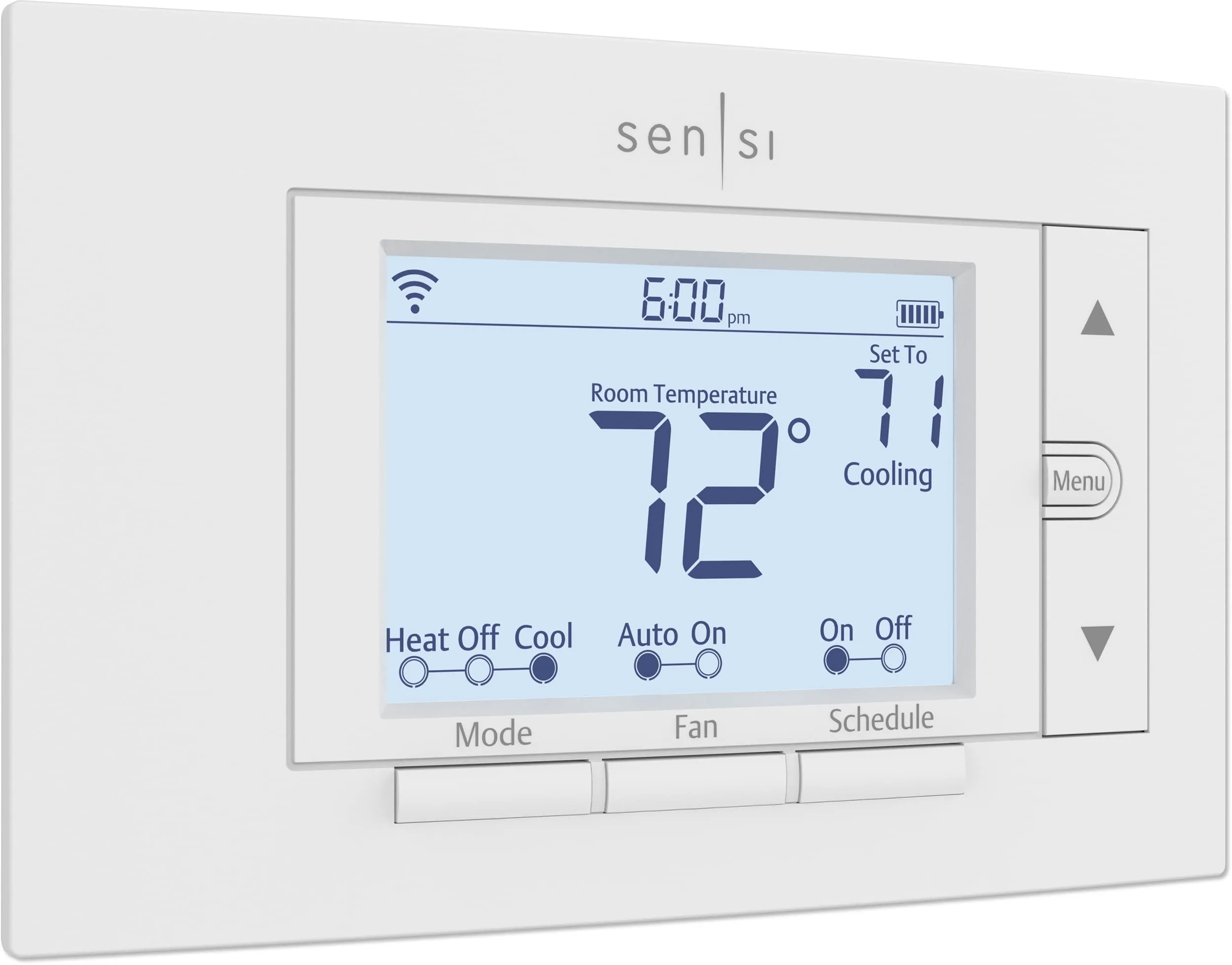
Sensi ST55 is designed to look and feel like a traditional thermostat and to cover the same wall footprint, which can be helpful if you’re replacing an older unit and want to avoid patching and painting. It also has a slightly larger stated screen size and a glossy finish. Honeywell RTH6580WF keeps a practical, button-forward layout with a big backlit display that many users find easy to read. If you prefer a more “classic thermostat” look, Sensi leans that way; Honeywell is more utilitarian.
Both are space-efficient because they mount on the wall and don’t use countertop or floor space. Their dimensions are broadly similar, and either will suit small homes, apartments, or tight hallways. Sensi ST55 emphasizes fitting the same space as a traditional thermostat, which can reduce the chance you’ll need to patch or paint around the old footprint. Honeywell RTH6580WF is also compact and easy to place where an existing thermostat already sits.
Installation is where these two separate most. Honeywell RTH6580WF requires a C-wire and clearly states it won’t work with electric baseboard heat (120–240V), so pre-checking wiring and system compatibility is essential. When compatible, many users find the physical install straightforward, though Wi‑Fi setup can involve a few extra steps.
Sensi ST55 is designed for DIY installs with app instructions and a built-in level, and it’s positioned to work without a C-wire in many common applications. Some users still recommend confirming system type and checking additional configuration guidance online for certain HVAC setups.
Both thermostats use plastic housings and are designed as lightweight wall-mounted units. Sensi ST55 gets a stronger build-quality signal overall in the provided scoring, and it ships with mounting hardware and a warranty booklet listed in the box contents. Honeywell RTH6580WF is often described as competently assembled, but the provided customer summary includes mixed reliability feedback over time, which can affect perceived quality even if the physical construction feels fine. Neither listing provides detailed material reinforcement or premium hardware specifics.
Neither listing provides detailed long-term durability specs, so the best signal comes from aggregated feedback and reliability patterns. Sensi ST55 has stronger durability signals overall in the provided scoring and includes batteries in the box, which can support operation in setups that rely on battery power. Honeywell RTH6580WF has more mixed long-term commentary in the provided summary, including early failures reported by some owners. If you want the safer bet for longer service life based on the provided data, Sensi is the better pick.
Thermostat maintenance is mostly about occasional cleaning and keeping settings up to date. Honeywell RTH6580WF scores well here because it’s straightforward to operate and doesn’t require frequent hands-on upkeep once programmed. Sensi ST55 goes further by adding maintenance reminders (like filter replacement indicators) and usage reports, which can help you stay on top of HVAC care. If you prefer a thermostat that nudges you about upkeep, Sensi is stronger; if you want minimal prompts and simple schedules, Honeywell fits.
Neither thermostat is designed to be portable in the way a plug-in appliance is. Both are wall-mounted and intended to remain in a fixed location once installed. If you expect to move homes or want something easy to relocate, the practical “portability” factor is really how easily it can be removed and reinstalled. Sensi ST55’s traditional footprint approach may reduce wall touch-up in some replacements, but both will require basic reinstall work.
Sensi ST55 offers a richer feature bundle in the provided details, including usage reports, equipment alerts, and maintenance reminders such as filter replacement indicators. It also emphasizes flexible scheduling and remote access through its app. Honeywell RTH6580WF covers the essentials—7-day scheduling, app control, Smart Response learning, and Auto Changeover (listed)—and supports common voice assistants. A practical difference: Honeywell reviewers note certain “advanced” settings can only be adjusted on the thermostat itself rather than remotely, while Sensi leans more heavily on app-led configuration.
Sensi ST55 has the stronger app experience in the provided data, with reviewers highlighting intuitive scheduling controls, installation guidance in the app, and useful adjustments like temperature offsets. It also positions the app around ongoing home comfort management with reports and reminders. Honeywell RTH6580WF supports the Honeywell Home app and Total Connect Comfort, and many users describe them as basic but effective; however, app and Wi‑Fi experiences are more mixed, and some advanced settings are not accessible remotely.
Both thermostats support app control over Wi‑Fi and list voice assistant compatibility with Alexa and Google Assistant. Sensi ST55 goes a step further on ecosystem flexibility by listing SmartThings compatibility, which can matter if you run routines in that platform. Honeywell RTH6580WF supports voice control and remote scheduling through Honeywell’s apps, but some advanced settings are only accessible on the physical device. If you want more smart-home “hooks” and app-driven features, Sensi is typically the better fit.
For smart-home households, Sensi ST55 is the more flexible option based on the listed integrations (including SmartThings) and the emphasis on app-driven features beyond basic control. Honeywell RTH6580WF supports voice assistants and remote management through Honeywell apps, and many users find it sufficient for simple routines. However, some deeper configuration options may require being at the thermostat, which can limit how “fully remote” it feels compared with a more app-centric system.
Both thermostats support programmable scheduling and remote adjustments, which is the core “automation” most homes rely on. Sensi ST55 adds more automation-adjacent support through reminders and alerts that can prompt action without you actively checking the thermostat. Honeywell RTH6580WF includes Smart Response learning to better time the heating/cooling start so the home reaches the target temperature when scheduled. Choose Sensi if you want more proactive app guidance; choose Honeywell if you mainly want timed schedules done simply.
Both thermostats use Wi‑Fi for remote access, and both have mixed buyer feedback around connectivity. Honeywell RTH6580WF reviews include both smooth 2.4 GHz setup experiences and reports of connection/setup difficulties. Sensi ST55 reviews similarly include many reports of quick pairing and stable connections, alongside complaints that some units stop connecting to the network. If your home Wi‑Fi is inconsistent, either thermostat may require troubleshooting during setup and occasional reconnection steps.
Both thermostats are ENERGY STAR certified, and both emphasize energy savings through scheduling and remote access. Sensi ST55 also highlights usage reports and reminders that can help you spot inefficient patterns and stay on top of filter maintenance. Honeywell RTH6580WF mentions utility program participation and uses Smart Response to better align system runtime with schedules. Real-world efficiency gains will depend heavily on your HVAC system, schedule discipline, and correct configuration rather than the thermostat alone.
Privacy is a clearer differentiator here. Sensi ST55 explicitly states it won’t sell personal information to third parties, which may matter if you’re cautious about connected-home data. Honeywell RTH6580WF provides app-based and voice control capabilities but does not make an equivalent privacy claim in the provided data. If privacy policy positioning is a priority in your smart home choices, Sensi has the stronger stated stance based on the listing details.
Honeywell RTH6580WF offers strong value if your home’s wiring is compatible (C-wire present) and you mainly want remote control plus dependable scheduling at a low upfront cost. It’s often praised as a practical purchase that delivers the essentials without paying for extra analytics.
Sensi ST55 costs more, but it brings more “smart” value through usage reports, reminders, broader ecosystem support (including SmartThings), and a privacy-focused promise. If you’ll actually use those app features and want an easier install path without a C-wire in many cases, Sensi can justify the price.
Both brands have strong recognition in the thermostat/HVAC space based on how they’re presented. Honeywell Home is positioned as a mainstream, widely used thermostat brand with a large installed base (reflected in substantial review volume). Sensi (Emerson) emphasizes “100 years of expertise” in its listing and focuses on privacy and app experience. With the provided information, Sensi has a slight edge on trust signals due to clearer privacy commitments and stronger overall reliability scoring, while Honeywell’s trust is supported by value and widespread use.
Both thermostats receive high overall satisfaction signals, with strong average star ratings and very large review counts. Honeywell RTH6580WF customers frequently mention easy installation, simple programming, good value, and helpful remote access, but the review summary also notes mixed reliability over time and mixed Wi‑Fi setup experiences. Sensi ST55 customers similarly praise easy DIY install, smooth voice assistant integration, and app convenience, while also reporting mixed Wi‑Fi experiences with some units dropping connection. If you’re sensitive to connectivity issues, neither is a guaranteed win based on reviews.
Between these two thermostats, Sensi ST55 is the clearer overall winner for most households: it combines strong ease of use, a fuller app feature set (reports, alerts, reminders), and a privacy-forward claim that may matter in a connected home. Its main limitation is that Wi‑Fi connectivity is still mixed in buyer feedback, and some installations may need extra configuration guidance depending on the HVAC system.
Honeywell Home RTH6580WF remains a strong budget alternative with simple scheduling, a large backlit display, and effective remote control. The biggest drawbacks are the required C-wire and more mixed long-term reliability signals in the provided review summary. If you want the most capable smart thermostat here, pick Sensi; if you want the essentials for less and your wiring fits, Honeywell is the practical choice.

Overall winner
Depends on your needs
The Sensi ST55 is the stronger all-round smart thermostat based on the provided scoring and feature set, especially for app experience, smart-home features, and privacy positioning. The Honeywell RTH6580WF makes more sense if you want a simpler Wi‑Fi thermostat at a much lower price and your system has a compatible C‑wire setup. Both have some mixed Wi‑Fi feedback in reviews.
Yes—Honeywell RTH6580WF requires a C-wire for power and notes that it does not work with electric baseboard heat (120–240V). The Sensi ST55 states that a C‑wire is not required in most applications, which can make it easier in many homes, but compatibility still depends on your HVAC system. It’s worth checking wiring and system type before buying.
Both are commonly described as DIY-friendly, but Sensi ST55 leans more into guided installation with step-by-step app instructions and a built-in level. Honeywell RTH6580WF is also frequently called easy to install, but its required C‑wire can be a blocker in some homes, and setup can involve more attention during Wi‑Fi pairing for some users.
Sensi ST55 appears stronger for app experience in the provided data, with reviews highlighting intuitive scheduling and controls, plus features like usage reports and maintenance reminders. Honeywell RTH6580WF supports app control through Honeywell Home or Total Connect Comfort, and many users find it effective, but the overall feedback is more mixed around Wi‑Fi setup and app/connectivity depending on location and network conditions.
Both list support for Alexa and Google Assistant for voice control. Sensi ST55 also lists SmartThings compatibility in the specifications, which may matter if you use that ecosystem. Honeywell RTH6580WF lists voice assistant compatibility and is designed around remote control and scheduling, but smart-home needs can vary depending on how you want to integrate routines.
Either can work well in a flat or apartment because both are wall-mounted and don’t take up usable space. The practical deciding factors are wiring and compatibility: if you don’t have a C‑wire, Sensi ST55 may be easier to install in many cases. If you have a compatible C‑wire setup and want to keep costs down, Honeywell RTH6580WF can be a simple fit.
Yes. Both products have mixed Wi‑Fi feedback: some buyers report smooth setup and stable connections, while others mention difficulties connecting or staying connected. For the Honeywell RTH6580WF, the provided review summary also mentions mixed reliability over time, including reports of failures after a few months. With Sensi ST55, the key concern in the provided data is occasional Wi‑Fi drop-offs and installation guidance for specific systems.
Honeywell RTH6580WF is the value pick if you want core smart thermostat benefits—remote access and 7-day programming—at a much lower upfront price (assuming you have a C‑wire). Sensi ST55 costs more, but adds a broader feature set (like usage reports and maintenance reminders) and a privacy-focused stance, which can justify the extra spend for smart-home users.
Check our rankings and expert guides to find the best home lifestyle products for your goals.