HouseholdRanker
Menu

Review

Nixplay Digital Picture Frame Review

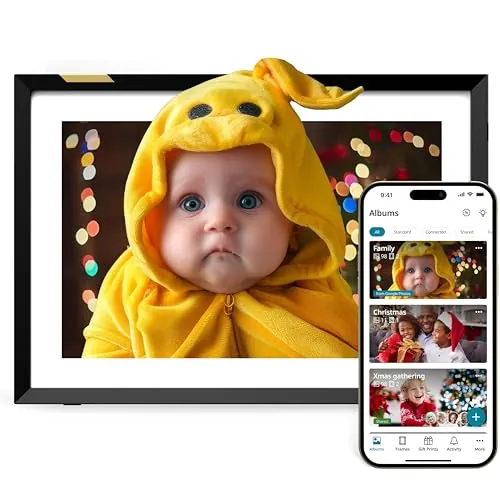
The Nixplay Digital Picture Frame is a Wi-Fi digital photo frame built for sharing family photos and videos around the home. Its strongest points are easy setup, flexible app-based sharing, and gift-friendly features. The main drawbacks are mixed value feedback, optional subscription upsells, and some reported upload or compatibility friction.
Expert reviewed
83
Overall score
Data-driven scoring Expert reviewed Updated analysis

Why we ranked it highly

The Nixplay Digital Picture Frame is a 10.1-inch connected photo frame designed for displaying family photos and short videos in living spaces such as bedrooms, kitchens, and lounges. It uses Wi-Fi and works with Android, iPhone, and desktop devices, with photo sharing available through the Nixplay app, web tools, and email-based options. The frame also includes practical convenience features such as auto-rotation, an activity sensor, and multi-user access. Based on the product details and buyer feedback, it appears aimed at households that want an easy way to keep memories visible without constantly handling printed photos or memory cards. It is also positioned strongly as a gift product, especially for parents and grandparents. Reviews suggest that setup and everyday use are generally straightforward, though some buyers have reported app friction, subscription concerns, and occasional upload compatibility issues.
90-day review Expert reviewed User feedback Data scoring

Key specs

Features & Specs

Resolution
720p
Compatible Devices
Android, Desktop, iPhone
Connectivity Technology
Wi-Fi
Power Source
Corded Electric
Touchscreen
Touchscreen
Aspect Ratio
16:10
Control Method
Voice

Additional details

Color
10 inch (Classic Black)
Frame Material
Plastic

Measurements

Display Size
10.1 Inches
Item Dimensions L x W
10.55"L x 7.4"W

Item details

Brand
Nixplay
Model Number
W10P
Unit Count
1.0 Count
Manufacturer
Nixplay
Global Trade Identification Number
05060156642283
Manufacturer Part Number
W10P
Item Weight
1.1 Pounds
Item Type Name
Digital Photo Frame

Scores breakdown

84 /100

Performance

88 /100

Features

88 /100

Safety

82 /100

Comfort

87 /100

Ease of use

83 /100

Space efficiency

100 /100

Noise

86 /100

Design

Strengths

  • Easy initial setup with clear on-screen guidance and strong feedback from less tech-confident users.
  • Good photo display quality on a 10.1-inch HD touchscreen with auto-rotation for portrait and landscape viewing.
  • Flexible sharing options through the mobile app, web app, and email-based uploads.
  • Useful gifting features, including the ability to preload photos and messages before giving the frame.
  • Wi-Fi connectivity and multi-user access make it practical for families sharing photos remotely.
  • Activity sensor and scheduling features support low-effort day-to-day use in the home.

Limitations

  • Some buyers report upload or compatibility issues, including past problems with certain phone photo files or resolutions.
  • Value for money is mixed, with some reviewers feeling the frame is overpriced for what it offers.
  • Subscription upgrades are available for extra features, which may not suit buyers who want all functions included upfront.
  • App experience appears generally good but not completely friction-free, with some users finding photo management less intuitive at first.
  • The 720p resolution is adequate for casual viewing but is not especially high by current display standards.
  • Plastic frame construction is practical but does not suggest especially premium materials.

Ideal user profiles

  • Families who want to share photos remotely with parents or grandparents.
  • Gift buyers looking for a digital frame that can be preloaded before delivery.
  • Households that want a simple living room, hallway, or bedroom photo display.
  • Users who prefer app-based photo management over manual memory card transfers.

Use cases

  • Displaying rotating family photos in a living room or kitchen.
  • Sending new pictures to relatives from another home through Wi-Fi.
  • Preloading a frame with photos and a message for birthdays, weddings, or holidays.
  • Managing multiple frames for different family members from one app account.
  • Showing short videos alongside still images for shared family memories.
  • Using scheduled on and off times to keep the display active only when needed.

Fit and positioning

Who this works for

Category positioning

This product sits in the general home and lifestyle gadget category, with some overlap into connected home devices because it relies on Wi-Fi, app control, and cloud-based sharing. Its main household role is simple: keep family photos and videos visible in a shared room without requiring manual updates. Compared with basic digital frames, it is more focused on remote sharing and family connectivity than on local playback alone.

Best for

The Nixplay frame is best suited to families who want to send photos to relatives remotely, especially parents or grandparents who may not be confident with phones or cloud albums. It also makes sense for gift buyers because the frame can be preloaded before it is given. Households that value simple setup, app sharing, and automatic photo rotation should find it a good fit.

Not best for

It may be less suitable for buyers who want a completely subscription-free ownership experience, prefer offline use, or expect every upload method to work perfectly with no setup friction. Some users also report that direct photo uploads and app workflows can be inconsistent. If value for money is your top priority, the mixed pricing feedback is worth noting before buying.

Home use

In day-to-day home use, this frame works as a low-effort way to keep family memories visible in a living room, bedroom, hallway, or kitchen. The combination of Wi-Fi sharing, scheduling, and motion-based wake and sleep makes it more practical than a basic digital frame that needs manual updates. It is especially useful in homes where relatives want to add fresh photos regularly from different locations.

Performance analysis

How it performs in practice

Each scoring dimension is separated into a compact card so the strengths and tradeoffs are easier to compare without reading one long block.

Performance analysis

For its main job of displaying and updating family photos remotely, the Nixplay frame appears to perform well overall. Buyers regularly praise the display clarity, quick setup, and the convenience of sending photos to another household without needing to handle the frame in person. The auto-rotation and scheduling features also improve practical use. Performance is not completely trouble-free, though. Some reviews describe issues with direct uploads, app workflow friction, or photo compatibility, so its real-world performance seems strongest when your devices and preferred sharing method work smoothly with the platform.

Feature analysis

The feature set is one of the stronger aspects of this frame. It includes a touchscreen, Wi-Fi connectivity, app and web uploads, email sharing, multi-user access, auto-rotation, motion sensing, and scheduling. Those features make it notably more flexible than a simple offline photo frame. The main trade-off is that some advanced functions appear tied to a paid plan, so not every buyer will view the feature package as equally complete.

Safety

Safety risks appear low based on the available data. It is a light, corded indoor display with no obvious heating element, blade, or moving mechanical parts. Practical safety considerations are mostly basic household ones: place it on a stable surface, manage the power cable neatly, and keep it away from knocks in busy walkways. There is no supported evidence here of overheating or major electrical safety concerns, but equally no formal certification claims should be assumed beyond the listing.

Comfort

This frame adds a simple kind of household comfort by keeping family photos visible and updated without much effort. For households with distant relatives, that ongoing visual connection can be genuinely useful in daily life. Features such as scheduling and motion sensing also make the experience feel less intrusive, helping the frame blend into the room rather than demanding constant attention.

How it compares

Within the digital photo frame category, this model appears stronger than average for ease of use, sharing flexibility, and gifting practicality. The Wi-Fi setup, app-based management, motion sensing, and multi-user access help it stand apart from simpler frames that rely more heavily on local storage or manual loading. Its weaker side is that it does not look like the outright leader for pure value or friction-free ownership. The 720p screen and optional subscription model may feel less competitive for buyers who mainly care about hardware specifications rather than remote sharing convenience.

Ranking summary

This product ranks well because it combines the things most buyers want from a digital frame: simple setup, clear everyday usability, remote photo sharing, and strong gift appeal. Its large review volume and generally positive buyer sentiment reinforce that it works well for a broad mainstream audience. It does not rank at the very top of its category because the ownership experience is not completely friction-free. Mixed value feedback, optional subscription upgrades, and some reported upload or compatibility issues hold it back. Overall, it stands out as a strong family-focused connected frame rather than a no-compromise option.

Buying advice

Consider this frame if your main goal is easy family photo sharing across households, especially if you are buying for parents or grandparents. It is also a sensible pick if you want to preload a gift before giving it. Before buying, check that you are comfortable with app-based setup, cloud sharing, and the possibility of optional paid upgrades for extra features. If you want a simple local frame with no account dependency, or if price-to-spec value matters more than remote sharing convenience, you may want to compare alternatives carefully. Also think about whether the 10.1-inch size is large enough for the room where it will be used.
83
Overall score

Final verdict

The Nixplay Digital Picture Frame is a strong option in its category for buyers who value easy setup, remote family sharing, and gift-friendly convenience. Its main strength is how well it fits real household use, especially for keeping relatives connected through regularly updated photos and videos. Its main limitation is that the experience is not fully seamless for everyone, with mixed feedback on value, subscriptions, and occasional upload or app friction. For households that will use its connected features regularly, it makes good practical sense. For buyers seeking the simplest or cheapest digital frame, it may be less convincing.
Back to review

Key topics

nixplay digital picture frame review, nixplay 10.1 digital frame, wifi digital photo frame, digital picture frame for grandparents, touch screen digital photo frame, digital frame app photo sharing, smart digital photo frame review, gift digital photo frame, nixplay frame setup, digital photo frame with app

Frequently asked questions

Is the Nixplay Digital Picture Frame easy to set up?
Yes, setup appears to be one of its strongest points. Many buyers say the frame is quick to get running, with simple on-screen steps and straightforward app connection. It looks especially suitable for households that want remote photo sharing without a complicated installation process.
How good is the display on the Nixplay 10.1-inch frame?
The frame uses a 10.1-inch 720p display and customer feedback is generally positive about photo clarity. For casual home viewing, it appears clear enough for family pictures and short videos, although it is not a high-resolution panel by current premium display standards.
Can multiple people send photos to the frame?
Yes, multi-user sharing is one of the main attractions here. Nixplay supports sharing through its app, web tools, and email-based options, making it practical for families who want to keep a relative's frame updated from different locations.
Is the Nixplay frame good as a gift?
Yes, it seems particularly well suited to gifting. The option to preload photos, videos, and a message before giving it to someone makes it a strong fit for birthdays, weddings, holidays, or gifts for grandparents who want regular family photo updates.
Does the Nixplay frame require a subscription?
Not necessarily for basic use, but optional paid plans are part of the wider Nixplay setup. Reviews suggest the frame can work on a free plan for many users, while extra storage or features may require ongoing payment, which affects long-term value for some buyers.
What are the main limitations of the Nixplay Digital Picture Frame?
The main drawbacks are mixed value feedback, some app or upload friction, and reports from a minority of users that photo compatibility or direct uploads did not always work smoothly. Buyers who want a fully offline or no-account experience may also want to check the setup details carefully.
Is the Nixplay frame suitable for small spaces?
Yes, the 10.1-inch format is compact enough for desks, shelves, side tables, and smaller rooms. Its footprint is manageable for flats or bedrooms, though it still needs access to a power outlet because it is a corded device rather than a battery-powered frame.
Does the Nixplay frame have smart features?
It includes several connected convenience features, such as Wi-Fi photo sharing, app control, auto-rotation, an activity sensor, and scheduling. These features are useful for daily household use, although it is better described as a connected digital frame than a full smart home hub.


Related Guides & Rankings

Comparisons featuring this product